
|
|
Operating System
White Paper
By Dave MacDonald and Warren Barkley
This white paper describes the Microsoft® Windows® 2000 operating system TCP/IP implementation details, and is a supplement to the Microsoft Windows 2000 TCP/IP manuals. The Microsoft TCP/IP protocol suite is examined from the bottom up. Throughout the paper, network traces are used to illustrate key concepts. These traces were gathered and formatted using Microsoft Network Monitor, a software-based protocol tracing and analysis tool included in the Microsoft Systems Management Server product. The intended audience for this paper is network engineers and support professionals who are already familiar with TCP/IP.
Microsoft has adopted TCP/IP as the strategic enterprise network transport for its platforms. In the early 1990s, Microsoft started an ambitious project to create a TCP/IP stack and services that would greatly improve the scalability of Microsoft networking. With the release of the Microsoft® Windows NT® 3.5 operating system, Microsoft introduced a completely rewritten TCP/IP stack. This new stack was designed to incorporate many of the advances in performance and ease of administration that were developed over the past decade. The stack is a high-performance, portable 32-bit implementation of the industry-standard TCP/IP protocol. It has evolved with each version of Windows NT to include new features and services that enhance performance and reliability.
The goals in designing the TCP/IP stack were to make it:
This paper describes Windows 2000 implementation details and is a supplement to the Microsoft Windows 2000 TCP/IP manuals. It examines the Microsoft TCP/IP implementation from the bottom up and is intended for network engineers and support professionals who are familiar with TCP/IP.
This paper uses network traces to help illustrate concepts. These traces were gathered and formatted using Microsoft Network Monitor 2.0, a software-based protocol tracing and analysis tool included in the Microsoft Systems Management Server product. Windows 2000 Server includes a reduced functionality version of Network Monitor. The primary difference between this version and the Systems Management Server version is that the limited version can only capture frames that would normally be seen by the computer that it is installed on, rather than all frames that pass over the network (which requires the adapter to be in promiscuous mode). It also does not support connecting to remote Network Monitor Agents.
The TCP/IP suite for Windows 2000 was designed to make it easy to integrate Microsoft systems into large-scale corporate, government, and public networks, and to provide the ability to operate over those networks in a secure manner. Windows 2000 is an Internet-ready operating system.
Windows 2000 supports the following standard features:
In addition, Windows 2000 has the following performance enhancements:
The Windows 2000 Server family of operating systems provides the following services:
The table below lists features and the operating system versions that they are present in as a reference. Features are described in more detail throughout this document.
Table 1 N=No, Y=Yes, and D=Disabled by Default
Requests for Comments (RFCs) are a constantly evolving series of reports, proposals for protocols, and protocol standards used by the Internet community. You can use FTP to obtain RFCs from any of the following:
Table 2 RFCs supported by this version of Microsoft TCP/IP
The Microsoft TCP/IP suite contains core protocol elements, services, and the interfaces between them. The Transport Driver Interface (TDI) and the Network Device Interface Specification (NDIS) are public, and their specifications are available from Microsoft.1
http://www.microsoft.com
and
ftp://ftp.microsoft.com).
In addition, there are a number of higher-level interfaces available to user-mode applications. The most commonly-used are Windows Sockets, remote procedure call (RPC), and NetBIOS.
Abstract
Introduction
Capabilities and Functionality
Overview
Support for Standard Features
Performance Enhancements
Services Available
Feature Comparison Table for Microsoft TCP/IP Versions
Product
Windows 95
Windows 95 Winsock 2
Windows 98
Windows 98 SE
Windows NT 4.0 SP5
Windows 2000
Dead Gateway Detect
N
N
Y
Y
Y
Y
VJ Fast Retransmit
N
Y
Y
Y
Y
Y
AutoNet
N
N
Y
Y
N
Y
SACK (Selective ACK)
N
Y
Y
Y
N
Y
Jumbo frame support
Y
Y
Y
Y
Y
Y
Large Windows
N
D
D
D
N
D
Dynamic DNS
N
N
N
N
N
Y
Media Sense
N
N
N
N
N
Y
Wake-On-LAN
N
N
N
N
N
Y
IP Forwarding
N
N
N
D
D
D
NAT
N
N
N
D
N
D
Kerberos v5
N
N
N
N
N
Y
IPSec (IP Security)
N
N
N
N
N
Y
PPTP
N
N
Y
Y
Y
Y
L2TP
N
N
N
N
N
Y
IP Helper API
N
N
Y
Y
Y
Y
Winsock2 API
N
Y
Y
Y
Y
Y
GQoS API
N
N
Y
Y
N
Y
IP Filtering API
N
N
N
N
N
Y
Firewall Hooks
N
N
N
N
N
Y
Packet Scheduler
N
N
N
N
N
D
RSVP
N
N
Y
Y
N
Y
ISSLO
N
N
Y
Y
N
Y
Trojan Filtering
N
N
N
N
D
D
Blocking src routing
N
N
N
Y
Y
Y
ICMP Router Discovery
N
Y
Y
Y
D
D
Offload-TCP
N
N
N
N
N
Y
Offload-IPSec
N
N
N
N
N
Y
Internet RFCs Supported by Microsoft Windows 2000 TCP/IP
RFC
Title
768
User Datagram Protocol (UDP)
783
Trivial File Transfer Protocol (TFTP)
791
Internet Protocol (IP)
792
Internet Control Message Protocol (ICMP)
793
Transmission Control Protocol (TCP)
816
Fault Isolation and Recovery
826
Address Resolution Protocol (ARP)
854
Telnet Protocol (TELNET)
862
Echo Protocol (ECHO)
863
Discard Protocol (DISCARD)
864
Character Generator Protocol (CHARGEN)
865
Quote of the Day Protocol (QUOTE)
867
Daytime Protocol (DAYTIME)
894
IP over Ethernet
919, 922
IP Broadcast Datagrams (broadcasting with subnets)
950
Internet Standard Subnetting Procedure
959
File Transfer Protocol (FTP)
1001, 1002
NetBIOS Service Protocols
1065, 1035, 1123, 1886
Domain Name System (DNS)
1042
A Standard for the Transmission of IP Datagrams over IEEE 802 Networks
1055
Transmission of IP over Serial Lines (IP-SLIP)
1112
Internet Group Management Protocol (IGMP)
1122, 1123
Host Requirements (communications and applications)
1144
Compressing TCP/IP Headers for Low-Speed Serial Links
1157
Simple Network Management Protocol (SNMP)
1179
Line Printer Daemon Protocol
1188
IP over FDDI
1191
Path MTU Discovery
1201
IP over ARCNET
RFC
Title
1256
ICMP Router Discovery Messages
1323
TCP Extensions for High Performance (see the TCP1323opts registry parameter)
1332
PPP Internet Protocol Control Protocol (IPCP)
1518
Architecture for IP Address Allocation with CIDR
1519
Classless Inter-Domain Routing (CIDR): An Address Assignment and Aggregation Strategy
1534
Interoperation Between DHCP and BOOTP
1542
Clarifications and Extensions for the Bootstrap Protocol
1552
PPP Internetwork Packet Exchange Control Protocol (IPXCP)
1661
The Point-to-Point Protocol (PPP)
1662
PPP in HDLC-like Framing
1748
IEEE 802.5 MIB using SMIv2
1749
IEEE 802.5 Station Source Routing MIB using SMIv2
1812
Requirements for IP Version 4 Routers
1828
IP Authentication using Keyed MD5
1829
ESP DES-CBC Transform
1851
ESP Triple DES-CBC Transform
1852
IP Authentication using Keyed SHA
1886
DNS Extensions to Support IP Version 6
1994
PPP Challenge Handshake Authentication Protocol (CHAP)
1995
Incremental Zone Transfer in DNS
1996
A Mechanism for Prompt DNS Notification of Zone Changes
2018
TCP Selective Acknowledgment Options
2085
HMAC-MD5 IP Authentication with Replay Prevention
2104
HMAC: Keyed Hashing for Message Authentication
2131
Dynamic Host Configuration Protocol
2136
Dynamic Updates in the Domain Name System (DNS UPDATE)
2181
Clarifications to the DNS Specification
2205
Resource ReSerVation Protocol (RSVP) -- Version 1 Functional Specification
2236
Internet Group Management Protocol, Version 2
2308
Negative Caching of DNS Queries (DNS NCACHE)
2401
Security Architecture for the Internet Protocol
2401
Security Architecture for the Internet Protocol
2402
IP Authentication Header
2406
IP Encapsulating Security Payload (ESP)
2581
TCP Congestion Control
Architectural Model
Overview
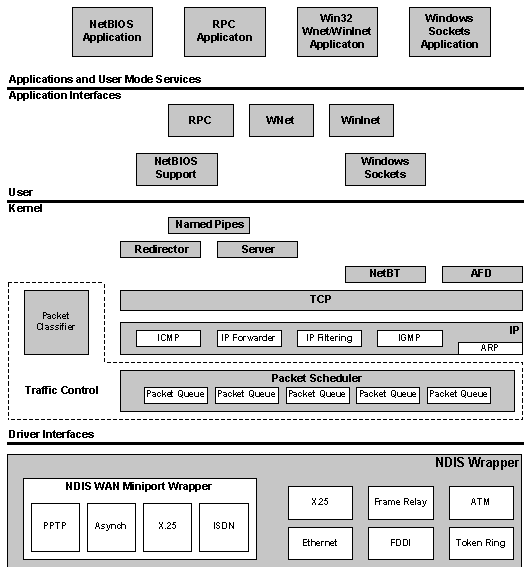
Figure 1 The Windows 2000 TCP/IP network model
Windows 2000 introduces support for Plug and Play. Plug and Play has the following capabilities and features:
Plug and Play operation does not require Plug and Play hardware. To the degree possible, the first two bullets above apply to legacy hardware, as well as Plug and Play hardware. In some cases, orderly enumeration of legacy devices is not possible because the detection methods are destructive or inordinately time-consuming.
The primary impact that Plug and Play support has on protocol stacks is that network interfaces can come and go at any time. The Windows 2000 TCP/IP stack and related components have been adapted to support Plug and Play.
Microsoft networking protocols use the Network Device Interface Specification (NDIS) to communicate with network card drivers. Much of the OSI model link layer functionality is implemented in the protocol stack. This makes development of network card drivers much simpler.
NDIS 3.1 supports basic services that allow a protocol module to send raw packets over a network device and allow that same module to be notified of incoming packets received by a network device.
NDIS 4.0 added the following new features to NDIS 3.1:
NDIS 5.0 includes all functionality defined in NDIS 4.0, plus the following extensions:
NDIS can power down network adapters when the system requests a power level change. Either the user or the system can initiate this request. For example, the user may want to put the computer in sleep mode, or the system may request a power level change based on keyboard or mouse inactivity. In addition, disconnecting the network cable can initiate a power-down request if the network interface card (NIC) supports this functionality. In this case, the system waits a configurable time period before powering down the NIC because the disconnect could be the result of temporary wiring changes on the network, rather than the disconnection of a cable from the network device itself.
NDIS power management policy is no network activity–based. This means that all overlying network components must agree to the request before the NIC can be powered down. If there are any active sessions or open files over the network, the power-down request can be refused by any or all of the components involved.
The computer can also be awakened from a lower power state, based on network events. A wakeup signal can be caused by:
At driver initialization, NDIS queries the capabilities of the miniport to determine if it supports such things as Magic Packet, pattern match, or link change wakeups, and to determine the lowest required power state for each wakeup method. The network protocols then query the miniport capabilities. At run time, the protocol sets the wakeup policy, using object identifiers (OIDs), such as Enable Wakeup, Set Packet Pattern, and Remove Packet Pattern.
Currently, Microsoft TCP/IP is the only Microsoft protocol stack that supports network power management. It registers the following packet patterns at miniport initialization:
NDIS-compliant drivers are available for a wide variety of NICs from many vendors. The NDIS interface allows multiple protocol drivers of different types to bind to a single NIC driver and allows a single protocol to bind to multiple NIC drivers. The NDIS specification describes the multiplexing mechanism used to accomplish this. Bindings can be viewed or changed from the Windows Network Connections folder.
Windows 2000 TCP/IP provides support for:
The goals for these new features include the following:
Link layer functionality is divided between the network interface card/driver combination and the low-level protocol stack driver. The network card/driver combination filters are based on the destination media access control (MAC) address of each frame.
Normally, the hardware filters out all incoming frames except those containing one of the following destination addresses:
Because this first filtering decision is made by the hardware, the NIC discards any frames that do not meet the filter criteria without incurring any CPU processing. All frames (including broadcasts) that pass the hardware filter are then passed up to the NIC driver through a hardware interrupt.2 The NIC driver is software that runs on the computer, so any frames that make it this far require some CPU time to process. The NIC driver brings the frame into system memory from the interface card. Then the frame is indicated (passed up) to the appropriate bound transport driver(s). The NDIS 5.0 specification provides more detail on this process.
Frames are passed up to all bound transport drivers in the order that they are bound.
As a packet traverses a network or series of networks, the source media access control address is always that of the NIC that placed it on the media, and the destination media access control address is that of the NIC that is intended to pull it off the media. This means that, in a routed network, the source and destination media access control address changes with each hop through a network-layer device (router or Layer 3 switch).
Each media type has a maximum frame size that cannot be exceeded. The link layer is responsible for discovering this MTU and reporting it to the protocols above. NDIS drivers may be queried for the local MTU by the protocol stack. Knowledge of the MTU for an interface is used by upper layer protocols, such as TCP, that optimize packet sizes for each media automatically. For details, see the discussion of TCP Path Maximum Transmission Unit (PMTU) discovery in the "Transmission Control Protocol (TCP)" section of this paper.
If a NIC driver—such as an ATM driver—uses LAN emulation mode, it may report that it has an MTU that is higher than what is expected for that media type. For example, it may emulate Ethernet but report an MTU of 9180 bytes. Windows NT and Windows 2000 accept and use the MTU size reported by the adapter, even when it exceeds the normal MTU for a given media type.
Sometimes the MTU reported to the protocol stack may be less than what would be expected for a given media type. For instance, use of the 802.1p standard for QoS over Ethernet often (this is hardware dependent) reduces the MTU reported by 4 bytes due to larger link-layer headers.
The core protocol stack components are those shown between the NDIS and TDI interfaces in figure 1. They are implemented in the Windows 2000 Tcpip.sys driver. The Microsoft stack is accessible through the TDI interface and the NDIS interface. The Winsock2 interface also provides some support for direct access to the protocol stack.
ARP performs IP address-to-Media Access Control (MAC) address resolution for outgoing packets. As each outgoing IP datagram is encapsulated in a frame, source and destination media access control addresses must be added. Determining the destination media access control address for each frame is the responsibility of ARP.
ARP compares the destination IP address on every outbound IP datagram to the ARP cache for the NIC over which the frame will be sent. If there is a matching entry, the MAC address is retrieved from the cache. If not, ARP broadcasts an ARP Request Packet on the local subnet, requesting that the owner of the IP address in question reply with its media access control address. If the packet is going through a router, ARP resolves the media access control address for that next-hop router, rather than the final destination host. When an ARP reply is received, the ARP cache is updated with the new information, and it is used to address the packet at the link layer.
You can use the ARP utility to view, add, or delete entries in the ARP cache. Examples are shown below. Entries added manually are static and are not automatically removed from the cache, whereas dynamic entries are removed from the cache (see the "ARP Cache Aging" section for more information).
The arp command can be used to view the ARP cache, as shown here:
C:\>arp –a


Interface: 199.199.40.123


   Internet Address   Physical Address    Type


   199.199.40.1       00-00-0c-1a-eb-c5   dynamic


   199.199.40.124     00-dd-01-07-57-15   dynamic


Interface: 10.57.8.190


   Internet Address   Physical Address    Type


  10.57.9.138 	 00-20-af-1d-2b-91   dynamic
The computer in this example is multihomed—has more than one NIC—so there is a separate ARP cache for each interface.
In the following example, the command arp –s is used to add a static entry to the ARP cache used by the second interface for the host whose IP address is 10.57.10.32 and whose NIC address is 00608C0E6C6A:
C:\>arp -s 10.57.10.32 00-60-8c-0e-6c-6a 10.57.8.190


C:\>arp -a


Interface: 199.199.40.123


   Internet Address   Physical Address    Type


   199.199.40.1       00-00-0c-1a-eb-c5   dynamic


   199.199.40.124     00-dd-01-07-57-15   dynamic


Interface: 10.57.8.190


   Internet Address   Physical Address    Type


   10.57.9.138        00-20-af-1d-2b-91   dynamic


   10.57.10.32        00-60-8c-0e-6c-6a   static
Windows NT and Windows 2000 adjust the size of the ARP cache automatically to meet the needs of the system. If an entry is not used by any outgoing datagram for two minutes, the entry is removed from the ARP cache. Entries that are being referenced are removed from the ARP cache after ten minutes. Entries added manually are not removed from the cache automatically. A new registry parameter, ArpCacheLife, was added in Windows NT 3.51 Service Pack 4 to allow more administrative control over aging. This parameter is described in Appendix A.
Use the command arp –d to delete entries from the cache, as shown below:
C:\>arp -d 10.57.10.32


C:\>arp -a


Interface: 199.199.40.123


   Internet Address   Physical Address    Type


   199.199.40.1       00-00-0c-1a-eb-c5   dynamic


   199.199.40.124     00-dd-01-07-57-15   dynamic


Interface: 10.57.8.190


   Internet Address   Physical Address    Type


   10.57.9.138        00-20-af-1d-2b-91   dynamic
ARP queues only one outbound IP datagram for a specified destination address while that IP address is being resolved to a media access control address. If a User Datagram Protocol (UDP)-based application sends multiple IP datagrams to a single destination address without any pauses between them, some of the datagrams may be dropped if there is no ARP cache entry already present. An application can compensate for this by calling the iphlpapi.dll routine SendArp() to establish an ARP cache entry, before sending the stream of packets. See the Microsoft Knowledge Base article Q193059 or the Platform SDK for IP Helper API details.
IP is the mailroom of the TCP/IP stack, where packet sorting and delivery take place. At this layer, each incoming or outgoing packet is referred to as a datagram. Each IP datagram bears the source IP address of the sender and the destination IP address of the intended recipient. Unlike the media access control addresses, the IP addresses in a datagram remain the same throughout a packet's journey across an internetwork. IP layer functions are described below.
Routing is a primary function of IP. Datagrams are handed to IP from UDP and TCP above, and from the NIC(s) below. Each datagram is labeled with a source and destination IP address. IP examines the destination address on each datagram, compares it to a locally maintained route table, and decides what action to take. There are three possibilities for each datagram:
The route table maintains four different types of routes. They are listed below in the order that they are searched for a match:
To determine a single route to use to forward an IP datagram, IP uses the following process:
You can use the route print command to view the route table from the command prompt, as shown below:
C:\>route print


===============================================================


Interface List


0x1 ........................... MS TCP Loopback interface


0x2 ...00 a0 24 e9 cf 45 ...... 3Com 3C90x Ethernet Adapter


0x3 ...00 53 45 00 00 00 ...... NDISWAN Miniport


0x4 ...00 53 45 00 00 00 ...... NDISWAN Miniport


0x5 ...00 53 45 00 00 00 ...... NDISWAN Miniport


0x6 ...00 53 45 00 00 00 ...... NDISWAN Miniport


==================================================================


==================================================================


Active Routes:


Network Destination        Netmask     Gateway       Interface  Metric


          0.0.0.0          0.0.0.0     10.99.99.254  10.99.99.1       1


       10.99.99.0    255.255.255.0     10.99.99.1    10.99.99.1       1


       10.99.99.1  255.255.255.255     127.0.0.1     127.0.0.1       1


   10.255.255.255  255.255.255.255     10.99.99.1    10.99.99.1       1


        127.0.0.0        255.0.0.0     127.0.0.1     127.0.0.1       1


        224.0.0.0        224.0.0.0     10.99.99.1    10.99.99.1       1


  255.255.255.255  255.255.255.255     10.99.99.1    10.99.99.1       1


Default Gateway:      10.99.99.254


=================================================================


Persistent Routes:


  None
The route table above is for a computer with the class A IP address of 10.99.99.1, the subnet mask of 255.255.255.0, and the default gateway of 10.99.99.254. It contains the following eight entries:
The Default Gateway is the currently active default gateway. This is useful to know when multiple default gateways are configured.
On this host, if a packet is sent to 10.99.99.40, the closest matching route is the local subnet route (10.99.99.0 with the mask of 255.255.255.0). The packet is sent via the local interface 10.99.99.1. If a packet is sent to 10.200.1.1, the closest matching route is the default route. In this case, the packet is forwarded to the default gateway.
The route table is maintained automatically in most cases. When a host initializes, entries for the local network(s), loopback, multicast, and configured default gateway are added. More routes may appear in the table as the IP layer learns of them. For instance, the default gateway for a host may advise it of a better route to a specific network, subnet, or host, using ICMP, which is explained later in this white paper. Routes also may be added manually using the route command, or by a routing protocol. The -p (persistent) switch can be used with the route command to specify permanent routes. Persistent routes are stored in the registry under the registry key
HKEY_LOCAL_MACHINE


 \SYSTEM


  \CurrentControlSet


   \Services


    \Tcpip


     \Parameters


      \PersistentRoutes
Windows 2000 TCP/IP introduces a new metric configuration option for default gateways. This metric allows better control of which default gateway is active at any particular time. The default value for the metric is 1. A route with a lower metric value is preferred to a route with a higher metric. In the case of default gateways, the computer will use the one with the lowest metric unless it appears to be inactive, in which case dead gateway detection may trigger a switch to the next lowest metric default gateway in the list. Default gateway metrics can be set using TCP/IP Advanced Configuration properties. DHCP servers provide a base metric, and a list of default gateways. If a DHCP server provides a base of 100, and a list of three default gateways, the gateways will be configured with metrics of 100, 101, and 102 respectively. A DHCP-provided base does not apply to statically configured default gateways.
Most Autonomous System (AS) routers use a protocol such as Routing Information Protocol (RIP) or Open Shortest Path First (OSPF) to exchange routing tables with each other. Windows 2000 Server includes support for these protocols. Windows 2000 Professional includes support for silent RIP.
By default, Windows-based systems do not behave as routers and do not forward IP datagrams between interfaces. However, the Routing and Remote Access service is included in Windows 2000 Server. It can be enabled and configured to provide full multiprotocol routing services.
When running multiple logical subnets on the same physical network, the following command can be used to tell IP to treat all subnets as local and to use ARP directly for the destination:
route add 0.0.0.0 MASK 0.0.0.0 <my local ip address>
Thus, packets destined for non-local subnets are transmitted directly onto the local media instead of being sent to a router. In essence, the local interface card can be designated as the default gateway. This can be useful where several class C networks are used on one physical network with no router to the outside world, or in a proxy-ARP environment.
Duplicate address detection is an important feature. When the stack is first initialized or when a new IP address is added, gratuitous ARP requests are broadcast for the IP addresses of the local host. The number of ARPs to send is controlled by the ArpRetryCount registry parameter, which defaults to 3. If another host replies to any of these ARPs, the IP address is already in use. When this happens, the Windows-based computer still boots; however, the interface containing the offending address is disabled, a system log entry is generated, and an error message is displayed. If the host that is defending the address is also a Windows-based computer, a system log entry is generated, and an error message is displayed on that computer. In order to repair the damage possibly done to the ARP caches on other computers, the offending computer re-broadcasts another ARP, restoring the original values in the ARP caches of the other computers.
A computer using a duplicate IP address can be started when it is not attached to the network, in which case no conflict would be detected. However, if it is then plugged into the network, the first time that it sends an ARP request for another IP address, any Windows NT–based computer with a conflicting address detects the conflict. The computer detecting the conflict displays an error message and logs a detailed event in the system log. A sample event log entry is shown below:
The system detected an address conflict for IP address 199.199.40.123 with the system having network hardware address 00:DD:01:0F:7A:B5. Network operations on this system may be disrupted as a result.
DHCP-enabled clients inform the DHCP server when an IP address conflict is detected and, instead of invalidating the stack, they request a new address from the DHCP server and request that the server flag the conflicting address as bad. This capability is commonly known as DHCP Decline support.
When a computer is configured with more than one IP address, it is referred to as a multihomed system. Multihoming is supported in three different ways:
Multiple IP addresses per NIC
When an IP datagram is sent from a multihomed host, it is passed to the interface with the best apparent route to the destination. Accordingly, the datagram may contain the source IP address of one interface in the multihomed host, yet be placed on the media by a different interface. The source media access control address on the frame is that of the interface that actually transmitted the frame to the media, and the source IP address is the one that the sending application sourced it from, not necessarily one of the IP addresses associated with the sending interface in the Network Connections UI.
When a computer is multihomed with NICs attached to disjoint networks (networks that are separate from and unaware of each other, such as a remote access-connected network and a local connection), routing problems may arise. It is often necessary to set up static routes to remote networks in this situation.
When configuring a computer to be multihomed on two disjoint networks, the best practice is to set the default gateway on the main or largest and least-known network. Then, either add static routes or use a routing protocol to provide connectivity to the hosts on the smaller or better-known network. Avoid configuring a different default gateway on each side; this can result in unpredictable behavior and loss of connectivity.
Note There can only be one active default gateway for a computer at any moment in time.
More details on name registration, resolution, and choice of NIC on outbound datagrams with multihomed computers are provided in the "Transmission Control Protocol (TCP)," "NetBIOS over TCP/IP," and "Windows Sockets" sections of this paper.
CIDR, described in RFCs 1518 and 1519, removes the concept of class from the IP address assignment and management process. In place of predefined, well-known boundaries, CIDR allocates addresses defined by a starting address and a range, which makes more efficient use of available space. The range defines the network part of the address. For example an assignment from an ISP to a corporate client might be expressed as 10.57.1.128 /25. This would result in a 128-address block for local use, with the upper 25 bits being the network identifier part of the address. A legacy, class-full allocation would be expressed as <net>.0.0.0 /8, <net>.<net>.0.0 /16, or <net>.<net>.<net>.0 /24. As these are reclaimed, they will be reallocated using classless CIDR techniques.
Given the installed base of class-full systems, the initial implementation of CIDR was to concatenate pieces of the Class C space. This process was called supernetting. Supernetting can be used to consolidate several class C network addresses into one logical network. To use supernetting, the IP network addresses that are to be combined must share the same high-order bits, and the subnet mask is shortened to take bits away from the network portion of the address and add them to the host portion. For example, the class C network addresses 199.199.4.0, 199.199.5.0, 199.199.6.0, and 199.199.7.0 can be combined by using a subnet mask of 255.255.252.0 for each:
NET       199.199.4   (1100 0111.1100 0111.0000 0100.0000 0000)


NET       199.199.5   (1100 0111.1100 0111.0000 0101.0000 0000)


NET       199.199.6   (1100 0111.1100 0111.0000 0110.0000 0000)


NET       199.199.7   (1100 0111.1100 0111.0000 0111.0000 0000)


MASK  255.255.252.0   (1111 1111.1111 1111.1111 1100.0000 0000)
When routing decisions are made, only the bits covered by the subnet mask are used, thus making all these addresses appear to be part of the same network for routing purposes. Any routers in use must also support CIDR and may require special configuration. Windows 2000 TCP/IP includes support for 0's and 1's subnets as described in RFC 1878.
IP multicasting is used to provide efficient multicast services to clients that may not be located on the same network segment. Windows Sockets applications can join a multicast group to participate in a wide-area conference, for instance.
Windows 2000 is level-2 (send and receive) compliant with RFC 1112. IGMP is the protocol used to manage IP multicasting, which is described later in this document.
Windows 2000 introduces support for IP over ATM. RFC 1577 (and successors) define the basic operation of an IP over ATM network, or more precisely, a Logical IP Subnet over an ATM network. A Logical IP Subnet (or LIS) is a set of IP hosts that can communicate directly with each other. Two hosts belonging to different Logical IP Subnets can communicate only through an IP router that is a member of both subnets.
Because an ATM network is non-broadcast, ARP broadcasts (as used by Ethernet or Token Ring) are not a suitable solution. Instead, a dedicated Address Resolution Protocol server (or ARP server) is used to provide IP-to-ATM address resolution.
One of the stations in a LIS is designated as an ARP server (and the ARP server software is loaded on it). Stations that use the services of the ARP server are referred to as ARP clients. All IP stations within a LIS are ARP clients. Each ARP client is configured with the ATM address of the ARP server. When an ARP client starts up, it makes an ATM connection to the ARP server, and sends a packet to the server that contains the client's IP and ATM addresses. The ARP server builds a table of IP-address-to-ATM-address mappings. When a client has an IP packet to be sent to another client (whose IP address is known but whose ATM address is unknown), it first queries the ARP server for the ATM address of the desired client. When it receives a reply that contains the desired ATM address, the client establishes a direct ATM connection to the target client and sends IP packets for that client on this connection.
The clients close any ATM connection, including the connection to the server, if the connections are inactive. All clients refresh their IP and ATM address information with the server periodically (the default is 15 minutes). An entry that is not refreshed after 20 minutes (by default) is purged by the server. The ATM ARP client and ARP server both support a number of adjustable registry parameters, which are listed in Appendix A.
ICMP is a maintenance protocol specified in RFC 792 and is normally considered part of the IP layer. ICMP messages are encapsulated within IP datagrams, so that they can be routed throughout an internetwork. Windows NT and Windows 2000 use ICMP to:
Windows 2000 can perform router discovery as specified in RFC 1256. Router discovery provides an improved method of configuring and detecting default gateways. Instead of using manually- or DHCP-configured default gateways, hosts can dynamically discover routers on their subnet. If the primary router fails or the network administrators change router preferences, hosts can automatically switch to a backup router.
When a host that supports router discovery initializes, it joins the all-systems IP multicast group (224.0.0.1), and then listens for the router advertisements that routers send to that group. Hosts can also send router-solicitation messages to the all-routers IP multicast address (224.0.0.2) when an interface initializes to avoid any delay in being configured. Windows 2000 sends a maximum of three solicitations at intervals of approximately 600 milliseconds.
The use of router discovery is controlled by the PerformRouterDiscovery and SolicitationAddressBCast registry parameters, and it defaults to DHCP controlled in Windows 2000.
Setting SolicitationAddressBCast to 1 causes router solicitations to be broadcast, instead of multicast, as described in the RFC.
When a Windows-based computer is initialized, the route table normally contains only a few entries. One of those entries specifies a default gateway. Datagrams that have a destination IP address with no better match in the route table are sent to the default gateway. However, because routers share information about network topology, the default gateway may know a better route to a given address. When this is the case, then upon receiving a datagram that could take the better path, the router forwards the datagram normally. It then advises the sender of the better route, using an ICMP Redirect message. These messages can specify redirection for one host, a subnet, or for an entire network. When a Windows-based computer receives an ICMP redirect, a validity check is performed to be sure that it came from the first-hop gateway in the current route, and that the gateway is on a directly connected network. If so, a host route with a 10-minute lifetime is added to the route table for that destination IP address. If the ICMP redirect did not come from the first-hop gateway in the current route, or if that gateway is not on a directly connected network, the ICMP redirect is ignored.
TCP employs Path Maximum Transmission Unit (PMTU) discovery, as described later in the "Transmission Control Protocol (TCP)" section of this paper. The mechanism relies on ICMP Destination Unreachable messages.
C:\>tracert www.whitehouse.gov


Tracing route to www.whitehouse.gov [128.102.252.1]


over a maximum of 30 hops:


   1  300 ms  281 ms  280 ms roto.seanet.com [199.181.164.100]


   2  300 ms  301 ms  310 ms sl-stk-1-S12-T1.sprintlink.net [144.228.192.65]


   3  300 ms  311 ms  320 ms sl-stk-5-F0/0.sprintlink.net [144.228.40.5]


   4  380 ms  311 ms  340 ms icm-fix-w-H2/0-T3.icp.net [144.228.10.22]


   5  310 ms  301 ms  320 ms arc-nas-gw.arc.nasa.gov [192.203.230.3]


   6  300 ms  321 ms  320 ms n254-ed-cisco7010.arc.nasa.gov [128.102.64.254]


   7  360 ms  361 ms  371 ms www.whitehouse.gov [128.102.252.1]
Another new feature in Windows 2000 is support for QoS. Windows 2000 supports several QoS mechanisms such as the Resource reServation Protocol (RSVP), Differentiated Services (DiffServ), IEEE 802.1p, ATM QoS, and so on. The QoS mechanisms supported in Windows 2000 are abstracted through a simple Generic QoS (GQoS) API. An overview of support for QoS from the stack and related system components is presented here.
The GQoS API is an extension to the Winsock programming interface. It includes APIs and system components that provide applications with a method of reserving network bandwidth between client and server. Windows 2000 automatically maps GQoS requests to QoS mechanisms such as RSVP, Diffserv, 802.1p or ATM QoS. RSVP is a layer 3 signaling protocol that is used to reserve bandwidth for individual flows on a network. RSVP is a per-flow QoS mechanism because it sets up a reservation for each flow. Diffserv is another layer 3 QoS mechanism. Diffserv defines 6 bits in the IP header that determine how the IP packet is prioritized3 . Diffserv traffic can be prioritized into 64 possible classes known as Per Hop Behaviors (PHBs). 802.1p, on the other hand, is a layer 2 QoS mechanism that defines how layer 2 devices such as Ethernet switches should prioritize traffic. 802.1p defines 8 priority classes ranging from 0 to 7. DiffServ and 802.1p are called aggregate QoS mechanisms because they classify all traffic into a finite number of priority classes.
The following sequence of events characterize an application's interaction with GQoS:
There are several other QoS mechanisms—such as Integrated Services over ATM (ISATM), which automatically maps GQoS requests to ATM QoS on Classical IP over ATM networks. Integrated Services Over Low Bit Rate (ISSLOW) is another QoS mechanism that improves latency for prioritized traffic on slow WAN links. In addition to the GQoS API, a control or management application has access to traffic control functionality via the Traffic Control (TC) API. The TC API allows a control or management application to assist in providing some quality of service for non-QoS-enabled applications. Windows 2000 also provides a policy server called the QoS Admission Control Service (QoS ACS). The QoS ACS allows network administrators to control who gets QoS on the network. The QoS ACS also exposes an API called the Local Policy Module (LPM) API. The LPM API allows ISVs to build customized policy modules that add to the policy enforcement functionality in the QoS ACS.
Figure 2, below, illustrates the system components involved in QoS and RSVP. GQoS is a QoS provider that can invoke RSVP signaling, trigger traffic control, and provide notification of events to the application. Rsvp.exe is responsible for RSVP signaling to or from the network, and for invoking Traffic.dll to add flows and filters to the stack. The packet classifier is responsible for classifying packets according to the packet filters indicated by Traffic.dll. The packet scheduler maintains separate queues for each classification of traffic and includes a conformance analyzer, shaper, and packet sequencer. The shaper manages flows into the packet queues at the agreed-upon rate, and the sequencer feeds packets to the network interface in the order of priority from the queues that it manages. Traffic that has no QoS specification goes into the best effort queue, which is lowest in priority.
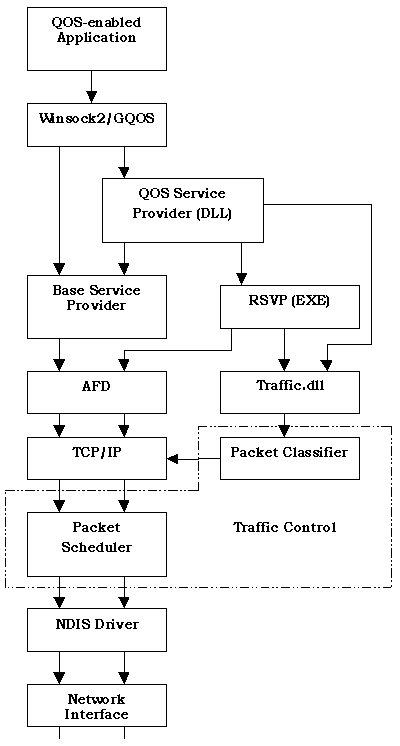
Figure 2 QoS/RSVP architecture
The flowchart in figure 2 illustrates how an application uses QoS RSVP to deliver a flow of data to a client or clients. The application is an audio server, and it needs 1 megabit-per-second of reliable bandwidth to provide acceptable audio quality to a client. RSVP supports both unicast and multicast flows. This example uses a unicast flow to a single client.
The application initializes and completes a structure to be provided to GQoS. This structure includes a sending and receiving flow specification. Flow specifications include parameters such as peak bandwidth, latency, delay variation, service type, and so on. Examples of service types include Best Effort and Guaranteed.
The application then calls WSAConnect to connect to the client. A call to this function triggers a number of events. RSVP is invoked to signal the network by sending special path messages. A path message is sent to the same destination IP address that the flow goes to; however, it is intended to set up the routers in the flow and to identify the flow. A router receiving a path message inserts its own IP address into the path message's last hop and forwards the message to the next router in the path until it reaches the client. This gives the client the ability to understand the path between the sender and itself and to reserve bandwidth along that path for the application. The client returns a reservation request (again describing the desired flow) back along the same path. The routers along the path are responsible for examining the resources available to them and determining if they can accept the reservation. If all of the routers along the path agree to accept the reservation, the application can count on having the desired network bandwidth and other characteristics available.
Because networks are dynamic and the server or client could mistakenly abandon their resources without notifying the network, both path messages and reservation requests must be refreshed frequently. If there were no changes in the network, additional path messages and reservations refresh only the existing path. However, if a new route appears, the path taken by the flow could change on the fly as the network makes adjustments.
When a server application is used to multicast to many clients, a similar sequence of events occurs. One interesting difference is that when routers receive reservation requests from various clients referencing the same flow, they can merge reservation requests, rather than maintaining individual reservations for the same information flow.
For more, detailed information on these topics, see the Winsock2 specification and RFC 2205.
IP Security (IPSec) is another new feature in Windows 2000. IPSec features and implementation details are very complex and are described in detail in a series of RFCs and IETF drafts and in other Microsoft white papers. IPSec uses cryptography-based security to provide access control, connectionless integrity, data origin authentication, protection against replays, confidentiality, and limited traffic-flow confidentiality. Because IPSec is provided at the IP layer, its services are available to the upper-layer protocols in the stack and, transparently, to existing applications.
IPSec enables a system to select security protocols, decide which algorithm(s) to use for the service(s), and establish and maintain cryptographic keys for each security relationship. IPSec can protect paths between hosts, between security gateways, or between hosts and security gateways. The services available and required for traffic are configured using IPSec policy. IPSec policy may be configured locally on a computer or can be assigned through Windows 2000 Group Policy mechanisms using the Active Directory™ services. When using the Active Directory, hosts detect policy assignment at startup, retrieve the policy, and then periodically check for policy updates. The IPSec policy specifies how computers trust each other. IPSec can use either certificates or Kerberos as an authentication method. The easiest trust to use is the Windows 2000 domain trust based on Kerberos. Predefined IPSec policies are configured to trust computers in the same or other trusted Windows 2000 domains.
Each IP datagram processed at the IP layer is compared to a set of filters that are provided by the security policy, which is maintained by an administrator for a computer that belongs to a domain. IP can do one of three things with any datagram:
An IPSec policy contains a filter, filter action, authentication, tunnel setting, and connection type. For example, two stand-alone computers in the same Windows 2000 domain can be configured to use IPSec between them and activate the secure server policy. If the two computers are not members of the same or a trusted domain, trust must be configured using a certificate or preshared key in a secure server mode by:
Once the policy has been put in place, traffic that matches the filters uses the services provided by IPSec. When IP traffic (including something as simple as a ping in this case) is directed at one host by another, a Security Association (SA) is established through a short conversation over UDP port 500, through Internet Key Exchange service (IKE), and then the traffic begins to flow. The following network trace illustrates setting up a TCP connection between two such IPSec-enabled hosts. The only parts of the IP datagram that are unencrypted and visible to Netmon after the SA is established are the media access control and IP headers:
Source IP      Dest IP       Prot  Description


davemac-ipsec  calvin-ipsec  UDP   Src Port: ISAKMP, (500); Dst Port: ISAKMP (500); Length = 216 (0xD8)


calvin-ipsec   davemac-ipsec UDP   Src Port: ISAKMP, (500); Dst Port: ISAKMP (500); Length = 216 (0xD8)


davemac-ipsec  calvin-ipsec  UDP   Src Port: ISAKMP, (500); Dst Port: ISAKMP (500); Length = 128 (0x80)


calvin-ipsec   davemac-ipsec UDP   Src Port: ISAKMP, (500); Dst Port: ISAKMP (500); Length = 128 (0x80)


davemac-ipsec  calvin-ipsec  UDP   Src Port: ISAKMP, (500); Dst Port: ISAKMP (500); Length = 76 (0x4C)


calvin-ipsec   davemac-ipsec UDP   Src Port: ISAKMP, (500); Dst Port: ISAKMP (500); Length = 76 (0x4C)


davemac-ipsec  calvin-ipsec  UDP   Src Port: ISAKMP, (500); Dst Port: ISAKMP (500); Length = 212 (0xD4)


calvin-ipsec   davemac-ipsec UDP   Src Port: ISAKMP, (500); Dst Port: ISAKMP (500); Length = 172 (0xAC)


davemac-ipsec  calvin-ipsec  UDP   Src Port: ISAKMP, (500); Dst Port: ISAKMP (500); Length = 84 (0x54)


calvin-ipsec   davemac-ipsec UDP   Src Port: ISAKMP, (500); Dst Port: ISAKMP (500); Length = 92 (0x5C)


davemac-ipsec  calvin-ipsec  IP    ID = 0xC906; Proto = 0x32; Len: 96


calvin-ipsec   davemac-ipsec IP    ID = 0xA202; Proto = 0x32; Len: 96


davemac-ipsec  calvin-ipsec  IP    ID = 0xCA06; Proto = 0x32; Len: 88
Opening one of the IP datagrams sent after the SA is established reveals very little of what is actually in the datagram (a TCP SYN, or connection request). The only clear parts of the packet are the Ethernet and IP headers. Even the TCP header is encrypted and cannot be parsed by Netmon if ESP is used.
Src IP         Dest IP        Protoc  Description


===================================================


davemac-ipsec  calvin-ipsec   IP      ID = 0xC906; Proto = 0x32; Len: 96


+ FRAME: Base frame properties


+ ETHERNET: ETYPE = 0x0800 : Protocol = IP:  DOD Internet Protocol


  IP: ID = 0xC906; Proto = 0x32; Len: 96


      IP: Version = 4 (0x4)


      IP: Header Length = 20 (0x14)


      IP: Precedence = Routine


      IP: Type of Service = Normal Service


      IP: Total Length = 96 (0x60)


      IP: Identification = 51462 (0xC906)


    + IP: Flags Summary = 2 (0x2)


      IP: Fragment Offset = 0 (0x0) bytes


      IP: Time to Live = 128 (0x80)


      IP: Protocol = 0x32


      IP: Checksum = 0xD55A


      IP: Source Address = 172.30.250.139


      IP: Destination Address = 157.59.24.37


      IP: Data: Number of data bytes remaining = 76 (0x004C)


00000:  52 A4 68 7B 94 80 00 00 90 1D 84 80 08 00 45 00   R.h{..........E.


00010:  00 60 C9 06 40 00 80 32 D5 5A AC 1E FA 8B 9D 3B   .`..@..2.Z.....;


00020:  18 25 18 D9 03 E8 00 00 00 01 F6 EF D0 23 1C 59   .%...........#.Y


00030:  BD 01 78 BE 69 24 D6 EB AE 4F 08 DA 0F D4 6C 04   ..x.i$...O....l.


00040:  5F BC A6 E0 8D BE 5C 89 2D 56 60 80 FA 8B CC 5E   _.....\.-V`....^


00050:  4E 61 3D 46 75 B9 D1 5B 52 45 79 7D 1E 36 1F 01   Na=Fu..[REy}.6..


00060:  FF 25 E5 BA 48 AF D7 7A D5 9A 34 3E 5D 7D         .%..H..z..4>]}
Using a secure server policy also restricts all other types of traffic from reaching destinations that do not understand IPSec or are not part of the same trusted group. Secure Initiator policy provides settings that apply best to servers; traffic security is attempted, but if the client does not understand IPSec, the negotiation falls back to sending clear text packets.
When IPSec is used to encrypt data, network performance generally drops, due to the processing overhead of encryption. One possible method for reducing the impact of this overhead is to offload the processing to a hardware device. Because NDIS 5.0 supports task offloading, it is feasible to include encryption hardware on NICs. NICs supporting IPSec hardware offload are available from several vendors.
IPSec promises to be popular for protecting both public network traffic and internal corporate/government traffic that requires confidentiality. One common implementation may be to apply secure server IPSec policies only to specific servers that are used to store and/or serve confidential information.
Windows 2000 provides level 2 (full) support for IP multicasting (IGMP version 2), as described in RFC 1112 and RFC 2236. The introduction to RFC 1112 provides a good overall summary of IP multicasting. The text reads:
"IP multicasting is the transmission of an IP datagram to a host group—a set of zero or more hosts identified by a single IP destination address. A multicast datagram is delivered to all members of its destination host group with the same 'best-effort' reliability as regular unicast IP datagrams; that is, the datagram is not guaranteed to arrive intact to all members of the destination group or in the same order relative to other datagrams.
"The membership of a host group is dynamic; that is, hosts may join and leave groups at any time. There is no restriction on the location or number of members in a host group. A host may be a member of more than one group at a time. A host need not be a member of a group to send datagrams to it.
"A host group may be permanent or transient. A permanent group has a well-known, administratively assigned IP address. It is the address—not the membership of the group—that is permanent; at any time a permanent group may have any number of members, even zero. Those IP multicast addresses that are not reserved for permanent groups are available for dynamic assignment to transient groups that exist only as long as they have members.
"Internetwork forwarding of IP multicast datagrams is handled by multicast routers that may be co-resident with, or separate from, Internet gateways. A host transmits an IP multicast datagram as a local network multicast that reaches all immediately-neighboring members of the destination host group. If the datagram has an IP time-to-live greater than 1, the multicast router(s) attached to the local network take responsibility for forwarding it towards all other networks that have members of the destination group. On those other member networks that are reachable within the IP time-to-live, an attached multicast router completes delivery by transmitting the datagram as a local multicast."
To support IP multicasting, an additional route is defined on the host. The route (added by default) specifies that if a datagram is being sent to a multicast host group, it should be sent to the IP address of the host group through the local interface card, and not forwarded to the default gateway. The following route (which you can discover using the route print command) illustrates this:
Network Address  Netmask    Gateway Address  Interface     Metric


224.0.0.0        224.0.0.0  10.99.99.1       10.99.99.1    1
Host group addresses are easily identified, as they are from the class D range, 224.0.0.0 to 239.255.255.255. These IP addresses all have 1110 as their high-order bits.
To send a packet to a host group, using the local interface, the IP address must be resolved to a media access control address. As stated in the RFCs:
"An IP host group address is mapped to an Ethernet multicast address by placing the low-order 23 bits of the IP address into the low-order 23 bits of the Ethernet multicast address 01-00-5E-00-00-00 (hex). Because there are 28 significant bits in an IP host group address, more than one host group address may map to the same Ethernet multicast address."
For example, a datagram addressed to the multicast address 225.0.0.5 would be sent to the (Ethernet) media access control address 01-00-5E-00-00-05. This media access control address is formed by the junction of 01-00-5E and the 23 low-order bits of 225.0.0.5 (00-00-05).
Because more than one host group address can map to the same Ethernet multicast address, the interface may indicate hand-up multicasts for a host group for which no local applications have a registered interest. These extra multicasts are discarded by TCP/IP.
Internet Protocol multicasting is currently supported only on AF_INET sockets of type SOCK_DGRAM and SOCK_RAW. By default, IP multicast datagrams are sent with a Time to Live (TTL) of 1. Applications can use the setsockopt function to specify a TTL. By convention, multicast routers use TTL thresholds to determine how far to forward datagrams. These TTL thresholds are defined as follows:
Some Windows NT and Windows 2000 components use IGMP. For example, router discovery uses multicasts, by default. WINS servers use multicasting when attempting to locate replication partners.
TCP provides a connection-based, reliable byte-stream service to applications. Microsoft networking relies upon the TCP transport for logon, file and print sharing, replication of information between domain controllers, transfer of browse lists, and other common functions. It can only be used for one-to-one communications.
TCP uses a checksum on both the headers and payload of each segment to reduce the chance that network corruption will go undetected. NDIS 5.0 provides support for task offloading, and Windows 2000 TCP takes advantage of this by allowing the NIC to perform the TCP checksum calculations if the NIC driver offers support for this function. Offloading the checksum calculations to hardware can result in performance improvements in very high-throughput environments. Windows 2000 TCP has also been hardened against a variety of attacks that were published over the past couple of years and has been subject to an internal security review intended to reduce susceptibility to future attacks. For instance, the initial sequence number algorithm has been modified so that ISNs increase in random increments, using an RC4-based random number generator initialized with a 2048-bit random key upon system startup.
The TCP receive window size is the amount of receive data (in bytes) that can be buffered at one time on a connection. The sending host can send only that amount of data before waiting for an acknowledgment and window update from the receiving host. The Windows 2000 TCP/IP stack was designed to tune itself in most environments and uses larger default window sizes than earlier versions. Instead of using a hard-coded default receive window size, TCP adjusts to even increments of the maximum segment size (MSS) negotiated during connection setup. Matching the receive window to even increments of the MSS increases the percentage of full-sized TCP segments used during bulk data transmission.
The receive window size defaults to a value calculated as follows:
For Ethernet, the window is normally set to 17,520 bytes (16 KB rounded up to twelve 1460-byte segments.) There are two methods for setting the receive window size to specific values:
To improve performance on high-bandwidth, high-delay networks, scalable windows support (RFC 1323) has been introduced in Windows 2000. This RFC details a method for supporting scalable windows by allowing TCP to negotiate a scaling factor for the window size at connection establishment. This allows for an actual receive window of up to 1 gigabyte (GB). RFC 1323 Section 2.2 provides a good description:
"The three-byte Window Scale option may be sent in a SYN segment by a TCP. It has two purposes: 1. indicate that the TCP is prepared to do both send and receive window scaling, and 2. communicate a scale factor to be applied to its receive window. Thus, a TCP that is prepared to scale windows should send the option, even if its own scale factor is 1. The scale factor is limited to a power of two and encoded logarithmically, so it may be implemented by binary shift operations.
   TCP Window Scale Option (WSopt):


      Kind: 3 Length: 3 bytes


             +---------+---------+---------+


             | Kind=3  |Length=3 |shift.cnt|


             +---------+---------+---------+
"This option is an offer, not a promise; both sides must send Window Scale options in their SYN segments to enable window scaling in either direction. If window scaling is enabled, then the TCP that sent this option will right-shift its true receive-window values by 'shift.cnt' bits for transmission in SEG.WND. The value shift.cnt may be zero (offering to scale, while applying a scale factor of 1 to the receive window).
"This option may be sent in an initial <SYN> segment (in other words, a segment with the SYN bit on and the ACK bit off). It may also be sent in a <SYN,ACK> segment, but only if a Window Scale option was received in the initial <SYN> segment. A Window Scale option in a segment without a SYN bit should be ignored.
"The Window field in a SYN (in other words, a <SYN> or <SYN,ACK>) segment itself is never scaled."
When you read network traces of a connection that was established by two computers that support scalable windows, keep in mind that the window sizes advertised in the trace must be scaled by the negotiated scale factor. The scale factor can be observed in the connection establishment (three-way handshake) packets, as illustrated in the following Network Monitor capture:
*************************************************************************


Src Addr   Dst Addr  Protocol  Description


THEMACS1   NTBUILDS  TCP       ....S., len:0, seq:725163-725163, ack:0,


win:65535, src:1217 dst:139


+ FRAME: Base frame properties


+ ETHERNET: ETYPE = 0x0800 : Protocol = IP:  DOD Internet Protocol


+ IP: ID = 0xB908; Proto = TCP; Len: 64


  TCP: ....S., len:0, seq:725163-725163, ack:0, win:65535, src:1217


dst:139 (NBT Session)


      TCP: Source Port = 0x04C1


      TCP: Destination Port = NETBIOS Session Service


      TCP: Sequence Number = 725163 (0xB10AB)


      TCP: Acknowledgement Number = 0 (0x0)


      TCP: Data Offset = 44 (0x2C)


      TCP: Reserved = 0 (0x0000)


    + TCP: Flags = 0x02 : ....S.


      TCP: Window = 65535 (0xFFFF)


      TCP: Checksum = 0x8565


      TCP: Urgent Pointer = 0 (0x0)


      TCP: Options


        + TCP: Maximum Segment Size Option


          TCP: Option Nop = 1 (0x1)


          TCP: Window Scale Option


              TCP: Option Type = Window Scale


              TCP: Option Length = 3 (0x3)


              TCP: Window Scale = 5 (0x5)


          TCP: Option Nop = 1 (0x1)


          TCP: Option Nop = 1 (0x1)


        + TCP: Timestamps Option


          TCP: Option Nop = 1 (0x1)


          TCP: Option Nop = 1 (0x1)


        + TCP: SACK Permitted Option


00000:  8C 04 C8 BD A3 82 00 00 50 7D 83 80 08 00 45 00


........P}....E.


00010:  00 40 B9 08 40 00 80 06 A7 1A 9D 36 15 FD AC 1F


.@..@......6....


00020:  3B 42 04 C1 00 8B 00 0B 10 AB 00 00 00 00 B0 02


;B..............


00030:  FF FF 85 65 00 00 02 04 05 B4 01 03 03 05 01 01


...e............


00040:  08 0A 00 00 00 00 00 00 00 00 01 01 04 02         ..............


*************************************************************************
The computer sending the packet above is offering the Window Scale option, with a scaling factor of 5. If the target computer responds, accepting the Window Scale option in the SYN-ACK, then it is understood that any TCP window advertised by this computer needs to be left-shifted 5 bits from this point onward (the SYN itself is not scaled). For example, if the computer advertised a 32 KB window in its first send of data, this value would need to be left-shifted (shifting in 0's from the right) 5 bits as shown below:
32Kbytes = 0x7fff =       111 1111 1111 1111


Left-shift 5 bits = 1111 1111 1111 1110 0000 = 0xffffe (1,048,544 bytes)


As a check, left-shifting a number 5 bits is equivalent to multiplying it


by 25, or 32.  32767 * 32 = 1,048,544
The scale factor is not necessarily symmetrical, so it may be different for each direction of data flow.
Windows 2000 uses window scaling automatically if the TcpWindowSize is set to a value greater than 64 KB, and the Tcp1323Opts registry parameter is set appropriately. See Appendix A for details on setting this parameter.
As specified in RFC 1122, TCP uses delayed acknowledgments (ACKs) to reduce the number of packets sent on the media. The Microsoft TCP/IP stack takes a common approach to implementing delayed ACKs. As data is received by TCP on a connection, it only sends an acknowledgment back if one of the following conditions is met:
In summary, normally an ACK is sent for every other TCP segment received on a connection, unless the delayed ACK timer (200 milliseconds) expires. The delayed ACK timer can be adjusted through the TcpDelAckTicks registry parameter, which is new in Windows 2000.
Windows 2000 introduces support for an important performance feature known as Selective Acknowledgement (SACK). SACK is especially important for connections using large TCP window sizes. Prior to SACK, a receiver could only acknowledge the latest sequence number of contiguous data that had been received, or the left edge of the receive window. When SACK is enabled, the receiver continues to use the ACK number to acknowledge the left edge of the receive window, but it can also acknowledge other non-contiguous blocks of received data individually. SACK uses TCP header options, as shown below. This text was taken directly from RFC 2018:
"Sack-Permitted Option
"This two-byte option may be sent in a SYN by a TCP that has been extended to receive (and presumably process) the SACK option once the connection has opened. It MUST NOT be sent on non-SYN segments.
       TCP Sack-Permitted Option:


       Kind: 4


       +---------+---------+


       | Kind=4  | Length=2|


       +---------+---------+
"Sack Option Format
"The SACK option is to be used to convey extended acknowledgment information from the receiver to the sender over an established TCP connection.
       TCP SACK Option:


       Kind: 5


       Length: Variable


                         +--------+--------+


                         | Kind=5 | Length |


       +--------+--------+--------+--------+


       |      Left Edge of 1st Block       |


       +--------+--------+--------+--------+


       |      Right Edge of 1st Block      |


       +--------+--------+--------+--------+


       |                                   |


       /            . . .                  /


       |                                   |


       +--------+--------+--------+--------+


       |      Left Edge of nth Block       |


       +--------+--------+--------+--------+


       |      Right Edge of nth Block      |


       +--------+--------+--------+--------+
When SACK is enabled (the default), a packet or series of packets can be dropped, and the receiver can inform the sender of exactly which data has been received, and where the holes in the data are. The sender can then selectively retransmit the missing data without needing to retransmit blocks of data that have already been received successfully. SACK is controlled by the SackOpts registry parameter. The Network Monitor capture below illustrates a host acknowledging all data up to sequence number 54857341, plus the data from sequence number 54858789-54861685.
+ FRAME: Base frame properties


+ ETHERNET: ETYPE = 0x0800 : Protocol = IP:  DOD Internet Protocol


+ IP: ID = 0x1A0D; Proto = TCP; Len: 64


  TCP: .A...., len:0, seq:925104-925104, ack:54857341, win:32722, src:1242  dst:139


      TCP: Source Port = 0x04DA


      TCP: Destination Port = NETBIOS Session Service


      TCP: Sequence Number = 925104 (0xE1DB0)


      TCP: Acknowledgement Number = 54857341 (0x3450E7D)


      TCP: Data Offset = 44 (0x2C)


      TCP: Reserved = 0 (0x0000)


    + TCP: Flags = 0x10 : .A....


      TCP: Window = 32722 (0x7FD2)


      TCP: Checksum = 0x4A72


      TCP: Urgent Pointer = 0 (0x0)


      TCP: Options


          TCP: Option Nop = 1 (0x1)


          TCP: Option Nop = 1 (0x1)


        + TCP: Timestamps Option


          TCP: Option Nop = 1 (0x1)


          TCP: Option Nop = 1 (0x1)


          TCP: SACK Option


              TCP: Option Type = 0x05


              TCP: Option Length = 10 (0xA)


              TCP: Left Edge of Block  = 54858789 (0x3451425)


   TCP: Right Edge of Block = 54861685 (0x3451F75)
Another RFC 1323 feature introduced in Windows 2000 is support for TCP time stamps. Like SACK, time stamps are important for connections using large window sizes. Time stamps were conceived to assist TCP in accurately measuring round-trip time (RTT) to adjust retransmission time-outs. The TCP header option for time stamps is shown here, from RFC 1323:
"TCP Timestamps Option (TSopt):
   Kind: 8


   Length: 10 bytes


    +-------+-------+---------------------+---------------------+


    |Kind=8 |  10   |   TS Value (TSval)  |TS Echo Reply (TSecr)|


    +-------+-------+---------------------+---------------------+


        1       1              4                     4
"The Timestamps option carries two four-byte time stamp fields. The time-stamp value field (TSval) contains the current value of the time-stamp clock of the TCP sending the option.
"The Timestamp Echo Reply field (TSecr) is only valid if the ACK bit is set in the TCP header; if it is valid, it echoes a timestamp value that was sent by the remote TCP in the TSval field of a Timestamps option. When TSecr is not valid, its value must be zero. The TSecr value will generally be from the most recent Timestamp option that was received; however, there are exceptions that are explained below.
"A TCP may send the Timestamps option (TSopt) in an initial <SYN> segment (i.e., segment containing a SYN bit and no ACK bit), and may send a TSopt in other segments only if it received a TSopt in the initial <SYN> segment for the connection."
The Timestamps option field can be viewed in a Network Monitor capture by expanding the TCP options field, as shown below:
    TCP: Timestamps Option


        TCP: Option Type = Timestamps


        TCP: Option Length = 10 (0xA)


        TCP: Timestamp = 2525186 (0x268802)


        TCP: Reply Timestamp = 1823192 (0x1BD1D8)
The use of time stamps is disabled by default. It can be enabled using theTcp1323Opts registry parameter, explained in Appendix A.
PMTU discovery is described in RFC 1191. When a connection is established, the two hosts involved exchange their TCP maximum segment size (MSS) values. The smaller of the two MSS values is used for the connection. Historically, the MSS for a host has been the MTU at the link layer minus 40 bytes for the IP and TCP headers. However, support for additional TCP options, such as time stamps, has increased the typical TCP+IP header to 52 or more bytes.

Figure 3 MTU versus MSS
When TCP segments are destined to a non-local network, the Don't Fragment bit is set in the IP header. Any router or media along the path can have an MTU that differs from that of the two hosts. If a media segment has an MTU that is too small for the IP datagram being routed, the router attempts to fragment the datagram accordingly. It then finds that the Don't Fragment bit is set in the IP header. At this point, the router should inform the sending host that the datagram can not be forwarded further without fragmentation. This is done with an ICMP Destination Unreachable Fragmentation Needed and DF Set message. Most routers also specify the MTU for the next hop by putting the value for it in the low-order 16 bits of the ICMP header field that is unused in RFC 792. See RFC 1191, section 4, for the format of this message. Upon receiving this ICMP error message, TCP adjusts its MSS for the connection to the specified MTU minus the TCP and IP header size so that any further packets sent on the connection are no larger than the maximum size that can traverse the path without fragmentation.
Note The minimum MTU permitted is 88 bytes, and Windows 2000 TCP enforces this limit.
Some noncompliant routers may silently drop IP datagrams that can not be fragmented or may not correctly report their next-hop MTU. If this occurs, it may be necessary to make a configuration change to the PMTU detection algorithm. There are two registry changes that can be made to the TCP/IP stack in Windows 2000 to work around these problematic devices. These registry entries are described in more detail in Appendix A:
The PMTU between two hosts can be discovered manually using the ping command with the -f (don't fragment) switch, as follows:
ping -f -n <number of pings> -l <size> <destination ip address>
As shown in the example below, the size parameter can be varied until the MTU is found. The size parameter used by ping is the size of the data buffer to send, not including headers. The ICMP header consumes 8 bytes, and the IP header is normally 20 bytes. In the case below (Ethernet), the link layer MTU is the maximum-sized ping buffer plus 28, or 1500 bytes:
C:\>ping -f -n 1 -l 1472 10.99.99.10
Pinging 10.99.99.10 with 1472 bytes of data:
Reply from 10.99.99.10: bytes=1472 time<10ms TTL=128
Ping statistics for 10.99.99.10:
Packets: Sent = 1, Received = 1, Lost = 0 (0% loss),
Approximate round trip times in milli-seconds:
    Minimum = 0ms, Maximum =  0ms, Average =  0ms


C:\>ping -f -n 1 -l 1473 10.99.99.10
Pinging 10.99.99.10 with 1473 bytes of data:
Packet needs to be fragmented but DF set.
Ping statistics for 10.99.99.10:
Packets: Sent = 1, Received = 0, Lost = 1 (100% loss),
Approximate round trip times in milliseconds:
Minimum = 0ms, Maximum = 0ms, Average = 0ms
In the example shown above, the IP layer returned an ICMP error message that ping interpreted. If the router had been a black hole router, ping would simply not be answered once its size exceeded the MTU that the router could handle. Ping can be used in this manner to detect such a router.
A sample ICMP Destination unreachable error message is shown here:
******************************************************************************


Src Addr       Dst Addr     Protocol  Description


10.99.99.10    10.99.99.9   ICMP      Destination Unreachable: 10.99.99.10


See frame 3


+ FRAME: Base frame properties


+ ETHERNET: ETYPE = 0x0800 : Protocol = IP:  DOD Internet Protocol


+ IP: ID = 0x4401; Proto = ICMP; Len: 56


  ICMP: Destination Unreachable: 10.99.99.10   See frame 3


      ICMP: Packet Type = Destination Unreachable


      ICMP: Unreachable Code = Fragmentation Needed, DF Flag Set


      ICMP: Checksum = 0xA05B


      ICMP: Next Hop MTU = 576 (0x240)


      ICMP: Data: Number of data bytes remaining = 28 (0x001C)


      ICMP: Description of original IP frame


          ICMP: (IP) Version = 4 (0x4)


          ICMP: (IP) Header Length = 20 (0x14)


          ICMP: (IP) Service Type = 0 (0x0)


              ICMP: Precedence = Routine


              ICMP: ...0.... = Normal Delay


              ICMP: ....0... = Normal Throughput


              ICMP: .....0.. = Normal Reliability


          ICMP: (IP) Total Length = 1028 (0x404)


          ICMP: (IP) Identification = 45825 (0xB301)


              ICMP: Flags Summary = 2 (0x2)


              ICMP: .......0 = Last fragment in datagram


              ICMP: ......1. = Cannot fragment datagram


          ICMP: (IP) Fragment Offset = 0 (0x0) bytes


          ICMP: (IP) Time to Live = 32 (0x20)


          ICMP: (IP) Protocol = ICMP - Internet Control Message


          ICMP: (IP) Checksum = 0xC91E


          ICMP: (IP) Source Address = 10.99.99.9


          ICMP: (IP) Destination Address = 10.99.99.10


          ICMP: (IP) Data: Number of data bytes remaining = 8 (0x0008)


          ICMP: Description of original ICMP frame


              ICMP: Checksum = 0xBC5F


              ICMP: Identifier = 256 (0x100)


              ICMP: Sequence Number = 38144 (0x9500)


00000:  00 AA 00 4B B1 47 00 AA 00 3E 52 EF 08 00 45 00   ...K.G...>R...E.


00010:  00 38 44 01 00 00 80 01 1B EB 0A 63 63 0A 0A 63   .8D........cc..c


00020:  63 09 03 04 A0 5B 00 00 02 40 45 00 04 04 B3 01   c....[...@E.....


00030:  40 00 20 01 C9 1E 0A 63 63 09 0A 63 63 0A 08 00   @. ....cc..cc...


00040:  BC 5F 01 00 95 00
This error was generated by using ping -f –n 1 -l 1000 on an Ethernet-based host to send a large datagram across a router interface that only supports an MTU of 576 bytes. When the router tried to place the large frame onto the network with the smaller MTU, it found that fragmentation was not allowed. Therefore, it returned the error message indicating that the largest datagram that could be forwarded is 0x240, or 576 bytes.
Dead gateway detection is used to allow TCP to detect failure of the default gateway and to adjust the IP routing table to use another default gateway. The Microsoft TCP/IP stack uses the triggered reselection method described in RFC 816, with slight modifications based upon customer experiences and feedback.
When a TCP connection routed through the default gateway attempts to send a TCP packet to the destination a number of times (equal to one-half of the registry value TcpMaxDataRetransmissions) without receiving a response, the algorithm changes the Route Cache Entry (RCE) for that remote IP address to use the next default gateway in the list. When 25 percent of the TCP connections have moved to the next default gateway, the algorithm advises IP to change the computer's default gateway to the one that the connections are now using.
For example, assume that there are currently TCP connections to 11 different IP addresses that are being routed through the default gateway. Now assume that the default gateway fails, that there is a second default gateway configured, and that the value for TcpMaxDataRetransmissions is at the default of 5.
When the first TCP connection tries to send data, it does not receive any acknowledgments. After the third retransmission, the RCE for that remote IP address is switched to the next default gateway in the list. At this point, any TCP connections to that one remote IP address have switched over, but the remaining connections still try to use the original default gateway.
When the second TCP connection tries to send data, the same thing happens. Now, two of the 11 RCEs point to the new gateway.
When the third TCP connection tries to send data, after the third retransmission, three of 11 RCEs have been switched to the second default gateway. Because, at this point, over 25 percent of the RCEs have been moved, the default gateway for the whole computer is moved to the new one.
That default gateway remains the primary one for the computer until it experiences problems (causing the dead gateway algorithm to try the next one in the list again) or until the computer is restarted.
When the search reaches the last default gateway, it returns to the beginning of the list.
TCP starts a retransmission timer when each outbound segment is handed down to IP. If no acknowledgment has been received for the data in a given segment before the timer expires, the segment is retransmitted. For new connection requests, the retransmission timer is initialized to 3 seconds (controllable using the TcpInitialRtt per-adapter registry parameter), and the request (SYN) is resent up to the value specified in TcpMaxConnectRetransmissions (the default for Windows 2000 is 2 times). On existing connections, the number of retransmissions is controlled by the TcpMaxDataRetransmissions registry parameter (5 by default). The retransmission time-out is adjusted on the fly to match the characteristics of the connection, using Smoothed Round Trip Time (SRTT) calculations as described in Van Jacobson's paper called "Congestion Avoidance and Control." The timer for a given segment is doubled after each retransmission of that segment. Using this algorithm, TCP tunes itself to the normal delay of a connection. TCP connections over high-delay links take much longer to time out than those over low-delay links.4
The following trace clip shows the retransmission algorithm for two hosts that are connected over Ethernet on the same subnet. An FTP file transfer was in progress when the receiving host was disconnected from the network. Because the SRTT for this connection was very small, the first retransmission was sent after about one-half second. The timer was then doubled for each of the retransmissions that followed. After the fifth retransmission, the timer was once again doubled. If no acknowledgment was received before it expired, the connection was aborted.
delta  source ip    dest ip      pro flags description


0.000  10.57.10.32  10.57.9.138  TCP .A.., len: 1460, seq: 8043781, ack: 8153124, win: 8760


0.521  10.57.10.32  10.57.9.138  TCP .A.., len: 1460, seq: 8043781, ack: 8153124, win: 8760


1.001  10.57.10.32  10.57.9.138  TCP .A.., len: 1460, seq: 8043781, ack: 8153124, win: 8760


2.003  10.57.10.32  10.57.9.138  TCP .A.., len: 1460, seq: 8043781, ack: 8153124, win: 8760


4.007  10.57.10.32  10.57.9.138  TCP .A.., len: 1460, seq: 8043781, ack: 8153124, win: 8760


8.130  10.57.10.32  10.57.9.138  TCP .A.., len: 1460, seq: 8043781, ack: 8153124, win: 8760
There are some circumstances under which TCP retransmits data prior to the time that the retransmission timer expires. The most common of these occurs due to a feature known as fast retransmit. When a receiver that supports fast retransmit receives data with a sequence number beyond the current expected one, it assumes that some data was dropped. To help make the sender aware of this event, the receiver immediately sends an ACK, with the ACK number set to the sequence number that it was expecting. It continues to do this for each additional TCP segment that arrives containing data subsequent to the missing data in the incoming stream. When the sender starts to receive a stream of ACKs that are acknowledging the same sequence number and that sequence number is earlier than the current sequence number being sent, it can infer that a segment (or more) must have been dropped. Senders that support the fast retransmit algorithm immediately resend the segment that the receiver is expecting to fill in the gap in the data, without waiting for the retransmission timer to expire for that segment. This optimization greatly improves performance in a busy network environment.
By default, Windows 2000 resends a segment if it receives three ACKs for the same sequence number and that sequence number lags the current one. This is controllable with the TcpMaxDupAcks registry parameter. See also the "TCP Selective Acknowledgment (RFC 2018)" section in this paper.
A TCP keep-alive packet is simply an ACK with the sequence number set to one less than the current sequence number for the connection. A host receiving one of these ACKs responds with an ACK for the current sequence number. Keep-alives can be used to verify that the computer at the remote end of a connection is still available. TCP keep-alives can be sent once every KeepAliveTime (defaults to 7,200,000 milliseconds or two hours) if no other data or higher-level keep-alives have been carried over the TCP connection. If there is no response to a keep-alive, it is repeated once every KeepAliveInterval seconds. KeepAliveInterval defaults to 1 second. NetBT connections, such as those used by many Microsoft networking components, send NetBIOS keep-alives more frequently, so normally no TCP keep-alives are sent on a NetBIOS connection. TCP keep-alives are disabled by default, but Windows Sockets applications can use the setsockopt function to enable them.
When a connection is established, TCP starts slowly at first to assess the bandwidth of the connection, and to avoid overflowing the receiving host or any other devices or links in the path. The send window is set to two TCP segments, and if that is acknowledged, it is incremented to three segments.5 If those are acknowledged, it is incremented again, and so on until the amount of data being sent per burst reaches the size of the receive window on the remote host. At that point, the slow start algorithm is no longer in use, and flow control is governed by the receive window. However, congestion could still occur on a connection at any time during transmission. If this happens (evidenced by the need to retransmit), a congestion-avoidance algorithm is used to reduce the send window size temporarily and to grow it back towards the receive window size. Slow start and congestion avoidance are discussed further in RFC 1122 and RFC 2581.
Silly Window Syndrome is described in RFC 1122 as follows:
"In brief, SWS is caused by the receiver advancing the right window edge whenever it has any new buffer space available to receive data and by the sender using any incremental window, no matter how small, to send more data [TCP:5]. The result can be a stable pattern of sending tiny data segments, even though both sender and receiver have a large total buffer space for the connection."
Windows 2000 TCP/IP implements SWS avoidance, as specified in RFC 1122, by not sending more data until there is a sufficient window size advertised by the receiving end to send a full TCP segment. It also implements SWS avoidance on the receive end of a connection by not opening the receive window in increments of less than a TCP segment.
Windows NT and Windows 2000 TCP/IP implement the Nagle algorithm described in RFC 896. The purpose of this algorithm is to reduce the number of very small segments sent, especially on high-delay (remote) links. The Nagle algorithm allows only one small segment to be outstanding at a time without acknowledgment. If more small segments are generated while awaiting the ACK for the first one, these segments are coalesced into one larger segment. Any full-sized segment is always transmitted immediately, on the assumption that there is a sufficient receive window available. The Nagle algorithm is effective in reducing the number of packets sent by interactive applications, such as Telnet, especially over slow links.
The Nagle algorithm can be observed in the following trace captured by Microsoft Network Monitor. The trace was captured by using PPP to dial up an Internet provider at 9600 BPS. A Telnet (character-mode) session was established, and then the Y key was held down on the Windows NT Workstation. At all times, one segment was sent, and further Y characters were held by the stack until an acknowledgment was received for the previous segment. In this example, three to four Y characters were buffered each time and sent together in one segment. The Nagle algorithm resulted in a huge savings in the number of packets sent—the number of packets was reduced by a factor of about three.
Time  Source IP     Dest IP       Prot   Description


0.644 204.182.66.83 199.181.164.4 TELNET To Server Port = 1901


0.144 199.181.164.4 204.182.66.83 TELNET To Client Port = 1901


0.000 204.182.66.83 199.181.164.4 TELNET To Server Port = 1901


0.145 199.181.164.4 204.182.66.83 TELNET To Client Port = 1901


0.000 204.182.66.83 199.181.164.4 TELNET To Server Port = 1901


0.144 199.181.164.4 204.182.66.83 TELNET To Client Port = 1901


. . .
Each segment contained several of the Y characters. The first segment is shown more fully parsed below, and the data portion is pointed out in the hexadecimal display at the bottom.
***********************************************************************


Time  Source IP      Dest IP        Prot    Description


0.644 204.182.66.83  199.181.164.4  TELNET  To Server Port = 1901


+ FRAME: Base frame properties


+ ETHERNET: ETYPE = 0x0800 : Protocol = IP: DOD Internet Protocol


+ IP: ID = 0xEA83; Proto = TCP; Len: 43


+ TCP: .AP..., len: 3, seq:1032660278, ack: 353339017, win: 7766, src: 1901 dst: 23 (TELNET)


 TELNET: To Server From Port = 1901


   TELNET: Telnet Data


D2 41 53 48 00 00 52 41 53 48 00 00 08 00 45 00  .ASH..RASH....E.


00 2B EA 83 40 00 20 06 F5 85 CC B6 42 53 C7 B5  .+..@. .....BS..


A4 04 07 6D 00 17 3D 8D 25 36 15 0F 86 89 50 18  ...m..=.%6....P.


1E 56 1E 56 00 00 79 79 79                       .V.V..yyy


                                                       ^^^


                                                       data
Windows Sockets applications can disable the Nagle algorithm for their connections by setting the TCP_NODELAY socket option. However, this practice should be avoided unless it is absolutely necessary because it increases network utilization. Some network applications may not perform well if their design does not take into account the effects of transmitting large numbers of small packets and the Nagle algorithm. The Nagle algorithm is not applied to loopback TCP connections for performance reasons. Windows 2000 Netbt disables Nagling for NetBIOS over TCP connections as well as direct-hosted redirector/server connections, which can improve performance for applications issuing numerous small file manipulation commands. An example is an application that uses file locking/unlocking frequently.
When a TCP connection is closed, the socket-pair is placed into a state known as TIME-WAIT. This is done so that a new connection does not use the same protocol, source IP address, destination IP address, source port, and destination port until enough time has passed to ensure that any segments that may have been misrouted or delayed are not delivered unexpectedly. The length of time that the socket-pair should not be reused is specified by RFC 793 as 2 MSL (two maximum segment lifetimes), or four minutes. This is the default setting for Windows NT and Windows 2000. However, with this default setting, some network applications that perform many outbound connections in a short time may use up all available ports before the ports can be recycled.
Windows NT and Windows 2000 offer two methods of controlling this behavior. First, the TcpTimedWaitDelay registry parameter can be used to alter this value. Windows NT and Windows 2000 allow it to be set as low as 30 seconds, which should not cause problems in most environments. Second, the number of user-accessible ephemeral ports that can be used to source outbound connections is configurable using the MaxUserPorts registry parameter. By default, when an application requests any socket from the system to use for an outbound call, a port between the values of 1024 and 5000 is supplied. The MaxUserPorts parameter can be used to set the value of the uppermost port that the administrator chooses to allow for outbound connections. For instance, setting this value to 10,000 (decimal) would make approximately 9000 user ports available for outbound connections. For more details on this concept, see RFC 793. See also the MaxFreeTcbs and MaxHashTableSize registry parameters.
When TCP connections are made to a multihomed host, both the WINS client and the Domain Name Resolver (DNR) attempt to determine whether any of the destination IP addresses provided by the name server are on the same subnet as any of the interfaces in the local computer. If so, these addresses are sorted to the top of the list so that the application can try them prior to trying addresses that are not on the same subnet. If none of the addresses is on a common subnet with the local computer, behavior is different depending upon the name space. The PrioritizeRecordData TCP/IP registry parameter can be used to prevent the DNR component from sorting local subnet addresses to the top of the list.
In the WINS name space, the client is responsible for randomizing or load balancing between the provided addresses. The WINS server always returns the list of addresses in the same order, and the WINS client randomly picks one of them for each connection.
In the DNS name space, the DNS server is usually configured to provide the addresses in a round robin fashion. The DNR does not attempt to further randomize the addresses. In some situations, it is desirable to connect to a specific interface on a multihomed computer. The best way to accomplish this is to provide the interface with its own DNS entry. For example, a computer named raincity could have one DNS entry listing both IP addresses (actually two separate records in the DNS with the same name), and also records in the DNS for raincity1 and raincity2, each associated with just one of the IP addresses assigned to the computer.
When TCP connections are made from a multihomed host, things get a bit more complicated. If the connection is a Winsock connection using the DNS name space, once the target IP address for the connection is known, TCP attempts to connect from the best source IP address available. Again, the route table is used to make this determination. If there is an interface in the local computer that is on the same subnet as the target IP address, its IP address is used as the source in the connection request. If there is no best source IP address to use, the system chooses one randomly.
If the connection is a NetBIOS-based connection using the redirector, little routing information is available at the application level. The NetBIOS interface supports connections over various protocols and has no knowledge of IP. Instead, the redirector places calls on all of the transports that are bound to it. If there are two interfaces in the computer and one protocol installed, there are two transports available to the redirector. Calls are placed on both, and NetBT submits connection requests to the stack, using an IP address from each interface. It is possible that both calls succeed. If so, the redirector cancels one of them. The choice of which one to cancel depends upon the redirector ObeyBindingOrder registry value6 . If this is set to 0 (the default value), the primary transport (determined by binding order) is the preferred one, and the redirector waits for the primary transport to time out before accepting the connection on the secondary transport. If this value is set to 1, the binding order is ignored, and the redirector accepts the first connection that succeeds and cancels the other(s).
TCP was designed to provide optimum performance over varying link conditions, and Windows 2000 contains improvements such as those supporting RFC 1323. Actual throughput for a link depends on a number of variables, but the most important factors are:
TCP throughput calculation is discussed in detail in Chapters 20–24 of TCP/IP Illustrated, by W. Richard Stevens7 . Some key considerations are listed below:
To summarize, Windows NT and Windows 2000 TCP/IP can adapt to most network conditions and can dynamically provide the best throughput and reliability possible on a per-connection basis. Attempts at manual tuning are often counter-productive unless a qualified network engineer first performs a careful study of data flow.
UDP provides a connectionless, unreliable transport service. It is often used for too many communications that use broadcast or multicast IP datagrams. Since delivery of UDP datagrams is not guaranteed, applications using UDP must supply their own mechanisms for reliability, if needed. Microsoft networking uses UDP for logon, browsing, and name resolution. UDP can also be used to carry IP multicast streams.
UDP is used for NetBIOS name resolution by unicast to a NetBIOS name server or subnet broadcasts, and for DNS host name to IP address resolution. NetBIOS name resolution is accomplished over UDP port 137. DNS queries use UDP port 53. Because UDP itself does not guarantee delivery of datagrams, both of these services use their own retransmission schemes if they receive no answer to queries. Broadcast UDP datagrams are not usually forwarded over IP routers, so NetBIOS name resolution in a routed environment requires a name server of some type, or the use of static database files.
Many NetBIOS applications use mailslot messaging. A second-class mailslot is a simple mechanism for sending a message from one NetBIOS name to another over UDP. Mailslot messages can be broadcast on a subnet or directed to the remote host. To direct a mailslot message to another host, there must be some method of NetBIOS name resolution available. Microsoft provides Windows Internet Name Server (WINS) for this purpose.
The Windows NT and Windows 2000 implementation of NetBIOS over TCP/IP is referred to as NetBT. NetBT uses the following TCP and UDP ports:
NetBIOS over TCP/IP is specified by RFC 1001 and RFC 1002. The NetBT.sys driver is a kernel-mode component that supports the Transport Driver Interface (TDI) interface. Services such as Workstation and Server use the TDI interface directly, but traditional NetBIOS applications have their calls mapped to TDI calls by the Netbios.sys driver. Using TDI to make calls to NetBT is a more difficult programming task, but can provide higher performance and freedom from historical NetBIOS limitations. NetBIOS concepts are discussed further in the "Network Application Interfaces" section of this document.
Microsoft developed the Transport Driver Interface (TDI) to provide greater flexibility and functionality than is provided by existing interfaces, such as NetBIOS and Windows Sockets. All Windows transport providers expose TDI. The TDI specification describes the set of primitive functions by which transport drivers and TDI clients communicate and the call mechanisms used for accessing them. Currently, TDI is kernel-mode only.
The Windows 2000 redirector and server both use TDI directly, rather than going through the NetBIOS mapping layer. By doing so, they are not subject to many of the restrictions imposed by NetBIOS, such as the legacy 254-session limit.
TDI may be the most difficult to use of all Windows network APIs. It is a simple conduit, so the programmer must determine the format and meaning of messages.
TDI includes the following features:
More information on TDI is available from the Windows 2000 Device Driver Kit (DDK).
Network security is a serious consideration for administrators with machines exposed to public networks. Microsoft's TCP/IP stack has been hardened against many attacks and in its default state handles most of the common attacks. Some additional protection against popular Denial of Service attacks can be added by enabling the SynAttackProtect key in the registry. This key allows the administrator to choose several levels of protection against SYN attacks.
Here are general guidelines that can lower your vulnerability to attack:
Consult the Microsoft Security Web site regularly for security bulletins.
There are a number of ways that network applications can communicate using the TCP/IP protocol stack. Some of them, such as named pipes, go through the network redirector, which is part of the Workstation service. Many older applications were written to the NetBIOS interface, which is supported by NetBIOS over TCP/IP.
The Windows Sockets interface is currently popular. A quick overview of the Windows Sockets Interface and the NetBIOS Interface is presented here.
Windows Sockets specifies a programming interface based on the familiar socket interface from the University of California at Berkeley. It includes a set of extensions designed to take advantage of the message-driven nature of Microsoft Windows. Version 1.1 of the specification was released in January 1993, and version 2.2.0 was published in May of 1996.8 http://www.microsoft.com and ftp.microsoft.com. Windows 2000 supports version 2.2, commonly referred to as Winsock2.
There are many Windows Sockets applications available. A number of the utilities that ship with Windows 2000 are based on Windows Sockets, including the FTP and DHCP clients and servers, Telnet client, and so on. There are also higher-level programming interfaces that rely on Winsock, such as the Windows Internet API (WinInet) used by Internet Explorer.
Windows Sockets applications generally use the gethostbyname() function to resolve a host name to an IP address. The gethostbyname() function uses the following (default) name look-up sequence:
Some applications use the gethostbyaddr() function to resolve an IP address to a host name. The gethostbyaddr() call uses the following (default) sequence:
Winsock2 provides support for IP multicasting. Multicasting is described in the Windows Sockets 2.0 specification and in the IGMP section of this document. IP multicasting is currently supported only on AF_INET sockets of the types SOCK_DGRAM and SOCK_RAW.
Windows Sockets server applications generally create a socket, and then use the listen() function on it to listen for connection requests. One of the parameters passed when calling listen() is the backlog of connection requests that the application would like Windows Sockets to queue for it. This value controls the number of unaccepted connections that can be queued. Once an application accepts a connection, it is moved out of the connection request backlog and no longer counts. The Windows Sockets 1.1 specification indicates that the maximum allowable value for a backlog is 5; however, Windows NT 3.51 accepts a backlog of up to 100, Windows NT 4.0 and Windows 2000 Server accept a backlog of 200, and Windows NT 4.0 Workstation and Windows 2000 Professional accept a backlog of 5 (which reduces memory demands).
By default, Windows 2000 TCP/IP completes a recv() call when one of the following conditions is met:
If a client application is run on a computer with a TCP/IP implementation that does not set the push bit on send operations, response delays may result. It is best to correct this on the client; however, a configuration parameter (IgnorePushBitOnReceives) was added to Afd.sys to force it to treat all arriving packets as though the push bit were set. This parameter was new in Windows NT 4.0 and is supported in Windows 2000.
NetBIOS defines a software interface and a naming convention, not a protocol. Early versions of Microsoft networking products provided only the NetBEUI local area networking protocol with a NetBIOS application-programming interface. NetBEUI is a small, fast protocol with no networking layer; thus, it is not routable and is often not suitable for WAN implementations. NetBEUI relies on broadcasts for name resolution and location of services. NetBIOS over TCP/IP provides the NetBIOS programming interface over the TCP/IP protocol, extending the reach of NetBIOS client and server programs to the WAN, and providing interoperability with various other operating systems.
The Workstation service, Server service, Browser, Messenger, and NetLogon services are all (direct) NetBT clients. They use TDI (described earlier in this paper) to communicate with NetBT. Windows NT and Windows 2000 also include a NetBIOS emulator. The emulator takes standard NetBIOS requests from NetBIOS applications and translates them to equivalent TDI primitives.
Windows 2000 still uses NetBIOS over TCP/IP to communicate with prior versions of Windows NT and other clients, such as Windows 95. However, the Windows 2000 redirector and server components now also support direct hosting to communicate with other computers running Windows 2000. Direct hosting uses the DNS for name resolution. No NetBIOS name resolution (WINS or broadcast) is used, and the protocol is simpler. Direct Host TCP uses port 445, instead of the NetBIOS TCP port 139.
By default, both NetBIOS and direct hosting are enabled, and both are tried in parallel when a new connection is established. The first to succeed in connecting is used for any attempt. NetBIOS support can be disabled to force all traffic to use direct hosting.
To disable NetBIOS support
Applications and services that depend on NetBIOS no longer function after this is done, so it is important that you verify that any clients and applications no longer need NetBIOS support before you disable it. For example, pre-Windows 2000 computers will be unable to browse, locate, or create file and print share connections to a Windows 2000 computer with NetBIOS disabled.
The NetBIOS namespace is flat, meaning that all names within the name space must be unique. NetBIOS names are 16 characters in length. Resources are identified by NetBIOS names, which are registered dynamically when computers boot, services or applications start, or users log on. Names can be registered as unique (one owner) or as group (multiple owner) names. A NetBIOS Name Query is used to locate a resource by resolving the name to an IP address.
Microsoft networking components, such as Workstation and Server services, allow the first 15 characters of a NetBIOS name to be specified by the user or administrator, but reserve the sixteenth character of the NetBIOS name to indicate a resource type (00-FF hex). Many popular third-party software packages also use this character to identify and register their specific services. Table 3 lists some example NetBIOS names used by Microsoft components.
Table 3 Examples of NetBIOS names used by Microsoft components
| Unique name |
Service |
|---|---|
| computer_name[00h] |
Workstation service |
| computer_name[03h] |
Messenger service |
| computer_name[06h] |
RAS Server service |
| computer_name[1Fh] |
NetDDE service |
| computer_name[20h] |
Server service |
| computer_name[21h] |
RAS Client service |
| computer_name[BEh] |
Network Monitor Agent |
| computer_name[BFh] |
Network Monitor Application |
| user_name[03] |
Messenger service |
| domain_name[1Dh] |
Master Browser |
| domain_name[1Bh] |
Domain Master Browser |
| Group Name |
Service |
| domain_name[00h] |
Domain name |
| domain_name[1Ch] |
Domain controllers |
| domain_name[1Eh] |
Browser service elections |
| \\--__MSBROWSE__[01h] |
Master browser |
To see which names a computer has registered over NetBT, type the following from a command prompt:
nbtstat -n
Windows 2000 allows you to re-register names with the name server after a computer has already been started. To do this, type the following from a command prompt:
nbtstat –RR
Windows TCP/IP systems use several methods to locate NetBIOS resources:
NetBIOS name resolution order depends upon the node type and system configuration. The following node types are supported:
Microsoft ships a NetBIOS name server known as the Windows Internet Name Service (WINS). Most WINS clients are set up as h-nodes; that is, they first attempt to register and resolve names using WINS, and if that fails, they try local subnet broadcasts. Using a name server to locate resources is generally preferable to broadcasting for two reasons:
As mentioned, NetBT binds to only one IP address per physical network interface. From the NetBT viewpoint, a computer is multihomed only if it has more than one NIC installed. When a name registration packet is sent from a multihomed machine, it is flagged as a multihomed name registration so that it does not conflict with the same name being registered by another interface in the same computer.
If a multihomed machine receives a broadcast name query, all NetBT/interface bindings receiving the query respond with their addresses, and by default the client chooses the first response and connects to the address supplied by it. This behavior can be controlled by the RandomAdapter registry parameter described in Appendix B.
When a directed name query is sent to a WINS server, the WINS server responds with a list of all IP addresses that were registered with WINS by the multihomed computer.
Choosing the best IP address to connect to on a multihomed computer is a client function. Currently, the following algorithm is employed, in the order listed:
This algorithm provides a reasonably good way of balancing connections to a server across multiple NICs, and still favoring direct (same subnet) connections when they are available. When a list of IP addresses is returned, they are sorted into the best order, and NetBT attempts to ping each of the addresses in the list until one responds. NetBT then attempts a connection to that address. If no addresses respond, a connection attempt is made to the first address in the list anyway. This is tried in case there is a firewall or other device filtering ICMP traffic. Windows 2000 supports per interface NetBT name caching, and nbtstat -c displays the name cache on a per-interface basis.
It has always been possible to connect from one Windows-based computer to another using NetBT over the Internet. To do so, some means of name resolution had to be provided. Two common methods were to use the Lmhosts file or a WINS server. Several enhancements were introduced in Windows NT 4.0 and carried forward in Windows 2000 to eliminate these special configuration needs.
It is now possible to connect to a NetBIOS over TCP/IP resource in two new ways:
Examples of using new functionality to map a drive to ftp.microsoft.com are shown here. The IP address listed here is subject to change.
In addition, various applications, such as the Event Viewer Select Computer option on the Log menu, allow you to enter an FQDN or IP address directly. In Windows 2000, it is also possible to use direct hosting to establish redirector or server connections between Windows 2000 computers without the use of the NetBIOS namespace or mapping layer at all. By default, Windows attempts to make connections using both methods so that it can support connections to lower-level computers. However, in Windows 2000–only environments, you can disable NetBIOS completely from the Network Connections folder.
The new interface in Windows 2000 that makes NetBIOS-less operation possible is termed the SMB device. It appears to the redirector and server as another interface, much as an individual network adapter/protocol stack combination does. At the TCP/IP stack however, the SMB device is bound to ADDR_ANY, and it uses the DNS namespace natively, like a Windows Sockets application. Calls placed on the SMB device will result in a standard DNS lookup to resolve the (DNS) name to an IP address, followed by a single outbound connection request (even on a multihomed computer) using the best source IP address and interface as determined by the route table. Additionally, there is no NetBIOS session setup on top of the TCP connection, as there is with traditional NetBIOS over TCP/IP. By default, the redirector places calls on both the NetBIOS device(s) and the SMB device, and the file server receives calls on both. The file server SMB device listens on TCP port 445 instead of the traditional NetBIOS over TCP port 139.
NetBIOS sessions are established between two names. For example, when a Windows 2000 Professional-based workstation makes a file-sharing connection to a server using NetBIOS over TCP/IP, the following sequence of events takes place:
When the NetBIOS session has been established, the workstation and server negotiate which level of the SMB protocol to use. Microsoft networking uses only one NetBIOS session between two names at any time. Any additional file or print sharing connections are multiplexed over the same NetBIOS session using identifiers within the SMB header.
NetBIOS keep-alives are used on each connection to verify that both the server and workstation are still able to maintain their session. Therefore, if a workstation is shut down ungracefully, the server eventually cleans up the connection and associated resources, and vice versa. NetBIOS keep-alives are controlled by the SessionKeepAlive registry parameter and default to once per hour.
If LMhosts files are used and an entry is misspelled, it is possible to attempt to connect to a server using the correct IP address but an incorrect name. In this case, a TCP connection is still established to the server. However, the NetBIOS session request (using the wrong name) is rejected by the server, because there is no listen posted on that name. An Error 51, "Remote computer not listening," is returned.
Datagrams are sent from one NetBIOS name to another over UDP port 138. The datagram service provides the ability to send a message to a unique name or to a group name. Group names may resolve to a list of IP addresses or a broadcast. For example, the command net send /d:mydomain test sends a datagram containing the text "test" to the group name mydomain[03]. The mydomain[03] name resolves to an IP subnet broadcast, so the datagram is sent with the following characteristics:
All hosts on the subnet pick up the datagram and process it, at least to the UDP protocol. On hosts that are running a NetBIOS datagram service, UDP hands the datagram to NetBT on port 138. NetBT checks the destination name to see if any application has posted a datagram receive on it and if so, passes the datagram up. If no receive is posted, the datagram is discarded.
If support for NetBIOS is disabled in Windows 2000 (as described earlier in this section), NetBIOS datagram services are not available.
The focus of this paper is on core TCP/IP stack components, not on the many available services that use it. However, the stack itself relies upon a few services for configuration information and name and address resolution. A few of these critical client services are discussed here.
One of the most important client services is the Dynamic Host Configuration Protocol (DHCP) client. The DHCP client has an expanded role in Windows 2000. Its primary new feature is the ability to automatically configure an IP address and subnet mask when the client is started on a small private network without a DHCP server available to assign addresses (such as a home network). Another new feature is support for Media Sense, which can improve the roaming experience for portable device users.
If the DHCP client has previously obtained a lease from a DHCP server, the following modified sequence of events occurs:
Media Sense support was added in NDIS 5.0. It provides a mechanism for the Network Interface Card (NIC) to notify the protocol stack of media connect and media disconnect events. Windows 2000 TCP/IP utilizes these notifications to assist in automatic configuration. For instance, in Windows NT 4.0, when a portable computer was located and DHCP was configured on an Ethernet subnet, and then moved to another subnet without rebooting, the protocol stack received no indication of the move. This meant that the configuration parameters became stale, and not relevant to the new network. Additionally, if the computer was shut off, carried home and rebooted, the protocol stack was not aware that the NIC was no longer connected to a network, and again stale configuration parameters remained. This could be problematic, as subnet routes, default gateways, and so on, could conflict with dial-up parameters.
Media Sense support allows the protocol stack to react to events and invalidate stale parameters. For instance, if a computer running Windows 2000 is unplugged from the network (assuming the NIC supports Media Sense), after a damping period implemented in the stack (currently 3 seconds), TCP/IP will invalidate the parameters associated with the network which has been disconnected. The IP address(es) will no longer allow sends, and any routes associated with the interface are invalidated. You can make the network connection status visible on the taskbar by selecting a connection, right-clicking it, clicking Properties, and then selecting the Show icon in taskbar when connected check box. The network connection icon will also appear automatically with a red "X" when the adapter is having a connectivity problem.
If an application is bound to a socket that is using an invalidated address, it should handle the event and recover in a graceful way, such as attempting to use another IP address on the system or notifying the user of the disconnect.
Windows 2000 includes support for dynamic updates to DNS as described in RFC 2136. Every time there is an address event (new address or renewal), the DHCP client sends option 81 and its fully qualified name to the DHCP server, and requests the DHCP server to register a DNS pointer resource record PTR RR on its behalf. The dynamic update client handles the A RR registration on its own. This is done because only the client knows which IP addresses on the host map to that name. The DHCP server may not be able to properly do the A RR registration because it has incomplete knowledge. However, the DHCP server can be configured to instruct the client to allow the server to register both records with the DNS. Registry parameters associated with the dynamic update DNS client are documented in Appendix C.
The Windows 2000 DHCP server handles option 81 requests as specified in the draft RFC10 . If a Windows 2000 DHCP client talks to a down-level DHCP server that does not handle option 81, it registers a PTR RR on its own. The Windows 2000 DNS server is capable of handling dynamic updates.
Statically configured (non-DHCP) clients register both the A RR and the PTR RR with the DNS server themselves.
Windows 2000 includes a caching DNS resolver service, which is enabled by default. For troubleshooting purposes, this service can be viewed, stopped, and started like any other Windows service. The caching resolver reduces DNS network traffic and speeds name resolution by providing a local cache for DNS queries. Name query responses are cached for the TTL specified in the response (not to exceed the value specified in the MaxCacheEntryTtlLimit parameter), and future queries are answered from the cache, when possible. One interesting feature of the DNS Resolver Cache Service is that it supports negative caching. For example, if a query is made to a DNS server for a given host name and the response is negative, succeeding queries for the same name are answered (negatively) from the cache for NegativeCacheTime seconds (the default is 300). Another example of negative caching is that if all DNS servers are queried and none are available, for NetFailureCacheTime seconds (the default is 30) all succeeding name queries fail instantly, instead of timing out. This feature can save time for services that query the DNS during the boot process, especially when the client is booted from the network.
The DNS Resolver Cache Service has a number of other adjustable registry parameters, which are documented in Appendix C.
Many network troubleshooting tools are available for Windows. Most are included in the product or the Windows 2000 Server Resource Kit. Microsoft Network Monitor is an excellent network-tracing tool. The full version is part of the Microsoft Systems Management Server product, and a more limited version is included in the Windows 2000 Server product.
When troubleshooting any problem, it is helpful to use a logical approach. Some questions to ask are:
Troubleshooting a problem from the bottom up is often a good way to isolate the problem quickly. The tools listed below are organized for this approach.
IPConfig is a command-line utility that prints out the TCP/IP-related configuration of a host. When used with the /all switch, it produces a detailed configuration report for all interfaces, including any configured serial ports (RAS). Output can be redirected to a file and pasted into other documents:
C:\>ipconfig /allWindows 2000 IP configuration:


   Host Name . . . . . . . . . . . . : DAVEMAC2


   Primary DNS Suffix  . . . . . . . : mytest.microsoft.com


   Node Type . . . . . . . . . . . . : Hybrid


   IP Routing Enabled. . . . . . . . : No


   WINS Proxy Enabled. . . . . . . . : No


   DNS Suffix Search List. . . . . . : microsoft.com


Ethernet adapter Local Area Connection 2:


   Connection-specific DNS Suffix  . :


   Description . . . . . . . . . . . : 3Com EtherLink III EISA (3C579-TP)


   Physical Address. . . . . . . . . : 00-20-AF-1D-2B-91


   DHCP Enabled. . . . . . . . . . . : No


   Autoconfiguration Enabled . . . . : Yes


   IP Address. . . . . . . . . . . . : 10.57.8.190


   Subnet Mask . . . . . . . . . . . : 255.255.255.0


   Default Gateway . . . . . . . . . :


   DNS Servers . . . . . . . . . . . : 10.57.9.254


   Primary WINS Server . . . . . . . : 10.57.9.254


Ethernet adapter Local Area Connection:


   Connection-specific DNS Suffix  . :


   Description . . . . . . . . . . . : AMD  Family PCI Ethernet Adapter


   Physical Address. . . . . . . . . : 00-80-5F-88-60-9A


   DHCP Enabled. . . . . . . . . . . : No


   IP Address. . . . . . . . . . . . : 199.199.40.22


   Autoconfiguration Enabled . . . . : Yes


   Subnet Mask . . . . . . . . . . . : 255.255.255.0


   Default Gateway . . . . . . . . . : 199.199.40.1


   DNS Servers . . . . . . . . . . . : 199.199.40.254


   Primary WINS Server . . . . . . . : 199.199.40.254
Ping is a tool that helps to verify IP-level reachability. The ping command can be used to send an ICMP echo request to a target name or IP address. First, ping the IP address of the target host to see if it responds because this is the simplest test. If that succeeds, try pinging the name. Ping uses Windows Sockets-style name resolution to resolve the name to an address; therefore, if pinging by address succeeds but pinging by name fails, the problem lies in name resolution, not network connectivity.
Type ping -? to see what command-line options are available. Ping allows you to specify the size of packets to use, how many to send, whether to record the route used, what TTL value to use, and whether to set the don't fragment flag. See the PMTU discovery section of this document for details on using ping to manually determine the PMTU between two computers.
The following example illustrates how to send two pings, each 1450 bytes in size, to address 10.99.99.2:
C:\>ping -n 2 -l 1450 10.99.99.2
Pinging 10.99.99.2 with 1450 bytes of data:
Reply from 10.99.99.2: bytes=1450 time<10ms TTL=32


Reply from 10.99.99.2: bytes=1450 time<10ms TTL=32
Ping statistics for 10.99.99.2:
Packets: Sent = 2, Received = 2, Lost = 0 (0% loss),
Approximate round trip times in milliseconds:
Minimum = 0ms, Maximum = 0ms, Average = 0ms
By default, ping waits one second for each response to be returned before timing out. If the remote system being pinged is across a high-delay link, such as a satellite link, responses could take longer to be returned. The -w (wait) switch can be used to specify a longer time-out. Computers using IPSec may require several seconds to set up a security association before they respond to a ping.
The Pathping command is a route-tracing tool that combines features of the ping and tracert commands with additional information that neither of those tools provides. The Pathping command sends packets to each router on the way to a final destination over a given period of time, and then computes results based on the packets returned from each hop. Since the command shows the degree of packet loss at any given router or link, it is easy to determine which routers or links might be causing network problems. The switches –R –T can be used with Pathping to determine whether the devices on the path are 802.1p-compliant and RSVP-aware.
The following example illustrates the default output when tracing the route to www.sectur.gov.ar [200.1.247.2] over a maximum of 30 hops:
 0  warren.microsoft.com [163.15.2.217]


  1  tnt2.seattle2.wa.da.uu.net [206.115.150.106]


  2  206.115.169.217


  3  119.ATM1-0-0.HR2.SEA1.ALTER.NET [152.63.104.38]


  4  412.atm11-0.gw1.sea1.ALTER.NET [137.39.13.73]


  5  teleglobe2-gw.customer.ALTER.NET [157.130.177.222]


  6  if-0-3.core1.Seattle.Teleglobe.net [207.45.222.37]


  7  if-1-3.core1.Burnaby.Teleglobe.net [207.45.223.113]


  8  if-1-2.core1.Scarborough.Teleglobe.net [207.45.222.189]


  9  if-2-1.core1.Montreal.Teleglobe.net [207.45.222.121]


 10  if-3-1.core1.PennantPoint.Teleglobe.net [207.45.223.41]


 11  if-5-0-0.bb1.PennantPoint.Teleglobe.net [207.45.222.94]


 12  BOSQUE-aragorn.tecoint.net [200.43.189.230]


 13  ARAGORN-bosque.tecoint.net [200.43.189.229]


 14  GANDALF-aragorn.tecoint.net [200.43.189.225]


 15  Startel.tecoint.net [200.43.189.18]


 16  200.26.9.245


 17  200.26.9.26


 18  200.1.247.2
Computing statistics for 450 seconds:
            Source to Here   This Node/Link


Hop  RTT    Lost/Sent = Pct  Lost/Sent = Pct  Address


  0                                           warren.microsoft.com [63.15.2.217]


                                0/ 100 =  0%   |


  1  115ms     0/ 100 =  0%     0/ 100 =  0%  tnt2.seattle2.wa.da.uu.net [206.115.150.106]


                                0/ 100 =  0%   |


  2  121ms     0/ 100 =  0%     0/ 100 =  0%  206.115.169.217


                                0/ 100 =  0%   |


  3  122ms     0/ 100 =  0%     0/ 100 =  0%  119.ATM.ALTER.NET [152.63.104.38]


                                0/ 100 =  0%   |


  4  124ms     0/ 100 =  0%     0/ 100 =  0%  412.atm.sea1.ALTER.NET [137.39.13.73]


                                0/ 100 =  0%   |


  5  157ms     0/ 100 =  0%     0/ 100 =  0%  teleglobe2-gw.ALTER.NET [157.130.177.222]


                                0/ 100 =  0%   |


  6  156ms     0/ 100 =  0%     0/ 100 =  0%  if-0-3.Teleglobe.net [207.45.222.37]


                                0/ 100 =  0%   |


  7  198ms     0/ 100 =  0%     0/ 100 =  0%  if-1-3.core1.Teleglobe.net [207.45.223.113]


                                0/ 100 =  0%   |


  8  216ms     0/ 100 =  0%     0/ 100 =  0%  if-1-2.core1. Teleglobe.net [207.45.222.189]


                                0/ 100 =  0%   |


  9  207ms     0/ 100 =  0%     0/ 100 =  0%  if-2-1.Teleglobe.net [207.45.222.121]


                                0/ 100 =  0%   |


 10  220ms     0/ 100 =  0%     0/ 100 =  0%  if-3-1.core1.Teleglobe.net [207.45.223.41]


                                0/ 100 =  0%   |


 11  240ms     0/ 100 =  0%     0/ 100 =  0%  if-5-0-0.bb1.Teleglobe.net [207.45.222.94]


                                0/ 100 =  0%   |


 12  423ms     1/ 100 =  1%     1/ 100 =  1%  BOSQUE-aragorn.tecoint.net [200.43.189.230]


                                0/ 100 =  0%   |


 13  412ms     0/ 100 =  0%     0/ 100 =  0%  ARAGORN-bosque.tecoint.net [200.43.189.229]


                                0/ 100 =  0%   |


 14  415ms     1/ 100 =  1%     1/ 100 =  1%  GANDALF-aragorn.tecoint.net [200.43.189.225]


                                0/ 100 =  0%   |


 15  578ms     0/ 100 =  0%     0/ 100 =  0%  Startel.tecoint.net [200.43.189.18]


                                2/ 100 =  2%   |


 16  735ms     2/ 100 =  2%     0/ 100 =  0%  200.26.9.245


                                5/ 100 =  5%   |


 17 1005ms     8/ 100 =  8%     1/ 100 =  1%  200.26.9.26


                                0/ 100 =  0%   |


 18 1089ms     7/ 100 =  7%     0/ 100 =  0%  200.1.247.2
Trace complete.
When Pathping is run, you first see the results for the route as it is tested for problems. This is the same path as that shown by the tracert command. The Pathping command then displays a busy message for the next 450 seconds (this time varies by the hop count). During this time, Pathping gathers information from all the routers previously listed and from the links between them. At the end of this period, it displays the test results.
The two right-most columns—This Node/Link Lost/Sent=Pct and Address—contain the most useful information. The link between 200.26.9.245 (hop 16) and 200.26.9.26 (hop 17) is dropping 8 percent of the packets.
The loss rates displayed for the links (marked as a | in the right-most column) indicate losses of packets being forwarded along the path. This loss indicates link congestion. The loss rates displayed for routers (indicated by their IP addresses in the right-most column) indicate that those routers' CPUs might be overloaded. Congested routers can also be a factor in end-to-end problems.
The arp command is useful for viewing the ARP cache. If two hosts on the same subnet cannot ping each other successfully, try running the arp -a command on each computer to see if the computers have the correct MAC addresses listed for each other. Use IPConfig to determine a host's media access control address. If another host with a duplicate IP address exists on the network, the ARP cache may have had the media access control address for the other computer placed in it. Use arp -d to delete an entry that may be incorrect. Add entries by using arp -s.
Tracert is a route-tracing utility. Tracert uses the IP TTL field and ICMP error messages to determine the route from one host to another through a network. Sample output from the tracert command is shown in the ICMP section of this document.
Route is used to view or modify the route table. Route print displays a list of current routes known by IP for the host. Sample output is shown in the IP section of this document. Note that in Windows 2000 the current active default gateway is shown at the end of the list of routes. Route add adds routes to the table. Route delete removes routes from the table.
Routes added to the table are not made persistent unless the -p switch is specified. Nonpersistent routes last only until the computer is rebooted.
For two hosts to exchange IP datagrams, they must both have a route to each other, or they must use a default gateway that knows of a route. Normally, routers exchange information with each other by using a protocol such as Routing Information Protocol (RIP) or Open Shortest Path First (OSPF). Silent RIP is available for Windows 2000 Professional, and full routing protocols are supported by Windows 2000 Server in the Routing and Remote Access service.
Netstat displays protocol statistics and current TCP/IP connections. Netstat -a displays all connections, and netstat -r displays the route table and any active connections. The -n switch tells netstat not to convert addresses and port numbers to names, which speeds up execution. The -e switch displays Ethernet statistics and may be combined with the -s switch, which shows protocol statistics. Sample output is shown here:
C:\>netstat -e
Interface statistics:
                           Received            Sent


Bytes                     372959625       123567086


Unicast packets              134302          145204


Non-unicast packets           55937             886


Discards                          0               0


Errors                            0               0


Unknown protocols           1757381


C:\>netstat -an
Active connections:
 Proto  Local Address          Foreign Address        State


  TCP    0.0.0.0:42             0.0.0.0:0              LISTENING


  TCP    0.0.0.0:88             0.0.0.0:0              LISTENING


  TCP    0.0.0.0:135            0.0.0.0:0              LISTENING


  TCP    0.0.0.0:389            0.0.0.0:0              LISTENING


  TCP    0.0.0.0:445            0.0.0.0:0              LISTENING


  TCP    0.0.0.0:593            0.0.0.0:0              LISTENING


  TCP    0.0.0.0:1038           0.0.0.0:0              LISTENING


  TCP    0.0.0.0:1041           0.0.0.0:0              LISTENING


  TCP    0.0.0.0:1048           0.0.0.0:0              LISTENING


  TCP    0.0.0.0:1054           0.0.0.0:0              LISTENING


  TCP    0.0.0.0:1077           0.0.0.0:0              LISTENING


  TCP    0.0.0.0:1080           0.0.0.0:0              LISTENING


  TCP    0.0.0.0:1088           0.0.0.0:0              LISTENING


  TCP    0.0.0.0:1092           0.0.0.0:0              LISTENING


  TCP    0.0.0.0:1723           0.0.0.0:0              LISTENING


  TCP    0.0.0.0:3268           0.0.0.0:0              LISTENING


  TCP    10.99.99.1:53          0.0.0.0:0              LISTENING


  TCP    10.99.99.1:139         0.0.0.0:0              LISTENING


  TCP    10.99.99.1:389         10.99.99.1:1092        ESTABLISHED


  TCP    10.99.99.1:1092        10.99.99.1:389         ESTABLISHED


  TCP    10.99.99.1:3604        10.99.99.1:135         TIME_WAIT


  TCP    10.99.99.1:3605        10.99.99.1:1077        TIME_WAIT


  UDP    0.0.0.0:42             *:*


  UDP    0.0.0.0:88             *:*


  UDP    0.0.0.0:123            *:*


  UDP    0.0.0.0:135            *:*


  UDP    0.0.0.0:389            *:*


  UDP    0.0.0.0:445            *:*


  UDP    0.0.0.0:1073           *:*


  UDP    0.0.0.0:1076           *:*


  UDP    0.0.0.0:1087           *:*


  UDP    10.99.99.1:53          *:*


  UDP    10.99.99.1:67          *:*


  UDP    10.99.99.1:137         *:*


  UDP    10.99.99.1:138         *:*


  UDP    127.0.0.1:1052         *:*


D:\>netstat -s
IP statistics:
 Packets Received                   = 3175996


  Received Header Errors             = 0


  Received Address Errors            = 38054


  Datagrams Forwarded                = 0


  Unknown Protocols Received         = 0


  Received Packets Discarded         = 0


  Received Packets Delivered         = 3142564


  Output Requests                    = 3523906


  Routing Discards                   = 0


  Discarded Output Packets           = 0


  Output Packet No Route             = 0


  Reassembly Required                = 0


  Reassembly Successful              = 0


  Reassembly Failures                = 0


  Datagrams Successfully Fragmented  = 0


  Datagrams Failing Fragmentation    = 0


  Fragments Created                  = 0
ICMP statistics:
                            Received    Sent


  Messages                  462         33


  Errors                    0           0


  Destination Unreachable   392         4


  Time Exceeded             0           0


  Parameter Problems        0           0


  Source Quenchs            0           0


  Redirects                 0           0


  Echos                     1           22


  Echo Replies              12          1


  Timestamps                0           0


  Timestamp Replies         0           0


  Address Masks             0           0


  Address Mask Replies      0           0
TCP statistics:
 Active Opens                        = 12164


  Passive Opens                       = 12


  Failed Connection Attempts          = 79


  Reset Connections                   = 11923


  Current Connections                 = 1


  Segments Received                   = 2970519


  Segments Sent                       = 3505992


  Segments Retransmitted              = 18
UDP statistics:
 Datagrams Received    = 155620


  No Ports              = 16578


  Receive Errors        = 0


  Datagrams Sent        = 17822
NBTStat is a useful tool for troubleshooting NetBIOS name-resolution problems. NBTStat -n displays the names that applications, such as the server and redirector, registered locally on the system. NBTStat -c shows the NetBIOS name cache, which contains name-to-address mappings for other computers. NBTStat -R purges the name cache and reloads it from the Lmhosts file. NBTStat –RR (new in Windows 2000 and NT 4.0 SP5) re-registers all names with the name server. NBTStat -a name performs a NetBIOS adapter status command against the computer that is specified by name. The adapter status command returns the local NetBIOS name table for that computer and the media access control address of the adapter card. NBTStat -s lists the current NetBIOS sessions and their status, including statistics.
Nslookup, added in Windows NT 4.0, is a useful tool for troubleshooting DNS problems, such as host name resolution. When you start nslookup, it shows the host name and IP address of the DNS server that is configured for the local system, and then displays a command prompt. If you type a question mark (?), nslookup shows the different commands that are available.
To look up the IP address of a host, using the DNS, type the host name and press Enter. Nslookup defaults to the DNS server that is configured for the computer that it is running on, but you can focus it on a different DNS server by typing server name (name is the host name of the server that you want to use for future lookups).
When you use Nslookup, you should be aware of the domain name devolution method. If you type in just a host name and press Enter, nslookup appends the domain suffix of the computer (such as cswatcp.microsoft.com) to the host name before it queries the DNS. If the name is not found, the domain suffix is devolved by one label (in this case, cswatcp is removed, and the suffix becomes microsoft.com). Then the query is repeated. Windows 2000-based computers only devolve names to the second level domain (microsoft.com in this example), so if this query fails, no further attempts are made to resolve the name. If a fully qualified domain name is typed in (as indicated by a trailing dot), the DNS server is only queried for that name and no devolution is performed. To look up a host name that is completely outside of your domain, you must type in a fully qualified name.
An especially useful troubleshooting feature is debug mode, which you can invoke by typing set debug, or for even greater detail, set d2. In debug mode, nslookup lists the steps being taken to complete its commands, as shown in this example:
C:\>nslookup


(null)   davemac3.cswatcp.microsoft.com


Address: 10.57.8.190


> set d2


> rain-city


(null)   davemac3.cswatcp.microsoft.com


Address: 10.57.8.190


------------


SendRequest(), len 49


    HEADER:


        opcode = QUERY, id = 2, rcode = NOERROR


        header flags: query, want recursion


        questions = 1,  answers = 0,  authority records = 0,  additional = 0


    QUESTIONS:


        rain-city.cswatcp.microsoft.com, type = A, class = IN


------------


Got answer (108 bytes):


    HEADER:


        opcode = QUERY, id = 2, rcode = NOERROR


        header flags: response, auth. answer, want recursion, recursion avail.


        questions = 1,  answers = 2,  authority records = 0,  additional = 0


    QUESTIONS:


        rain-city.cswatcp.microsoft.com, type = A, class = IN


    ANSWERS:


    ->  rain-city.cswatcp.microsoft.com


        type = CNAME, class = IN, dlen = 31


        canonical name = seattle.cswatcp.microsoft.com


        ttl = 86400 (1 day)


    ->  seattle.cswatcp.microsoft.com


        type = A, class = IN, dlen = 4


        internet address = 10.1.2.3


        ttl = 86400 (1 day)


------------


(null)   seattle.cswatcp.microsoft.com


Address: 10.1.2.3


Aliases: rain-city.cswatcp.microsoft.com
In this example, set d2 was issued to set nslookup to debug mode, then address look-up was used for the host name rain-city. The first two lines of output show the host name and IP address of the DNS server to which the lookup was sent. As the next paragraph shows, the domain suffix of the local machine (cswatcp.microsoft.com) was appended to the name rain-city, and nslookup submitted this question to the DNS server. The next paragraph indicates that nslookup received an answer from the DNS and that there were two answer records in response to one question. The question is repeated in the response, along with the two answer records. In this case, the first answer record indicates that the name rain-city.cswatcp.microsoft.com is actually a cname, or canonical name (alias) for the host name seattle.cswatcp.microsoft.com. The second answer record lists the IP address for that host as 10.1.2.3.
Microsoft Network Monitor is a tool developed by Microsoft to make the task of troubleshooting complex network problems easier and more economical. It is packaged as part of the Microsoft Systems Management Server product, but can be used as a stand-alone network monitor. In addition, Windows NT and Windows 95 include Network Monitor Agent software, and Windows NT Server and Windows 2000 include a limited version of Network Monitor. Stations running Network Monitor can attach to stations running the agent software over the network or by using dial-up (remote access) to perform monitoring or tracing of remote network segments. This can be a very useful troubleshooting tool.
Network Monitor works by placing the NIC on the capturing host into promiscuous mode so that it passes every frame on the wire up to the tracing tool. (The limited version of Network Monitor that ships with Windows 2000 Server allows only traffic to and from the computer to be traced.) Capture filters can be defined so that only specific frames are saved for analysis. Filters can be defined based on source and destination NIC addresses, source and destination protocol addresses, and pattern matches. Once the frames have been captured, display filtering can be used to further narrow down a problem. Display filtering allows specific protocols to be selected as well.
Windows NT–based computers use the Server Message Block (SMB) protocol for many functions, including file and print sharing. The smb.hlp file in the Netmon parser directory is a good reference for interpreting this protocol.
For the latest information on Windows 2000 Server, check out Microsoft TechNet or our Web site at http://www.microsoft.com/windows2000 and the Windows 2000 and Windows NT Forum at http://computingcentral.msn.com/topics/windowsnt .
The TCP/IP protocol suite implementation for Windows 2000 obtains all of its configuration data from the registry. This information is written to the registry by the Setup program. Some of this information is also supplied by the Dynamic Host Configuration Protocol (DHCP) client service, if it is enabled. This appendix defines all of the registry parameters used to configure the protocol driver, Tcpip.sys, which implements the standard TCP/IP network protocols.
The implementation of the protocol suite should perform properly and efficiently in most environments using only the configuration information gathered by Setup and DHCP. Optimal default values for all other configurable aspects of the protocols for most cases have been encoded into the drivers. Some customer installations may require changes to certain default values. To handle these cases, optional registry parameters can be created to modify the default behavior of some parts of the protocol drivers.
Note The Windows TCP/IP implementation is largely self-tuning. Adjusting registry parameters may adversely affect system performance.
All of the TCP/IP parameters are registry values located under the registry key
HKEY_LOCAL_MACHINE


     \SYSTEM


          \CurrentControlSet


               \Services:


                    \Tcpip


                         \Parameters
Adapter-specific values are listed under subkeys for each adapter. Depending on whether the system or adapter is DHCP-configured or static override values are specified, parameters may have both DHCP and statically configured values. If any of these parameters are changed using the registry editor, a reboot of the system is generally required for the change to take effect. A reboot is usually not required if values are changed using the network connections interface.
The following parameters receive default values during the installation of the TCP/IP components. To modify any of these values, use the Registry Editor (Regedt32.exe). A few of the parameters are visible in the registry by default, but most must be created to modify the default behavior of the TCP/IP protocol driver. Parameters configurable from the user interface are listed separately.
Key: Tcpip\Parameters
Value Type: REG_DWORD—Boolean
Valid Range: 0, 1 (False, True)
Default: 0 (False)
Description: This parameter controls access to raw sockets. If true, non - administrative users have access to raw sockets. By default, only administrators have access to raw sockets. For more information on raw sockets, see the Windows Sockets Specifications, available from ftp://ftp.microsoft.com/bussys/winsock/winsock2.
Key: Tcpip\Parameters
Value Type: REG_DWORD—Boolean
Valid Range: 0, 1, or not present (false, true, or not present)
Default: not present
Description: By default, the stack transmits ARP queries without source routing first and retries with source routing enabled if no reply is received. Setting this parameter to 0 causes all IP broadcasts to be sent without source routing. Setting this parameter to 1 forces TCP/IP to transmit all ARP queries with source routing enabled on Token Ring networks. (A change to the definition of the parameter was introduced in Windows NT 4.0 SP2.)
Key: Tcpip\Parameters
Value Type: REG_DWORD—Number of seconds
Valid Range: 0–0xFFFFFFFF
Default: In absence of an ArpCacheLife parameter, the defaults for ARP cache time-outs are a two-minute time-out on unused entries and a ten-minute time-out on used entries.
Description: See ArpCacheMinReferencedLife
Key: Tcpip\Parameters
Value Type: REG_DWORD—Number of seconds
Valid Range: 0–0xFFFFFFFF
Default: 600 seconds (10 minutes)
Description: ArpCacheMinReferencedLife controls the minimum time until a referenced ARP cache entry expires. This parameter can be used in combination with the ArpCacheLife parameter, as follows:
Entries in the ARP cache are referenced each time that an outbound packet is sent to the IP address in the entry.
Key: Tcpip\Parameters
Value Type: REG_DWORD—Number
Valid Range: 1–3
Default: 3
Description: This parameter controls the number of times that the computer sends a gratuitous ARP for its own IP address(es) while initializing. Gratuitous ARPs are sent to ensure that the IP address is not already in use elsewhere on the network. The value controls the actual number of ARPs sent, not the number of retries.
Key: Tcpip\Parameters
Value Type: REG_DWORD—Boolean
Valid Range: 0, 1 (false, true)
Default: 0 (false)
Description: Setting this parameter to 1 causes ARP broadcasts that are source-routed (Token Ring) to be sent as single-route broadcasts, instead of all-routes broadcasts.
Key: Tcpip\Parameters
Value Type: REG_DWORD—Boolean
Valid Range: 0, 1 (false, true)
Default: 0 (false)
Description: Setting this parameter to 1 forces TCP/IP to transmit Ethernet packets using 802.3 SNAP encoding. By default, the stack transmits packets in DIX Ethernet format. It always receives both formats.
Key: Tcpip\Parameters
Value Type: REG_EXPAND_SZ—Character string
Valid Range: A valid Windows NT file path
Default:: %SystemRoot%\system32\drivers\etc
Description: This parameter specifies the path to the standard Internet database files (Hosts, Lmhosts, Network, Protocols, Services). It is used by the Windows Sockets interface.
Key: Tcpip\Parameters
Value Type: REG_DWORD—Number of seconds/hops
Valid Range: 0–0xff (0–255 decimal)
Default: 128
Description: Specifies the default time-to-live (TTL) value set in the header of outgoing IP packets. The TTL determines the maximum amount of time that an IP packet may live in the network without reaching its destination. It is effectively a limit on the number of routers that an IP packet is allowed to pass through before being discarded.
Key: Tcpip\Parameters
Value Type: REG_DWORD—Boolean
Valid Range: 0, 1 (false, true)
Default: 0 (false)
Description: This parameter can be used to control DHCP Media Sense behavior. If set to 1, the DHCP client will ignore Media Sense events from the interface. By default, Media Sense events trigger the DHCP client to take an action, such as attempting to obtain a lease (when a connect event occurs), or invalidating the interface and routes (when a disconnect event occurs).
Key: Tcpip\Parameters
Value Type: REG_DWORD—Boolean
Valid Range: 0, 1, 2
0 - forward all packets


1 - do not forward Source Routed packets


2 - drop all incoming Source Routed packets
Default: 1 (true)
Description: IP source routing is a mechanism allowing the sender to determine the IP route that a datagram should take through the network, used primarily by tools such as tracert.exe and ping.exe.
This parameter was added to Windows NT 4.0 in Service Pack 5 (see the Microsoft Knowledge Base article Q217336). Windows 2000 disables IP source routing by default.
Key: Tcpip\Parameters
Value Type: REG_DWORD—Boolean
Valid Range: 0, 1 (false, true)
Default: 0 (false)
Description: This parameter can be used to disable logging of DHCP Media Sense events. By default, Media Sense events (connection/disconnection from the network) are logged in the event log for troubleshooting purposes.
Key: Tcpip\Parameters
Value Type: REG_DWORD—Boolean
Valid Range: 0, 1 (false, true)
Default: 0 (false)
Description: This parameter instructs the TCP/IP stack to disable offloading of tasks to the network card for troubleshooting and test purposes.
Key: Tcpip\Parameters
Value Type: REG_DWORD—Boolean
Valid Range: 0, 1 (false, true)
Default: 1 (true)
Description: This parameter can be used to allow programs to manipulate the Type Of Service (TOS) bits in the header of outgoing IP packets. In Windows 2000, this defaults to True. In general, individual applications should not be allowed to manipulate TOS bits, because this can defeat system policy mechanisms such as those described in the "Quality of Service (QoS) and Resource Reservation Protocol (RSVP)" section of this paper.
Key: Tcpip\Parameters \Interfaces\interface
Value Type: REG_DWORD—Boolean
Valid Range: 0, 1 (false, true)
Default: 0
Description: When you install PPTP, a default route is installed for each LAN adapter. You can disable the default route on one of them by adding this value and setting it to 1. After doing so, you may need to configure static routes for hosts that are reached using a router other than the default gateway.
Key: Tcpip\Parameters
Value Type: REG_DWORD—Boolean
Valid Range: 0, 1 (false, true)
Default: 0 (false)
Description: This parameter controls whether the computer responds to an ICMP address mask request.
Key: Tcpip\Parameters
Value Type: REG_DWORD—Boolean
Valid Range: 0, 1 (false, true)
Default: 1 (true)
Description: This parameter controls whether the computer responds to an ARP request when the source Ethernet address in the ARP is not unicast. Network Load Balancing Service (NLBS) will not work properly if this value is set to 0.
Key: Tcpip\Parameters
Value Type: REG_DWORD—Boolean
Valid Range: 0, 1 (false, true)
Default: 1 (true)
Description: When this parameter is set to 1, TCP is allowed to perform dead gateway detection. With this feature enabled, TCP may ask IP to change to a backup gateway if a number of connections are experiencing difficulty. Backup gateways may be defined in the Advanced section of the TCP/IP configuration dialog in the Network Control Panel. See the "Dead Gateway Detection" section in this paper for details.
Key: Tcpip\Parameters
Value Type: REG_DWORD--BOOLEAN
Valid Range: 0, 1 (False, True)
Default: 1 (True) for Beta 3. Slated to change to in RC1 to 1 (True)
Recommendation: 0 (False)
Description: This parameter controls whether Windows 2000 will alter its route table in response to ICMP redirect messages that are sent to it by network devices such as a routers.
Key: Tcpip\Parameters
Value Type: REG_DWORD—Boolean
Valid Range: 0, 1 (false, true)
Default: 0 (false)
Description: Fast route look-up is enabled if this flag is set. This can make route lookups faster at the expense of non-paged pool memory. This flag is used only if the computer runs Windows 2000 Server and falls into the medium or large class (in other words, contains at least 64 MB of memory). This parameter is created by the Routing and Remote Access Service.
Key: Tcpip\Parameters
Value Type: REG_DWORD—Boolean
Valid Range: 0, 1 (false, true)
Default: 0 (false)
Description: The routing service uses this parameter to control whether or not IP multicasts are forwarded. This parameter is created by the Routing and Remote Access Service.
Key: Tcpip\Parameters
Value Type: REG_DWORD—Boolean
Valid Range: 0, 1 (false, true)
Default: 0 (false)
Description: Setting this parameter to 1 (true) causes TCP to try to detect black hole routers while doing Path MTU Discovery. A black hole router does not return ICMP Destination Unreachable messages when it needs to fragment an IP datagram with the Don't Fragment bit set. TCP depends on receiving these messages to perform Path MTU Discovery. With this feature enabled, TCP tries to send segments without the Don't Fragment bit set if several retransmissions of a segment go unacknowledged11 1. If the segment is acknowledged as a result, the MSS is decreased and the Don't Fragment bit is set in future packets on the connection. Enabling black hole detection increases the maximum number of retransmissions that are performed for a given segment.
Key: Tcpip\Parameters
Value Type: REG_DWORD—Boolean
Valid Range: 0, 1 (false, true)
Default: 1 (true)
Description: When this parameter is set to 1 (true) TCP attempts to discover the Maximum Transmission Unit (MTU or largest packet size) over the path to a remote host. By discovering the Path MTU and limiting TCP segments to this size, TCP can eliminate fragmentation at routers along the path that connect networks with different MTUs. Fragmentation adversely affects TCP throughput and network congestion. Setting this parameter to 0 causes an MTU of 576 bytes to be used for all connections that are not to hosts on the local subnet.
Key: Tcpip\Parameters
Value Type: REG_DWORD—Boolean
Valid Range: 0, 1 (false, true)
Default: 1 (true)
Description: If this parameter is set to 1, Fast Forwarding Path (FFP) is enabled. If it is set to 0, TCP/IP instructs all FFP-capable adapters not to do any fast forwarding on this computer. Fast Forwarding Path–capable network adapters can receive routing information from the stack and forward subsequent packets in hardware without passing them up to the stack. FFP parameters are located in the TCP/IP registry key, but are actually placed there by the Routing and Remote Access Service (RRAS) service. See the RRAS documentation for more details.
Key: Tcpip\Parameters
Value Type: REG_DWORD—Number of bytes
Valid Range: 0–0xFFFFFFFF
Default: 100,000 bytes
Description: This is the maximum amount of memory that a driver that supports fast forwarding (FFP) can allocate for its fast-forwarding cache if it uses system memory for its cache. If the device has its own memory for fast-forwarding cache, this value is ignored.
Key: Tcpip\Parameters
Value Type: REG_DWORD—Number of bytes
Valid Range: network MTU– some reasonable value smaller than 0xFFFFFFFF
Default: 74240 (enough for fifty 1480-byte packets, rounded to a multiple of 256)
Description: This parameter determines how much memory IP allocates initially to store packet data in the router packet queue. When this buffer space is filled, the system attempts to allocate more memory. Packet queue data buffers are 256 bytes in length, so the value of this parameter should be a multiple of 256. Multiple buffers are chained together for larger packets. The IP header for a packet is stored separately. This parameter is ignored, and no buffers are allocated if the IP routing function is not enabled. The maximum amount of memory that can be allocated for this function is controlled by MaxForwardBufferMemory.
Key: Tcpip\Parameters
Value Type: REG_DWORD—Number of bytes
Valid Range: 0–0x3FFFFFFF (1073741823 decimal; however, values greater than 64 KB can only be achieved when connecting to other systems that support RFC 1323 window scaling, which is discussed in the TCP section of this document. Additionally, window scaling must be enabled using the Tcp1323Opts registry parameter.)
Default: This parameter does not exist by default.
Description: The TcpWindowSize parameter can be used to set the receive window on a per-interface basis. This parameter can be used to set a global limit for the TCP window size on a system-wide basis. This parameter is new in Windows 2000.
Key: Tcpip\Parameters\Interfaces\<interface>
Value Type: REG_SZ—String
Valid Range: A valid IP address
Default: None
Description: The DHCP client stores the IP address chosen by autoconfiguration here. This value should not be altered.
Key: Tcpip\Parameters, Tcpip\Parameters\Interfaces\interface
Value Type: REG_DWORD—Boolean
Valid Range: 0, 1 (false, true)
Default: 1 (true)
Description: This parameter enables or disables IP autoconfiguration. See the "Automatic Client Configuration and Media Sense" section of this paper for details. This parameter can be set globally or per interface. If a per-interface value is present, it overrides the global value for that interface.
Key: Tcpip\Parameters, Tcpip\Parameters\Interfaces\interface
Value Type: REG_SZ—String
Valid Range: A valid IP subnet mask
Default: 255.255.0.0
Description: This parameter controls the subnet mask assigned to the client by autoconfiguration. See the "Automatic Client Configuration and Media Sense" section of this document for details. This parameter can be set globally or per interface. If a per-interface value is present, it overrides the global value for that interface.
Key: Tcpip\Parameters, Tcpip\Parameters\Interfaces\interface
Value Type: REG_DWORD—Number
Valid Range: 0-0xFFFF
Default: 0
Description: This parameter is used internally by the DHCP client and should not be modified.
Key: Tcpip\Parameters, Tcpip\Parameters\Interfaces\interface
Value Type: REG_SZ—String
Valid Range: A valid IP subnet
Default: 169.254.0.0
Description: This parameter controls the subnet address used by autoconfiguration to pick an IP address for the client. See the "Automatic Client Configuration and Media Sense" section of this document for details. This parameter can be set globally or per interface. If a per-interface value is present, it overrides the global value for that interface.
Key: Tcpip\Parameters
Value Type: REG_DWORD—Number
Valid Range: 0,1,2
Default: 2
Description: This parameter determines to what extent the system supports IP multicasting and participates in the Internet Group Management Protocol. At level 0, the system provides no multicast support. At level 1, the system can send IP multicast packets but cannot receive them. At level 2, the system can send IP multicast packets and fully participate in IGMP to receive multicast packets.
Key: Tcpip\Parameters
Value Type: REG_DWORD—Boolean
Valid Range: 0, 1 (false, true)
Default: 0 (false)
Description: Setting this parameter to 1 (true) causes the system to route IP packets between the networks to which it is connected.
Key: Tcpip\Parameters
Value Type: REG_DWORD—Boolean
Valid Range: 0, 1 (false, true)
Default: 0 (false)
Description: Setup writes the previous value of IPEnableRouter to this key. It should not be adjusted manually.
Key: Tcpip\Parameters
Value Type: REG_DWORD—time in milliseconds
Valid Range: 1–0xFFFFFFFF
Default: 1000 (one second)
Description: This parameter determines the interval between keep-alive retransmissions until a response is received. Once a response is received, the delay until the next keep-alive transmission is again controlled by the value of KeepAliveTime. The connection is aborted after the number of retransmissions specified by TcpMaxDataRetransmissions have gone unanswered.
Key: Tcpip\Parameters
Value Type: REG_DWORD—time in milliseconds
Valid Range: 1–0xFFFFFFFF
Default: 7,200,000 (two hours)
Description: The parameter controls how often TCP attempts to verify that an idle connection is still intact by sending a keep-alive packet. If the remote system is still reachable and functioning, it acknowledges the keep-alive transmission. Keep-alive packets are not sent by default. This feature may be enabled on a connection by an application.
Key: Tcpip\Parameters
Value Type: REG_DWORD—number of bytes
Valid Range: network MTU–0xFFFFFFFF
Default: 2097152 decimal (2 MB)
Description: This parameter limits the total amount of memory that IP can allocate to store packet data in the router packet queue. This value must be greater than or equal to the value of the ForwardBufferMemory parameter. See the description of ForwardBufferMemory for more details.
Key: Tcpip\Parameters\Interfaces\interface
Value Type: REG_DWORD—number of packets
Valid Range: 1–0xFFFFFFFF
Default: 0x1388 (5000 decimal)
Description: This parameter limits the number of packets that the IP forwarding engine can submit for transmission to a specific network interface at any time. Additional packets are queued in IP until outstanding transmissions on the interface complete. Most network adapters transmit packets very quickly, so the default value is sufficient. A single RAS interface, however, may multiplex many slow serial lines. Configuring a larger value for this type of interface may improve its performance. The appropriate value depends on the number of outgoing lines and their load characteristics.
Key: Tcpip\Parameters
Value Type: REG_DWORD—number
Valid Range: 0–0xFFFFFFFF
Default: The following default values are used (note that small is defined as a computer with less than19 MB of RAM, medium is 19–63 MB of RAM, and large is 64 MB or more of RAM. Although this code still exists, nearly all computers are large now).
For Windows 2000 Server:
For Windows 2000 Professional:
Description: This parameter controls the number of cached (pre-allocated) Transport Control Blocks (TCBs) that are available. A Transport Control Block is a data structure that is maintained for each TCP connection.
Key: Tcpip\Parameters
Value Type: REG_DWORD—number
Valid Range: 1-0xFFFFFFFF
Default: 1000
Description: This parameter controls the number of Transport Control Blocks (TCBs) in the TIME-WAIT state that are allowed on the TIME-WAIT state list. Once this number is exceeded, the oldest TCB will be scavenged from the list. In order to maintain connections in the TIME-WAIT state for at least 60 seconds, this value should be >= (60 * (the rate of graceful connection closures per second) for the computer. The default value is adequate for most cases.
Key: Tcpip\Parameters
Value Type: REG_DWORD—number (must be a power of 2)
Valid Range: 0x40–0x10000 (64-65536 decimal)
Default: 512
Description: This value should be set to a power of 2 (for example, 512, 1024, 2048, and so on.) If this value is not a power of 2, the system configures the hash table to the next power of 2 value (for example, a setting of 513 is rounded up to 1024.) This value controls how fast the system can find a TCP control block and should be increased if MaxFreeTcbs is increased from the default.
Key: Tcpip\Parameters
Value Type: REG_DWORD—number
Valid Range: Any DWORD (0xFFFFFFFF means no limit on memory.)
Default: The following default values are used (Small is defined as a computer with less than19 MB of RAM, Medium is 19–63 MB of RAM, and Large is 64 MB or more of RAM. Although this code still exists, nearly all computers are Large now).
For Windows 2000 Server:
For Windows 2000 Professional:
Description: This parameter controls the maximum amount of memory that the system allows for the route table data and the routes themselves. It is designed to prevent memory exhaustion on the computer caused by adding large numbers of routes.
Key: Tcpip\Parameters
Value Type: REG_DWORD—number
Valid Range: 1–0xFFFFFFFF
Default: 0xFFFFFFFF
Description: This parameter limits the total number of IP packet headers that can be allocated for the router packet queue. This value must be greater than or equal to the value of the NumForwardPackets parameter. See the description of NumForwardPackets for more details.
Key: Tcpip\Parameters
Value Type: REG_DWORD—maximum port number
Valid Range: 5000–65534 (decimal)
Default: 0x1388 (5000 decimal)
Description: This parameter controls the maximum port number used when an application requests any available user port from the system. Normally, short-lived ports are allocated in the range from 1024 through 5000. Setting this parameter to a value outside of the valid range causes the nearest valid value to be used (5000 or 65534).
Key: Tcpip\Parameters\Interfaces\interface
Value Type: REG_DWORD—number
Valid Range: 88–the MTU of the underlying network
Default: 0xFFFFFFFF
Description: This parameter overrides the default Maximum Transmission Unit (MTU) for a network interface. The MTU is the maximum packet size, in bytes, that the transport can transmit over the underlying network. The size includes the transport header. An IP datagram can span multiple packets. Values larger than the default for the underlying network cause the transport to use the network default MTU. Values smaller than 88 cause the transport to use an MTU of 88.
Note Windows 2000 TCP/IP uses PMTU detection by default and queries the NIC driver to find out what local MTU is supported. Altering the MTU parameter is generally not necessary and may result in reduced performance. See the PMTU detection discussion in the TCP section of this document for more details.
Key: Tcpip\Parameters
Value Type: REG_DWORD—number
Valid Range: 1—some reasonable value smaller than 0xFFFFFFFF
Default: 0x32 (50 decimal)
Description: This parameter determines the number of IP packet headers that are allocated for the router packet queue. When all headers are in use, the system attempts to allocate more, up to the value configured for MaxNumForwardPackets. This value should be at least as large as the ForwardBufferMemory value divided by the maximum IP data size of the networks that are connected to the router. It should be no larger than the ForwardBufferMemory value divided by 256 because at least 256 bytes of forward buffer memory is used for each packet. The optimal number of forward packets for a given ForwardBufferMemory size depends on the type of traffic that is carried on the network and is somewhere between these two values. This parameter is ignored and no headers are allocated if routing is not enabled.
Key: Tcpip\Parameters\
Value Type: REG_DWORD—number of TCB table partitions
Valid Range: 1-0xFFFF
Default: 4
Description: This parameter controls the number of TCB table partitions. The TCB table can be portioned to improve scalability on multi-processor systems by reducing contention on the TCB table. This value should not be modified without a careful performance study. A suggested maximum value is (number of CPUs) times 2.
Key: Tcpip\Parameters\Interfaces\interface
Value Type: REG_DWORD
Valid Range: 0, 1, 2
0 (disabled)


1 (enabled)


2 (enable only if DHCP sends the router discover option)
Default: 2, DHCP-controlled but off by default.
Description: This parameter controls whether Windows 2000 attempts to perform router discovery per RFC 1256 on a per-interface basis. See also SolicitationAddressBcast.
Key: Tcpip\Parameters\Interfaces\interface
Value Type: REG_DWORD—Boolean
Valid Range: 0, 1 (false, true)
Default: none
Description: This parameter is used internally to keep a back-up copy of the PerformRouterDiscovery value. It should not be modified.
Key: Tcpip\Parameters
Value Type: REG_DWORD—number of times to retransmit a PPTP packet
Valid Range: 0–0xFF
Default: 5
Description: This parameter controls the number of times that a PPTP packet is retransmitted if it is not acknowledged. This parameter was added to allow retransmission of PPTP traffic to be configured separately from regular TCP traffic.
Key: Tcpip\Parameters
Value Type: REG_DWORD—Boolean
Valid Range: 0, 1 (false, true)
Default: 1 (true)
Description: This parameter controls whether or not Selective Acknowledgment (SACK, specified in RFC 2018) support is enabled. SACK is described in more detail in the "Transmission Control Protocol (TCP)" section of this paper.
Key: Tcpip\Parameters\Interfaces\interface
Value Type: REG_DWORDBoolean
Valid Range: 0, 1 (false, true)
Default: 0 (false)
Description: This parameter can be used to configure Windows to send router discovery messages as broadcasts instead of multicasts, as described in RFC 1256. By default, if router discovery is enabled, router discovery solicitations are sent to the all-routers multicast group (224.0.0.2). See also PerformRouterDiscovery.
Key: Tcpip\Parameters
Value Type: REG_DWORD
Valid Range: 0, 1, 2
0 (no synattack protection)


1 (reduced retransmission retries and delayed RCE (route cache entry)


creation if the TcpMaxHalfOpen and TcpMaxHalfOpenRetried


settings are satisfied.)


2 (in addition to 1 a delayed indication to Winsock is made.)
Note When the system finds itself under attack the following options on any socket can no longer be enabled: scalable windows (RFC 1323) and per adapter configured TCP parameters (Initial RTT, window size). This is because when protection is functioning the route cache entry is not queried before the SYN-ACK is sent and the Winsock options are not available at this stage of the connection.
Default: 0 (false)
Recommendation: 2
Description: Synattack protection involves reducing the amount of retransmissions for the SYN-ACKS, which will reduce the time for which resources have to remain allocated. The allocation of route cache entry resources is delayed until a connection is made. If synattackprotect = 2, then the connection indication to AFD is delayed until the three-way handshake is completed. Note that the actions taken by the protection mechanism only occur if TcpMaxHalfOpen and TcpMaxHalfOpenRetried settings are exceeded.
Key: Tcpip\Parameters
Value Type: REG_DWORD—number (flags)
Valid Range: 0, 1, 2, 3
0 (disable RFC 1323 options)


1 (window scale enabled only)


2 (timestamps enabled only)


3 (both options enabled)
Default: No value; the default behavior is as follows: do not initiate options but if requested provide them.
Description: This parameter controls RFC 1323 time stamps and window-scaling options. Time stamps and window scaling are enabled by default, but can be manipulated with flag bits. Bit 0 controls window scaling, and bit 1 controls time stamps.
Key: Tcpip\Parameters\Interfaces\interface
Value Type: REG_DWORD—number
Valid Range: 0–6
Default: 2 (200 milliseconds)
Description: Specifies the number of 100-millisecond intervals to use for the delayed-ACK timer on a per-interface basis. By default, the delayed-ACK timer is 200 milliseconds. Setting this value to 0 disables delayed acknowledgments, which causes the computer to immediately ACK every packet it receives. Microsoft does not recommend changing this value from the default without careful study of the environment.
Key: Tcpip\Parameters\Interfaces\interface
Value Type: REG_DWORD—number
Valid Range: 0–0xFFFF
Default: 3 seconds
Description: This parameter controls the initial time-out used for a TCP connection request and initial data retransmission on a per-interface basis. Use caution when tuning with this parameter because exponential backoff is used. Setting this value to larger than 3 results in much longer time-outs to nonexistent addresses.
Key: Tcpip\Parameters
Value Type: REG_DWORD—number
Valid Range: 0–255
Default: 2
Description: This parameter controls the number of times that a SYN-ACK is retransmitted in response to a connection request if the SYN is not acknowledged. If this value is greater than or equal to 2, the stack employs SYN-ATTACK protection internally. If this value is less than 2, the stack does not read the registry values at all for SYN-ATTACK protection. See also SynAttackProtect, TCPMaxPortsExhausted, TCPMaxHalfOpen, and TCPMaxHalfOpenRetried.
Key: Tcpip\Parameters
Value Type: REG_DWORD—number
Valid Range: 0–255 (decimal)
Default: 2
Description: This parameter determines the number of times that TCP retransmits a connect request (SYN) before aborting the attempt. The retransmission time-out is doubled with each successive retransmission in a given connect attempt. The initial time-out is controlled by the TcpInitialRtt registry value.
Key: Tcpip\Parameters
Value Type: REG_DWORD—number
Valid Range: 0–0xFFFFFFFF
Default: 5
Description: This parameter controls the number of times that TCP retransmits an individual data segment (not connection request segments) before aborting the connection. The retransmission time-out is doubled with each successive retransmission on a connection. It is reset when responses resume. The Retransmission Timeout (RTO) value is dynamically adjusted, using the historical measured round-trip time (Smoothed Round Trip Time, or SRTT) on each connection. The starting RTO on a new connection is controlled by the TcpInitialRtt registry value.
Key: Tcpip\Parameters
Value Type: REG_DWORD—number
Valid Range: 1–3
Default: 2
Description: This parameter determines the number of duplicate ACKs that must be received for the same sequence number of sent data before fast retransmit is triggered to resend the segment that has been dropped in transit. This mechanism is described in more detail in the "Transmission Control Protocol (TCP)" section of this paper.
Key: Tcpip\Parameters
Value Type: REG_DWORD—number
Valid Range: 100–0xFFFF
Default: 100 (Professional, Server), 500 (Advanced Server)
Description: This parameter controls the number of connections in the SYN-RCVD state allowed before SYN-ATTACK protection begins to operate. If SynAttackProtect is set to 1, ensure that this value is lower than the AFD listen backlog on the port you want to protect (see backlog parameters in Appendix C, below, for more information). See the SynAttackProtect parameter for more details.
Key: Tcpip\Parameters
Value Type: REG_DWORD—number
Valid Range: 80–0xFFFF
Default: 80 (Professional, Server), 400 (Advanced Server)
Description: This parameter controls the number of connections in the SYN-RCVD state for which there has been at least one retransmission of the SYN sent, before SYN-ATTACK attack protection begins to operate. See the SynAttackProtect parameter for more details.
Key: Tcpip\Parameters
Value Type: REG_DWORD—number
Valid Range: 0–0xFFFF
Default: 5
Description: This parameter controls the point at which SYN-ATTACK protection starts to operate. SYN-ATTACK protection begins to operate when TcpMaxPortsExhausted connect requests have been refused by the system because the available backlog for connections is set at 0.
Key: Tcpip\Parameters
Value Type: REG_DWORD—number
Valid Range: 0–0xFFFF
Default: 5000
Description: This parameter controls the size limit of the TCP header table. On machines with large amounts of RAM increasing this setting can improve responsiveness during synattack.
Key: Tcpip\Parameters
Value Type: REG_DWORD—number
Valid Range: 0–0xFFFFFE
Default: 0xFFFFFE
Description: This parameter limits the maximum number of connections that TCP can have open simultaneously.
Key: Tcpip\Parameters
Value Type: REG_DWORD—time in seconds
Valid Range: 30-300 (decimal)
Default: 0xF0 (240 decimal)
Description: This parameter determines the length of time that a connection stays in the TIME_WAIT state when being closed. While a connection is in the TIME_WAIT state, the socket pair cannot be reused. This is also known as the 2MSL state because the value should be twice the maximum segment lifetime on the network. See RFC 793 for further details.
Key: Tcpip\Parameters
Value Type: REG_DWORD—Boolean
Valid Range: 0, 1 (false, true)
Default: 0 (false)
Description: This parameter determines whether TCP uses the RFC 1122 specification for urgent data or the mode used by BSD-derived systems. The two mechanisms interpret the urgent pointer in the TCP header and the length of the urgent data differently. They are not interoperable. Windows 2000 defaults to BSD mode.
Key: Tcpip\Parameters, Tcpip\Parameters\Interface\interface
Value Type: REG_DWORD—number of bytes
Valid Range: 0–0x3FFFFFFF (1073741823 decimal). In practice the TCP/IP stack will round the number set to the nearest multiple of maximum segment size (MSS). Values greater than 64 KB can be achieved only when connecting to other systems that support RFC 1323 Window Scaling, which is discussed in the "Transmission Control Protocoal (TCP)" section of this document.
Default: The smaller of the following values:
The default can start at 17520 for Ethernet, but may shrink slightly when the connection is established to another computer that supports extended TCP head options, such as SACK and TIMESTAMPS, because these options increase the TCP header beyond the usual 20 bytes, leaving slightly less room for data.
Description: This parameter determines the maximum TCP receive window size offered. The receive window specifies the number of bytes that a sender can transmit without receiving an acknowledgment. In general, larger receive windows improve performance over high-delay, high-bandwidth networks. For greatest efficiency, the receive window should be an even multiple of the TCP Maximum Segment Size (MSS). This parameter is both a per-interface parameter and a global parameter, depending upon where the registry key is located. If there is a value for a specific interface, that value overrides the system-wide value. See also GobalMaxTcpWindowSize.
Key: Tcpip\Parameters
Value Type: REG_DWORD—Boolean
Valid Range: 0, 1 (false, true)
Default: 1 (true)
Description: This parameter determines whether IP multicasts are sent using the Token Ring Multicast address described in RFC 1469 or using the subnet broadcast address. The default value of 1 configures the computer to use the RFC1469 Token Ring Multicast address for IP multicasts. Setting the value to 0 configures the computer to use the subnet broadcast address for IP multicasts.
Key: Tcpip\Parameters\Interfaces\interface
Value Type: REG_DWORD
Valid Range: 0, 1, 2, 3
Default: 0 (allow multicast and unicast)
Description: This parameter determines whether the interface gets routes plumbed for unicast, multicast, or both traffic types, and whether those traffic types can be forwarded. If it is set to 0, both unicast and multicast traffic are allowed. If it is set to 1, unicast traffic is disabled. If it is set to 2, multicast traffic is disabled. If it set to 3, both unicast and multicast traffic are disabled. Since this parameter affects forwarding and routes, it may still be possible for a local application to send multicasts out over an interface, if there are no other interfaces in the computer that are enabled for multicast, and a default route exists.
Key: Tcpip\Parameters\Interfaces\interface
Value Type: REG_DWORD—Boolean
Valid Range: 0, 1 (false, true)
Default: 0 (false)
Description: If this parameter is set to 1 (true), IP will use 0s broadcasts (0.0.0.0) instead of 1s broadcasts (255.255.255.255). Most systems use 1s broadcasts, but some systems derived from BSD implementations use 0s broadcasts. Systems that use different broadcasts do not interoperate well on the same network.
The following parameters are created and modified automatically by the NCPA as a result of user-supplied information. There should be no need to configure them directly in the registry.
Key: Tcpip\Parameters\Interfaces\interface
Value Type: REG_MULTI_SZ—list of dotted decimal IP addresses
Valid Range: Any set of valid IP addresses
Default: None
Description: This parameter specifies the list of gateways to be used to route packets that are not destined for a subnet that the computer is directly connected to, and for which a more specific route does not exist. This parameter, if it has a valid value, overrides the DhcpDefaultGateway parameter. There is only one active default gateway for the computer at any time, so adding multiple addresses is only done for redundancy. See the "Dead Gateway Detection" section in this paper for details.
Key: Tcpip\Parameters\Interfaces\interface
Value Type: REG_SZ—character string
Valid Range: Any valid DNS domain name
Default: None
Description: This parameter specifies the DNS domain name of the interface. In Windows 2000, this and NameServer are per-interface parameters, rather than system-wide parameters. This parameter overrides the DhcpDomain parameter (filled in by the DHCP client), if it exists.
Key: Tcpip\Parameters\Interfaces\interface
Value Type: REG_DWORD—Boolean
Valid Range: 0, 1 (false, true)
Default: 0 (false)
Description: If this parameter is set to 1 (true), the DHCP client service attempts to use DHCP to configure the first IP interface on this adapter.
Key: Tcpip\Parameters
Value Type: REG_DWORD—Boolean
Valid Range: 0, 1 (false, true)
Default: 0 (false)
Description: If this parameter is set to 1 (true), IP security filters are enabled. See TcpAllowedPorts, UdpAllowedPorts, and RawIPAllowedPorts. To configure these values, on the Start menu, point to Settings, then click Network and Dial-up Connections, right-click Local Area Connection, and then click Properties. Select Internet Protocol (TCP/IP), and click Properties, then click Advanced. Click the Options tab, select TCP/IP filtering, and click Properties.
Key: Tcpip\Parameters
Value Type: REG_SZ—character string
Valid Range: Any valid DNS hostname
Default: The computer name of the system
Description: This parameter specifies the DNS host name of the system, which is returned by the hostname command.
Key: Tcpip\Parameters\Interfaces\interface
Value Type: REG_MULTI_SZ—list of dotted-decimal IP addresses
Valid Range: Any set of valid IP addresses
Default: None
Description: This parameter specifies the IP addresses of the IP interfaces to be bound to the adapter. If the first address in the list is 0.0.0.0, the primary interface on the adapter is configured from DHCP. A system with more than one IP interface for an adapter is logically multihomed. There must be a valid subnet mask value in the SubnetMask parameter for each IP address that is specified in this parameter. To add parameters with Regedt32.exe, select this key and type the list of IP addresses, pressing Enter after each one. Then go to the SubnetMask parameter, and type a corresponding list of subnet masks.
Key: Tcpip\Parameters\Interfaces\interface
Value Type: REG_SZ—a space delimited list of dotted decimal IP addresses
Valid Range: Any set of valid IP address
Default: None (blank)
Description: This parameter specifies the DNS name servers that Windows Sockets queries to resolve names. In Windows 2000, this and the DomainName are per-interface settings.
Key: Tcpip\Parameters\Interfaces\interface
Value Type: REG_DWORD—Boolean
Valid Range: 0, 1 (false, true)
Default: 0 (false)
Description: This parameter controls whether PPTP filtering is enabled on a per-adapter basis. If this value is set to 1, the adapter accepts only PPTP connections. This reduces exposure to hack attempts if the adapter is connected to a public network, such as the Internet.
Key: Tcpip\Parameters\Interfaces\interface
Value Type: REG_MULTI_SZ—list of IP protocol numbers
Valid Range: Any set of valid IP protocol numbers
Default: None
Description: This parameter specifies the list of IP protocol numbers for which incoming datagrams are accepted on an IP interface when security filtering is enabled (EnableSecurityFilters = 1). The parameter controls the acceptance of IP datagrams by the raw IP transport, which is used to provide raw sockets. It does not control IP datagrams that are passed to other transports (for example, TCP). An empty list indicates that no values are acceptable. A single value of 0 indicates that all values are acceptable. The behavior of a list containing the value 0 mixed with other, nonzero values is undefined. If this parameter is missing from an interface, all values are acceptable. This parameter applies to all IP interfaces that are configured on a specific adapter.
Key: Tcpip\Parameters
Value Type: REG_SZ—space delimited list of DNS domain name suffixes
Valid Range: 1-50
Default: None
Description: This parameter specifies a list of domain name suffixes to append to a name to be resolved through DNS if resolution of the unadorned name fails. By default, only the value of the Domain parameter is appended. This parameter is used by the Windows Sockets interface. See also the AllowUnqualifiedQuery parameter.
Key: Tcpip\Parameters\Interfaces\interface
Value Type: REG_MULTI_SZ—list of dotted decimal IP addresses
Valid Range: Any set of valid IP addresses.
Default: None
Description: This parameter specifies the subnet masks to be used with the IP interfaces bound to the adapter. If the first mask in the list is 0.0.0.0, the primary interface on the adapter is configured using DHCP. There must be a valid subnet mask value in this parameter for each IP address specified in the IPAddress parameter.
Key: Tcpip\Parameters\Interfaces\interface
Value Type: REG_MULTI_SZ—list of TCP port numbers
Valid Range: Any set of valid TCP port numbers
Default: None
Description: This parameter specifies the list of TCP port numbers for which incoming SYNs are accepted on an IP interface when security filtering is enabled (EnableSecurityFilters = 1). An empty list indicates that no values are acceptable. A single value of 0 indicates that all values are acceptable. The behavior of a list containing the value 0 mixed with other, nonzero values is undefined. If this parameter is missing from an interface, all values are acceptable. This parameter applies to all IP interfaces configured on a specified adapter.
Key: Tcpip\Parameters\Interfaces\interface
Value Type: REG_MULTI_SZ—list of UDP port numbers
Valid Range: Any set of valid UDP port numbers
Default: None
Description: This parameter specifies the list of UDP port numbers for which incoming datagrams are accepted on an IP interface when security filtering is enabled (EnableSecurityFilters = 1). An empty list indicates that no values are acceptable. A single value of 0 indicates that all values are acceptable. The behavior of a list containing the value 0 mixed with other, nonzero values is undefined. If this parameter is missing from an interface, all values are acceptable. This parameter applies to all IP interfaces configured on a specified adapter.
The route command can store persistent IP routes as values under the Tcpip\Parameters\PersistentRoutes registry key. Each route is stored in the value name string as a comma-delimited list of the form:
destination,subnet mask,gateway,metric
For example, the command:
route add 10.99.100.0 MASK 255.255.255.0 10.99.99.1 METRIC 1 /p
produces the registry value:
10.99.100.0,255.255.255.0,10.99.99.1,1
The value type is a REG_SZ. There is no value data (empty string). Addition and deletion of these values can be accomplished using the route command. There should be no need to configure them directly.
The following parameters are created and used internally by the TCP/IP components. They should never be modified using the Registry Editor. They are listed here for reference only.
Key: Tcpip\Parameters\Interfaces\interface
Value Type: REG_MULTI_SZ—list of dotted decimal IP addresses
Valid Range: Any set of valid IP addresses
Default: None
Description: This parameter specifies the list of default gateways to be used to route packets that are not destined for a subnet to which the computer is directly connected and for which a more specific route does not exist. This parameter is written by the DHCP client service, if enabled. This parameter is overridden by a valid DefaultGateway parameter value. Although this parameter is set on a per-interface basis, there is always only one default gateway active for the computer. Additional entries are treated as alternatives if the first one is down.
Key: Tcpip\Parameters\Interfaces\interface
Value Type: REG_SZ—dotted decimal IP address
Valid Range: Any valid IP address
Default: None
Description: This parameter specifies the DHCP-configured IP address for the interface. If the IPAddress parameter contains a first value other than 0.0.0.0, that value overrides this parameter.
Key: Tcpip\Parameters\Interfaces\interface
Value Type: REG_SZ—Character string
Valid Range: Any valid DNS domain name
Default: None (provided by DHCP server)
Description: This parameter specifies the DNS domain name of the interface. In Windows 2000, this and NameServer are now per-interface parameters, rather than system-wide parameters. If the Domain key exists, it overrides the DhcpDomain value.
Key: Tcpip\Parameters
Value Type: REG_SZ—A space delimited list of dotted decimal IP addresses
Valid Range: Any set of valid IP address
Default: None
Description: This parameter specifies the DNS name servers to be queried by Windows Sockets to resolve names. It is written by the DHCP client service, if enabled. If the NameServer parameter has a valid value, it overrides this parameter.
Key: Tcpip\Parameters\Interfaces\interface
Value Type: REG_SZ—dotted decimal IP address
Valid Range: Any valid IP address
Default: None
Description: This parameter specifies the IP address of the DHCP server that granted the lease on the IP address in the DhcpIPAddress parameter.
Key: Tcpip\Parameters\Interfaces\interface
Value Type: REG_SZ—dotted decimal IP subnet mask
Valid Range: Any subnet mask that is valid for the configured IP address
Default: None
Description: This parameter specifies the DHCP-configured subnet mask for the address specified in the DhcpIPAddress parameter.
Key: Tcpip\Parameters\Interfaces\interface
Value Type: REG_SZ—dotted decimal IP subnet mask
Valid Range: Any subnet mask that is valid for the configured IP address
Default: None
Description: This parameter is filled in by the DHCP client service and is used to build the DhcpSubnetMask parameter, which the stack actually uses. Validity checks are performed before the value is inserted into the DhcpSubnetMask parameter.
Key: Tcpip\Parameters\Interfaces\interface
Value Type: REG_DWORD—time in seconds
Valid Range: 1–0xFFFFFFFF
Default: None
Description: The DHCP client service uses this parameter to store the time, in seconds, for which the lease on the IP address for this adapter is valid.
Key: Tcpip\Parameters\Interfaces\interface
Value Type: REG_DWORD—absolute time, in seconds, since midnight of 1/1/70
Valid Range: 1–0xFFFFFFFF
Default: None
Description: The DHCP client service uses this parameter to store the time at which the lease on the IP address for this adapter was obtained.
Key: Tcpip\Parameters\Interfaces\interface
Value Type: REG_DWORD—absolute time, in seconds, since midnight of 1/1/70
Valid Range: 1–0xFFFFFFFF
Default: None
Description: The DHCP client service uses this parameter to store the time at which the lease on the IP address for this adapter expires.
Key: Tcpip\Parameters\Adapters\interface
Value Type: REG_SZ—Windows 2000 device name
Valid Range: A legal Windows 2000 device name
Default: Empty string (blank)
Description: This parameter is used to direct IP to bind to a different link-layer protocol than the built-in ARP module. The value of the parameter is the name of the Windows 2000 device to which IP should bind. This parameter is used in conjunction with the RAS component, for example. It is only present when ARP modules other than LAN bind to IP.
Key: Tcpip\Parameters\Interfaces\interface
Value Type: REG_MULTI_SZ—number
Valid Range: 0–0xFFFF
Default: none
Description: This parameter identifies the context of the IP address associated with an interface. Each IP address associated with an interface has its own context number. The values are used internally to identify an IP address and should not be altered.
Key: Tcpip\Parameters\Interfaces\interface
Value Type: REG_DWORD—absolute time, in seconds, since midnight of 1/1/70
Valid Range: 1–0xFFFFFFFF
Default: None
Description: The DHCP client service uses this parameter to store the time at which the service first tries to renew the lease on the IP address for the adapter by contacting the server that granted the lease.
Key: Tcpip\Parameters\Interfaces\interface
Value Type: REG_DWORD—absolute time, in seconds, since midnight of 1/1/70
Valid Range: 1–0xFFFFFFFF
Default: None
Description: The DHCP client service uses this parameter to store the time at which the service tries to renew the lease on the IP address for the adapter by broadcasting a renewal request. Time T2 should only be reached if the service is unable to renew the lease with the original server for some reason.
The ATM ARP client parameters are located—along with the TCP/IP parameters for each interface—under the AtmArpC subkey. A sample dump of the registry for a single TCP/IP interface for an ATM adapter is shown below.
HKEY_LOCAL_MACHINE \System \CurrentControlSet \Services \Tcpip \Parameters


Interfaces\{A24B73BE-D2CD-11D1-BE08-8FF4D413E1BE}\AtmArpC


SapSelector = REG_DWORD 0x00000001


AddressResolutionTimeout = REG_DWORD 0x00000003


ARPEntryAgingTimeout = REG_DWORD 0x00000384


InARPWaitTimeout = REG_DWORD 0x00000005


MaxResolutionAttempts = REG_DWORD 0x00000004


MinWaitAfterNak = REG_DWORD 0x0000000a


ServerConnectInterval = REG_DWORD 0x00000005


ServerRefreshTimeout = REG_DWORD 0x00000384


ServerRegistrationTimeout = REG_DWORD 0x00000003


DefaultVcAgingTimeout = REG_DWORD 0x0000003c


MARSConnectInterval = REG_DWORD 0x00000005


MARSRegistrationTimeout = REG_DWORD 0x00000003


JoinTimeout = REG_DWORD 0x0000000a


LeaveTimeout = REG_DWORD 0x0000000a


MaxJoinLeaveAttempts = REG_DWORD 0x00000005


MaxDelayBetweenMULTIs = REG_DWORD 0x0000000a


ARPServerList = REG_MULTI_SZ "4700790001020000000000000000A03E00000200"


MARServerList = REG_MULTI_SZ "4700790001020000000000000000A03E00000200"


MTU = REG_DWORD 0x000023dc


PVCOnly = REG_DWORD 0x00000000
A description of each of these parameters follows.
Key: Tcpip\Parameters\Interfaces\interface\AtmArpC
Value Type: REG_DWORD—number
Valid Range: 1–255
Default: 1
Description: Specifies the selector byte value used by the ATMARP client as the twentieth byte of its ATM address. The resulting address is used to register with the ATMARP server and the Multicast Address Resolution Server (MARS).
Key: Tcpip\Parameters\Interfaces\interface\AtmArpC
Value Type: REG_DWORD—number of seconds
Valid Range: 1–60
Default: 3
Description: Specifies how long the ATMARP client waits for a response after sending an ARP request for a unicast IP address (or MARS request for a multicast/broadcast IP address). If this timer elapses, the ATMARP client retransmits the request a maximum of (MaxResolutionAttempts – 1) times.
Key: Tcpip\Parameters\Interfaces\interface\AtmArpC
Value Type: REG_DWORD—number of seconds
Valid Range: 90–1800
Default: 900 seconds (15 minutes)
Description: Specifies how long the ATMARP client retains address resolution information for a unicast IP address before it is invalidated. If this timer expires, the ATMARP client does one of the following things:
Key: Tcpip\Parameters\Interfaces\interface\AtmArpC
Value Type: REG_DWORD—number of seconds
Valid Range: 1–60
Default: 5
Description: Specifies how long the ATMARP client waits for a response after sending an Inverse Address Resolution Protocol (InARP) request to revalidate a unicast IP address to ATM address mapping, that is, an ARP entry. If this timer expires, the ATMARP client deletes the ARP table entry that contains the IP address.
Key: Tcpip\Parameters\Interfaces\interface\AtmArpC
Value Type: REG_DWORD—number
Valid Range: 1–255
Default: 4
Description: Specifies the maximum number of attempts to be made by the ATMARP client to resolve a unicast or multicast or broadcast IP address to an ATM address (or addresses).
Key: Tcpip\Parameters\Interfaces\interface\AtmArpC
Value Type: REG_DWORD—number of seconds
Valid Range: 1–60
Default: 10
Description: Specifies how long the ATMARP client waits after receiving a failure (ARP NAK) response from the ARP server or MARS. This prevents the ATMARP client from flooding the server with queries for an IP address that is nonexistent or unknown.
Key: Tcpip\Parameters\Interfaces\interface\AtmArpC
Value Type: REG_DWORD—number of seconds
Valid Range: 1–30
Default: 5
Description: Specifies how long the ATMARP client waits after a failed attempt to connect to the ARP server before retrying the connection.
Key: Tcpip\Parameters\Interfaces\interface\AtmArpC
Value Type: REG_DWORD—number of seconds
Valid Range: 90–1800
Default: 900 seconds (15 minutes)
Description: Specifies the interval at which the ATMARP client sends an ARP Request with its own IP/ATM address information to refresh the ATMARP server's cache.
Key: Tcpip\Parameters\Interfaces\interface\AtmArpC
Value Type: REG_DWORD—number of seconds
Valid Range: 1–60
Default: 3
Description: Specifies how long the ATMARP client waits for an ARP Response packet in reply to an ARP Request packet that it sent to register its own IP/ATM information with the ATMARP server. If this timer expires, the ATMARP client retransmits the ARP Request packet.
Key: Tcpip\Parameters\Interfaces\interface\AtmArpC
Value Type: REG_DWORD—number of seconds
Valid Range: 10–1800
Default: 60
Description: Specifies the inactivity time-out for all VCs initiated by the ATMARP client. This does not apply to PVCs. Inactivity is defined as a condition of no data activity in either direction. If this timer expires, the ATMARP client disconnects the VC.
Key: Tcpip\Parameters\Interfaces\interface\AtmArpC
Value Type: REG_DWORD—number of seconds
Valid Range: 1–30
Default: 5
Description: Specifies how long the ATMARP client waits after a failed attempt to connect to the MARS before retrying the connection.
Key: Tcpip\Parameters\Interfaces\interface\AtmArpC
Value Type: REG_DWORD—number of seconds
Valid Range: 1–60
Default: 3
Description: Specifies how long the ATMARP client waits for an MARS Join packet in reply to a MARS Join packet that it sent to register its ATM address with the MARS. If this timer expires, the ATMARP client retransmits the MARS Join packet.
Key: Tcpip\Parameters\Interfaces\interface\AtmArpC
Value Type: REG_DWORD—number of seconds
Valid Range: 5–60
Default: 10
Description: Specifies how long the ATMARP client waits for a MARS Join packet in reply to a MARS Join packet it sent to initiate membership to an IP multicast group (or the IP broadcast address). If this timer expires, the ATMARP client retransmits the MARS join packet a maximum of MaxJoinLeaveAttempts.
Key: Tcpip\Parameters\Interfaces\interface\AtmArpC
Value Type: REG_DWORD—number of seconds
Valid Range: 5–60
Default: 10
Description: Specifies how long the ATMARP client waits for a MARS Leave packet in reply to a MARS Leave packet that it sent to terminate membership from an IP multicast group (or the IP broadcast address). If this timer expires, the ATMARP client retransmits the MARS Leave packet a maximum of MaxJoinLeaveAttempts one time.
Key: Tcpip\Parameters\Interfaces\interface\AtmArpC
Value Type: REG_DWORD—number
Valid Range: 1–10
Default: 5
Description: Specifies the maximum number of attempts to be made by the ATMARP client to Join or Leave an IP multicast (or broadcast) group.
Key: Tcpip\Parameters\Interfaces\interface\AtmArpC
Value Type: REG_DWORD—Number of seconds
Valid Range: 2–60
Default: 5
Description: Specifies the maximum delay expected by the ATMARP client between successive MARS MULTI packets corresponding to a single MARS Request.
Key: Tcpip\Parameters\Interfaces\interface\AtmArpC
Value Type: REG_MULTI_SZ
Valid Range: A list of strings containing ATM addresses
Default: 4700790001020000000000000000A03E00000200
Description: This is the list of ARP servers that the ARP client is allowed to register with. This is used in a failover fashion; that is, the ARP client tries to register using each address in sequence until successful.
Key: Tcpip\Parameters\Interfaces\interface\AtmArpC
Value Type: REG_MULTI_SZ—list of strings
Valid Range: A list of strings containing ATM addresses
Default: 4700790001020000000000000000A03E00000200
Description: This is the list of MARS servers that the ARP client is allowed to register with. This is used in a failover fashion; that is, the ARP client tries to register using each address in sequence, until successful.
Key: Tcpip\Parameters\Interfaces\interface\AtmArpC
Value Type: REG_DWORD—number of bytes
Valid Range: 9180–65527
Default: 9180
Description: Specifies the maximum transmission unit reported to the IP layer for this interface.
All of the NetBT parameters are registry values located under one of two different subkeys of HKEY_LOCAL_MACHINE \SYSTEM \CurrentControlSet \Services:
Values under the latter key(s) are specific to each interface. If the system is configured using DHCP, a change in parameters takes effect if you issue the command ipconfig /renew from a command prompt. Otherwise, you must reboot the system for a change in any of these parameters to take effect.
The following parameters are installed with default values by the NCPA during the installation of the TCP/IP components. They may be modified using the Registry Editor (Regedt32.exe). A few of the parameters are visible in the registry by default, but most must be created in order to modify the default behavior of the NetBT driver.
Key: Netbt\Parameters
Value Type: REG_DWORD—number
Valid Range: 3–0x14 (1–20 decimal)
Default: 3
Description: This parameter was added in response to Internet SYN-ATTACK issues. When a connection attempt is made to the NetBIOS TCP port (139), if the number of free connection blocks is below 2, a BackLogIncrement number of new connection blocks are created by the system. Each connection block consumes 78 bytes of memory. A limit on the total number of connection blocks allowed can be set using the MaxConnBackLog parameter. One connection block is required for each NetBT connection.
Key: Netbt\Parameters
Value Type: REG_DWORD—number
Valid Range: 1–0xFFFF
Default: 3
Description: This value determines the number of times NetBT broadcasts a query for a specific name without receiving a response.
Key: Netbt\Parameters
Value Type: REG_DWORD—time in milliseconds
Valid Range: 100–0xFFFFFFFF
Default: 0x2ee (750 decimal)
Description: This value determines the time interval between successive broadcast name queries for the same name.
Key: Netbt\Parameters
Value Type: REG_DWORD—4-byte, little-endian encoded IP address
Valid Range: 0–0xFFFFFFFF
Default: The 1s-broadcast address for each network
Description: This parameter can be used to force NetBT to use a specific address for all broadcast name-related packets. By default, NetBT uses the 1s-broadcast address appropriate for each net (that is, for a network of 10.101.0.0 with a subnet mask of 255.255.0.0, the subnet broadcast address would be 10.101.255.255). This parameter would be set, for example, if the network uses the 0s-broadcast address (set using the UseZeroBroadcast TCP/IP parameter). The appropriate subnet broadcast address would then be 10.101.0.0 in the example above. This parameter would then be set to 0x0b650000. This parameter is global and is used on all subnets to which NetBT is bound.
Key: Netbt\Parameters
Value Type: REG_DWORD—Boolean
Valid Range: 0, 1 (false, true)
Default: 1 (true)
Description: This value determines whether NetBIOS remote name caching is done on a per-adapter basis. Nbtstat -c has been enhanced to show the per-adapter name cache.
Key: Netbt\Parameters
Value Type: REG_DWORD—time, in milliseconds
Valid Range: 0xEA60–0xFFFFFFFF
Default: 0x927c0 (600000 milliseconds = 10 minutes)
Description: This value determines the time interval that names are cached in the remote name table. The nbtstat –c command can be used to view the remaining time for each name in the cache.
Key: Netbt\Parameters
Value Type: REG_DWORD—Boolean
Valid Range: 0, 1 (false, true)
Default: 0 (false)
Description: This value can be used to allow NetBT connections on the requested adapter only. When the redirector on a multihomed computer calls another computername, it places calls on all NetBT transports (protocol/adapter combinations) to which it is bound. Each transport independently attempts to reach the target name. Setting this parameter limits each transport to connecting to other computers that are reachable via its own adapter, preventing crossover traffic. For more details, see the "NetBIOS Name Registration and Resolution for Multihomed Computers" section of this paper.
It no longer works no wonder it doesn't make sense.
Key: Netbt\Parameters
Value Type: REG_DWORD—Boolean
Valid Range: 0, 1 (false, true)
Default: 1 (true)
Description: If this value is set to 1 (true), NetBT queries the DNS server for names that cannot be resolved by WINS, broadcast, or the Lmhosts file.
Key: Netbt\Parameters
Value Type: REG_DWORD—Boolean
Valid Range: 0, 1 (false, true)
Default: 0 (false)
Description: If this parameter is set to 1 (true), the proxy name server sends a negative response to a broadcast name registration if the name is already registered with WINS or is in the proxy's local name cache with a different IP address. This feature prevents a system from changing its IP address as long as WINS has a mapping for the name. For this reason, it is disabled by default.
Key: Netbt\Parameters
Value Type: REG_DWORD—time, in milliseconds
Valid Range: 960000–0xFFFFFFF
Default: 960000 (16 minutes)
Description: This parameter specifies the initial refresh time-out used by NetBT during name registration. NetBT tries to contact the WINS servers at one-eighth of this time interval when it is first registering names. When it receives a successful registration response, that response contains the new refresh interval to use.
Key: Netbt\Parameters
Value Type: REG_DWORD—time in milliseconds
Valid Range: 1000–0xFFFFFFFF
Default: 6000 (6 seconds)
Description: This parameter specifies the time-out value for Lmhosts and DNS name queries submitted by NetBT. The timer has a granularity of the time-out value, so the actual time-out could be as much as twice the value.
Key: Netbt\Parameters
Value Type: REG_DWORD—number
Valid Range: 2–0x9c40 (1-40,000 decimal)
Default: 1000
Description: This value determines the maximum number of connection blocks that NetBT allocates. See the BackLogIncrement parameter for more details.
Key: Netbt\Parameters
Value Type: REG_DWORD—number
Valid Range: 0x3E8–0x7D0 (1000–2000 decimal)
Default: 1000 decimal
Description: This value determines the maximum number of entries that are preloaded from the Lmhosts file. Entries to preload into the cache are flagged in the Lmhosts file with the #PRE tag.
Key: Netbt\Parameters
Value Type: REG_DWORD—number of bytes
Valid Range: 0x20000–0xFFFFFFFF
Default: 0x20000 (128K)
Description: This parameter specifies the maximum amount of memory that NetBT dynamically allocates for all outstanding datagram sends. Once this limit is reached, further sends fail due to insufficient resources.
Key: Netbt\Parameters
Value Type: REG_DWORD—number
Valid Range: 21600000-4294967295
Default: 21600000 ms (6 hours)
Description: This parameter is used to reset the TTL on the WakeupTimer if ½ of the TTL is less than 6 hours when the machine is put into sleep or hiberate mode.
Key: Netbt\Parameters
Value Type: REG_DWORD—number
Valid Range: 20-500
Default: 50
Description: This parameter is used allocate the number of free handles that the system has upon boot to accept incoming connections. These handles are allocated in addition to the number of active connections that are being serviced. Once the machine is in a steady state the number of free handles increases to ½ the value of the used handles. The number of free handles is never less than 50 unless specified in the registry.
Key: Netbt\Parameters
Value Type: REG_DWORD—UDP port number
Valid Range: 0–0xFFFF
Default: 0x89
Description: This parameter determines the destination port number to which NetBT sends name service-related packets, such as name queries and name registrations, to WINS. The Microsoft WINS Server listens on port 0x89 (138 decimal). NetBIOS name servers from other vendors may listen on different ports.
Key: Netbt\Parameters
Value Type: REG_DWORD—number
Valid Range: 0–0xFFFF
Default: 3
Description: This value determines the number of times that NetBT sends a query to a WINS server for a specified name without receiving a response.
Key: Netbt\Parameters
Value Type: REG_DWORD—time in milliseconds
Valid Range: 100–0xFFFFFFFF
Default: 1500 (1.5 seconds)
Description: This value determines the time interval between successive name queries to WINS for a specified name.
Key: Netbt\Parameters
Value Type: REG_DWORD—number
Valid Range: 1, 2, 4, 8 (b-node, p-node, m-node, h-node)
Default: 1 or 8 based on the WINS server configuration
Description: This parameter determines what methods NetBT uses to register and resolve names. A b-node system uses broadcasts. A p-node system uses only point-to-point name queries to a name server (WINS). An m-node system broadcasts first, then queries the name server. An h-node system queries the name server first, then broadcasts. Resolution through Lmhosts and DNS, if enabled, follows these methods. If this key is present, it overrides the DhcpNodeType key. If neither key is present, the system defaults to b-node if there are no WINS servers configured for the client. The system defaults to h-node if there is at least one WINS server configured.
Key: Netbt\Parameters
Value Type: REG_DWORD—Boolean
Valid Range: 0, 1 (false, true)
Default: 0 (false)
Description: This parameter determines whether the computer releases its NetBIOS name when it receives a name-release request from the network. It was added to allow the administrator to protect the machine against malicious name-release attacks.
Key: Netbt\Parameters
Value Type: REG_DWORD—Boolean
Valid Range: 0, 1 (false, true)
Default: 0 (false)
Description: This parameter applies to a multihomed host only. If it is set to 1 (true), NetBT randomly chooses the IP address to put in a name-query response from all of its bound interfaces. Usually, the response contains the address of the interface to which the query arrived. This feature would be used for load balancing by a server with two interfaces on the same network.
Key: Netbt\Parameters
Value Type: REG_DWORD—number
Valid Range: 8, 9
Default: 8
Description: This parameter forces NetBT to use a specific opcode field in name-refresh packets. The specification for the NetBT protocol is somewhat ambiguous in this area. Although the default of 8 that is used by Microsoft implementations appears to be the intended value, some other implementations, such as those by Ungermann-Bass, use the value 9. Two implementations must use the same opcode field to interoperate.
Key: Netbt\Parameters
Value Type: REG_SZ—character string
Valid Range: Any valid DNS domain name consisting of two dot-separated parts or an asterisk (*).
Default: None
Description: This parameter specifies the NetBIOS name scope for the node. This value must not begin with a period. If this parameter contains a valid value, it overrides the DHCP parameter of the same name. A blank value (empty string) is ignored. Setting this parameter to the value "*" indicates a null scope and overrides the DHCP parameter.
Key: Netbt\Parameters
Value Type: REG_DWORD—time in milliseconds
Valid Range: 60,000–0xFFFFFFFF
Default: 3,600,000 (1 hour)
Description: This value determines the time interval between keep-alive transmissions on a session. Setting the value to 0xFFFFFFF disables keep-alives.
Key: Netbt\Parameters
Value Type: REG_DWORD—Boolean
Valid Range: 0, 1 (false, true)
Default: 0 (false)
Description: This parameter applies to a multihomed host only. If this parameter is set to 1 (true), NetBT supplies only the IP address from one of its bound interfaces in name-query responses. By default, the addresses of all bound interfaces are included.
Key: Netbt\Parameters
Value Type: REG_DWORD
Valid Range: 1, 2, 3 (small, medium, large)
Default: 1 (small)
Description: This value determines the size of the name tables that are used to store local and remote names. In general, a setting of 1 (small) is adequate. If the system is acting as a proxy name server, the value is automatically set to 3 (large) to increase the size of the name cache hash table. Hash table buckets are sized as follows:
Key: Netbt\Parameters
Value Type: REG_DWORD—Boolean
Valid Range: 0, 1 (false, true)
Default: 1 (true)
Description: Windows 2000 supports a new network transport known as the SMB Device, which is enabled by default. This parameter can be used to disable the SMB device for troubleshooting purposes. See the "NetBT Internet/DNS Enhancements and the SMB Device" section of this paper for more details.
Key: Netbt\Parameters
Value Type: REG_DWORD—Boolean
Valid Range: 0, 1 (false, true)
Default: 0 (false)
Description: This parameter controls whether the client continues to query additional name servers from the list of configured servers when a NetBIOS session setup request to one of the IP addresses fails. If this parameter is enabled, attempts are made to query all the WINS servers in the list and connect to all the IP addresses supplied before failing the request to the user.
Key: Netbt\Parameters
Value Type: REG_DWORD—Boolean
Valid Range: 0, 1 (false, true)
Default: 1 (true)
Description: When a WINS server returns a list of IP addresses in response to a name query, they are sorted into a preference order based on whether any of them are on the same subnet as an interface belonging to the client. This parameter controls whether the client pings the IP addresses in the list and attempts to connect to the first one that responds, or whether it tries to connect to the first IP address in the (sorted) list and fails if that connection attempt fails. By default, the client pings each address in the list and attempts to connect to the first one that answers the ping.
Key: Netbt\Parameters
Value Type: REG_DWORD—Boolean
Valid Range: 0, 1 (false, true)
Default: 0 (false)
Description: This parameter is used to disable all NetBIOS name queries. NetBIOS name registrations and refreshes are still used, and NetBIOS sessions are still allowed. To completely disable NetBIOS on an interface, see the NetbiosOptions parameter.
Key: Netbt\Parameters
Value Type: REG_DWORD—time in milliseconds
Valid Range: 1000–0xFFFFFFFF
Default: 15,000 (15 seconds)
Description: This parameter determines the amount of time that NetBT waits before trying to use WINS again after it fails to contact any WINS server. This feature primarily allows computers that are temporarily disconnected from the network, such as laptops, to proceed through boot processing without waiting to time out each WINS name registration or query individually.
The following parameters can be set using the Network Control Panel tool (NCPA). There should be no need to configure them directly.
Key: Netbt\Parameters
Value Type: REG_DWORD—Boolean
Valid Range: 0, 1 (false, true)
Default: 1 (true)
Description: If this value is set to 1 (true), NetBT searches the Lmhosts file, if it exists, for names that cannot be resolved by WINS or broadcast. By default, there is no Lmhosts file database directory (specified by Tcpip\Parameters\DatabasePath), so no action is taken. This value is written by the Advanced TCP/IP Configuration dialog box of the NCPA.
Key: Netbt\Parameters
Value Type: REG_DWORD—Boolean
Valid Range: 0, 1 (false, true)
Default: 0 (false)
Description: If this value is set to 1 (true), the system acts as a proxy name server for the networks to which NetBT is bound. A proxy name server answers broadcast queries for names that it has resolved through WINS. A proxy name server allows a network of b-node implementations to connect to servers on other subnets that are registered with WINS.
Key: Netbt\Parameters\Interfaces\interface
Value Type: REG_MULTI_SZ—space separated, dotted decimal IP address (that is, 10.101.1.200)
Valid Range: any list of valid WINS server IP addresses.
Default: blank (no address)
Description: This parameter specifies the IP addresses of the list of WINS servers configured for the computer. If this parameter contains a valid value, it overrides the DHCP parameter of the same name. This parameter replaces the Windows NT 4.0 parameters NameServer and NameServerBackup, which are no longer used.
Key: Netbt\Parameters\Interfaces\interface
Value Type: REG_DWORD—number
Valid Range: 1, 2
Default: 1
Description: This parameter controls whether NetBIOS is enabled on a per-interface basis. On the Start menu, point to Settings, and click Network and Dial-up Connections. Right-click Local Area Connection, and click Properties. Select Internet Protocol (TCP\IP), and click Properties, then click Advanced. Click the WINS tab. The NetBIOS options are Enable NetBIOS over TCP\IP, Disable NetBIOS over TCP\IP, or Use NetBIOS setting from the DHCP server, the default. When enabled, the value is 1. When disabled, the value is set to 2. If this key does not exist, the DHCPNetbiosOptions key is read. If this key does exist, DHCPNetbiosOptions is ignored.
The following parameters are created and used internally by the NetBT components. They should never be modified using the Registry Edit or it can cause the component to become unstable. They are listed here for reference only.
Key: Netbt\Parameters\Interfaces\interface
Value Type: REG_MULTI_SZ—space separated, dotted decimal IP address (that is, 10.101.1.200)
Valid Range: any list of valid WINS server IP addresses.
Default: blank (no address)
Description: This parameter specifies the IP addresses of the list of WINS servers, as provided by the DHCP service. This parameter replaces the Windows NT 4.0 parameters DHCPNameServer and DHCPNameServerBackup, which are no longer used. See also NameServerList, which overrides this parameter if it is present.
Key: Netbt\Parameters\Interfaces\interface
Value Type: REG_DWORD—number
Valid Range: 1, 2
Default: 1
Description: This parameter is written by the DHCP client service. See the NetbiosOptions parameter for a description.
Key: Netbt\Parameters
Value Type: REG_DWORD—number
Valid Range: 1–8
Default: 1
Description: This parameter specifies the NetBT node type. It is written by the DHCP client service, if enabled. A valid NodeType value overrides this parameter. See the entry for NodeType for a complete description.
Key: Netbt\Parameters
Value Type: REG_SZ—character string
Valid Range: a dot-separated name string such as microsoft.com
Default: none
Description: This parameter specifies the NetBIOS name scope for the node. It is written by the DHCP client service, if enabled. This value must not begin with a period. See the entry for ScopeId for more information.
Key: Netbt\Parameters
Value Type: REG_SZ—character string
Valid Range: _tcp
Default: _tcp
Description: This parameter is used internally by the RPC component. The default value should not be changed.
Key: Netbt\Parameters
Value Type: REG_SZ—character string
Valid Range: N/A
Default: \Device\
Description: This parameter is used internally during product development. The default value should not be changed.
Afd.sys is the kernel-mode driver that is used to support Windows Sockets applications. When there are three default values, the default is calculated based on the amount of memory detected in the system:
For example, if the default is given as 0/2/10, a system containing 12.5 to 20 MB of RAM would default to 2.
The following values can be set under:
HKEY_LOCAL_MACHINE


     \SYSTEM


          \CurrentControlSet


               \Services


                    \Afd


                         \Parameters:
Value Type: REG_DWORD
Default: 4096/8192/8192
Description: The number of receive bytes that AFD buffers on a connection before imposing flow control. For some applications, a larger value here gives slightly better performance at the expense of increased resource utilization. Applications can modify this value on a per-socket basis with the SO_RCVBUF socket option.
Value Type: REG_DWORD
Default: 4096/8192/8192
Description: This is similar to DefaultReceiveWindow, but for the send side of connections.
Value Type: REG_DWORD
Default: 0
Range: 0, 1
Description: This parameter is used to prevent address sharing (SO_REUSEADDR) between processes so that if a process opens a socket, no other process can steal data from it. A similar effect can be achieved if an application uses the new socket option SO_EXCLUSIVEADDRUSE. This setting allows administrators to secure older applications that are not aware of this option.
Value Type: REG_DWORD
Default: 0
Range: 0, 1
Description: Disables the check for administrative privileges when attempting to open a raw socket. This is not used for Windows 2000 transports (like TCP/IP, which manages its own security for raw sockets), which have TDI_SERVICE_FORCE_ACCESS_CHECK set. See the TCP/IP AllowUserRawAccess registry parameter.
Value Type: REG_DWORD
Valid Range: 0–0xFFFFFFFF
Default: 0
Description: Controls the number of free connections to create when additional connections are necessary. Be careful with this value; a large value could lead to explosive free connection allocations. (Although this parameter still exists, the TCP stack itself has been hardened against SYN-ATTACK in Windows 2000; therefore, it should not be necessary to use this feature of AFD.)
Value Type: REG_DWORD
Default: 1024
Description: When an application posts a receive with a buffer that is smaller than the current packet being buffered by Winsock, AFD can either make an additional copy of the packet and then copy data to the application buffers directly (which is a two-stage copy because application buffers cannot be accessed directly under the lock), or it can lock and map application buffers and copy data once. This value represents a compromise between extra code execution for data copying, and extra code execution in the I/O subsystem and memory manager. The default value was found, by testing, to be the best overall value for performance. Changing this value is not generally recommended.
Value Type: REG_DWORD
Default: 1024
Description: Datagrams smaller than the value of this parameter go through the fast I/O path or are buffered on send. Larger ones are held until the datagram is actually sent. The default value was found by testing to be the best overall value for performance. Fast I/O means copying data and bypassing the I/O subsystem, instead of mapping memory and going through the I/O subsystem. This is advantageous for small amounts of data. Changing this value is not generally recommended.
Value Type: REG_DWORD—Boolean
Valid Range: 0, 1 (false, true)
Default: 0 (false)
Description: Normally, Windows 2000 completes a Windows Sockets Receive when one of the following occurs:
Setting this parameter to a 1 causes Afd.sys to treat all incoming packets as though the push bit was set. This should only be done when necessary to work around client TCP/IP implementations that are not properly pushing data.
Value Type: REG_DWORD
Valid Range: 1–255
Default: 4
Description: The count of IRP stack locations used by default for AFD. Changing this value is not recommended.
Value Type: REG_DWORD
Default: PAGE_SIZE (4096 bytes on i386, 8192 bytes on Alpha)
Description: The size, in bytes, of large buffers used by AFD. Smaller values use less memory and larger values can improve performance.
Value Type: REG_DWORD
Default: 0/2/10
Description: Depth of large buffer look-aside list.
Value Type: REG_DWORD
Valid Range: 0–0xffff (server), 2 (workstation)
Default: 0 (server), 2 (workstation)
Description: Allows configuration of the maximum number of concurrent TransmitFile requests outstanding. The value 0 means that it is not limited, except by system resources. This value is not configurable for Windows 2000 Professional.
Value Type: REG_DWORD
Valid Range: 0–0xffffffff
Default: 64 KB
Description: This parameter controls the maximum amount of data that is transferred in a TransmitFile request on the fast path. Fast I/O is essentially copying data and bypassing the I/O subsystem, instead of mapping memory and going through the I/O subsystem. This is advantageous for small amounts of data. Changing this value is not generally recommended.
Value Type: REG_DWORD
Valid Range: 0–0xFFFFFFFF
Default: 128
Description: This parameter controls the maximum size of data that uses copy instead of cached memory on the fast-path. Fast I/O is essentially copying data and bypassing the I/O subsystem, instead of mapping memory and going through the I/O subsystem. This is advantageous for small amounts of data. Changing this value is not generally recommended.
Value Type: REG_DWORD
Default: 1504
Description: The size, in bytes, of medium buffers used by AFD.
Value Type: REG_DWORD
Default: 4/8/24
Description: Depth of medium buffer look-aside list.
Value Type: REG_DWORD
Default: 1 page
Valid Range: A power of 2
Description: This parameter determines in what increments overhead is actually charged. The default is one page, and the intention is to properly charge and contain attacker type applications that try to run the system out of memory.
Value Type: REG_DWORD
Default: 2
Valid Range: 0–16
Description: The priority boost that AFD gives to a thread when it completes I/O for that thread. If a multithreaded application experiences starvation of some threads, the problem may be remedied by reducing this value.
Value Type: REG_DWORD
Default: 8/16/32
Description: Depth of the small buffer look-aside list.
Value Type: REG_DWORD
Default: 128
Description: The size in bytes of small buffers used by AFD.
Value Type: REG_DWORD
Default: 22
Description: The length of TDI addresses that are typically used for the computer. When using an alternate transport protocol, such as TP4, which uses very long addresses, increasing this value results in a slight performance improvement.
Value Type: REG_DWORD
Default: PAGE_SIZE/PAGE_SIZE*2/65536
Description: The default size for I/O (reads and sends) performed by TransmitFile(). For Windows 2000 Professional, the default I/O size is exactly one page.
Value Type: REG_DWORD
Default: 0x10
Valid Range: 0x10, 0x20
Description: This parameter controls how Afd.sys uses system threads. Setting it to 0x10 causes AFD to use system threads to perform IO that results from a long (more than 2 SendPacketLength worth of data) TransmitFile request. Setting it to 0x20 causes AFD to use kernel-mode APC for IO and to execute everything in the context of the same thread. This is new in Windows 2000 and can improve performance by reducing the number of context switches in long TransmitFile requests.
These parameters control behavior of the dynamic DNS registration client. If a parameter is not present, the default value listed is used.
Key: Tcpip\Parameters
Value Type: REG_MULTI_SZ—list of timeouts terminated by a zero
Valid Range: valid list of numbers
Default: 1 2 2 4 8 0 (format note: after entering each number hit return and terminate the list with zero)
Description: This parameter can be used to change the DNS query timeouts that the DNS client uses. In a controlled non-Internet or low-delay environment this could be used to decrease the time to failure of the query.
Key: Tcpip\Parameters
Value Type: REG_DWORD—seconds
Default: 0x4B0 (1200 decimal, or 20 minutes)
Valid Range: 0–0xFFFFFFFF
Description: This parameter can be used to control the TTL value sent with dynamic DNS registrations.
Key: Tcpip\Parameters\Interfaces\interface
Value Type: REG_DWORD—Boolean
Valid Range: 0, 1 (false, true)
Default: 0 (false)
Description: This parameter can be used to enable DNS dynamic update registration of a specific adapter's domain name information. This setting is useful when registrations of the adapter address(es) under the adapter's domain name are needed. When this key is set to true and DisableDynamicUpdate is false, the given adapter's address(es) is registered under the specific adapter's domain name and under the system's primary domain name.
Key: Tcpip\Parameters, Tcpip\Parameters\Interfaces\interface
Value Type: REG_DWORD—Boolean
Valid Range: 0, 1 (false, true)
Default: 0 (false; dynamic DNS-enabled)
Description: This parameter can be used to completely disable DNS dynamic update registration. This parameter is both a per-interface parameter and a global parameter, depending upon where the registry key is located. If the value at the Tcpip\Parameters level is set to 1, dynamic update is disabled for the entire system. If the value at the Tcpip\Parameters level is set to 0, dynamic updates can be disabled on a per-adapter basis.
Key: Tcpip\Parameters
Value Type: REG_DWORD—Boolean
Valid Range: 0, 1 (false, true)
Default: 0 (false)
Description: This parameter is used to turn off the address registration conflict rule that the last writer wins. By default, a computer does not replace any current records on the DNS server that do not appear to have been owned by it at one time.
Key: Tcpip\Parameters\Interfaces\interface
Value Type: REG_DWORD—Boolean
Valid Range: 0, 1 (false, true)
Default: 0 (false; registration of PTR records enabled)
Description: This parameter can be used to turn off DNS dynamic update reverse address (PTR) record registration. If the DHCP server that configures this computer is a Windows 2000 Server, then it is capable of registering the PTR record with the DNS dynamic update protocol. However, if the DHCP server is not capable of performing DNS dynamic update PTR registrations and you do not want to register PTR records with the DNS dynamic update protocol, set this parameter to 1.
Key: Tcpip\Parameters
Value Type: REG_DWORD—flags
Default: 0
Valid Range: 0,0x00000010, 0x00000020, 0x00000100
Description: This parameter can be used to control the security that is used for DNS dynamic updates. It defaults to 0, to try nonsecure update, and if refused, to send Windows 2000 secure dynamic updates. Valid values are listed below:
Windows 2000 includes a DNS caching resolver service. This service performs the function of caching DNR answers so that the DNS server does not need to be repeatedly queried for the same information. The service can be stopped using the Service Control Manager MMC snap-in. Registry parameters for this service are located under the \System\CurrentControlSet\Services\Dnscache\Parameters key.
Value Type: REG_DWORD—seconds
Valid Range: 0–0xFFFFFFFF
Default: 300 (5 minutes)
Description: The amount of time that a particular adapter on a multihomed machine is disabled when a DNS query attempt fails (times out) for all of the given adapter's DNS servers. For instance, if you have two adapters and the DNS servers on one of the networks are unreachable, mark the adapter as unusable for this time period. (A Plug and Play event or cache time-out forces the resolver to retry this interface and mark it as disabled, if needed.)
Value Type: REG_DWORD—number
Default: 0xD3 (211 decimal)
Valid Range: Any prime number greater than 0
Description: This parameter can be used to control the maximum number of rows in the hash table used by the DNS caching resolver service. It should not be necessary to adjust this parameter.
Value Type: REG_DWORD—number
Default: 0xa (10 decimal)
Range: 0–0x32 (50 decimal)
Description: This parameter can be used to control the maximum number of columns in the hash table used by the DNS caching resolver service. It should not be necessary to adjust this parameter.
Value Type: REG_DWORD—time in seconds
Default: 0x15180 (86400 decimal, or 24 hours)
Range: 0–0xFFFFFFFF
Description: This parameter can be used to control the dynamic DNS registration refresh interval.
Value Type: REG_DWORD—time in seconds
Default: 0x15180 (86400 decimal)
Valid Range: 0–0xFFFFFFFF (suggested value less than one day, to prevent very stale records)
Description: This parameter can be used to control the maximum cache entry time-to-live (TTL) value. It overrides any value that may have been set on a specific record that is larger.
Value Type: REG_DWORD—time, in seconds
Valid Range: 0–0xFFFFFFFF
Default: 120 (2 minutes)
Description: The maximum number of seconds that the resolver cache caches any SOA records. This value overrides any TTL value greater than itself for a specific SOA record that is returned from a DNS query. SOA records are essential for dynamic updates; therefore, they are not cached for long, to ensure that the most up-to-date record data is available for the DNS start of authority.
Value Type: REG_DWORD—time, in seconds
Default: 0x12c (300 decimal, or 5 minutes)
Valid Range: 0–0xFFFFFFFF (the suggested value is less one day, to prevent very stale records)
Description: This parameter can be used to control the cache time for negative records.
Value Type: REG_DWORD—time, in seconds
Default: 0x78 (120 decimal, or 2 minutes)
Valid Range: 0–0xFFFFFFFF (the suggested value is less than five minutes)
Description: This parameter can be used to control the cache time for negative Start of Authority (SOA) records. DNS registrations that fail are retried at five and ten minutes, so if this value is set to five minutes or more, retries are answered negatively from cache, instead of from the server, which could be available.
Value Type: REG_DWORD—Boolean
Valid Range: 0, 1 (false, true)
Default: 0 (false)
Description: This parameter enables the UI popup to indicate that the DNS resolver was unable to query (reach) the configured DNS servers for a repeated number of query attempts.
Value Type: REG_DWORD—time, in seconds
Default: 0x1e (30 decimal)
Valid Range: 0–0xFFFFFFFF (suggested value is less than five minutes)
Description: This parameter is used to control the general network failure cache time. It prevents the resolver from querying for a period of time when it has been detected that a time-out error is occurring for queries against all known DNS servers. This avoids slowness (caused by time-outs) when the network does not respond.
The following list of parameters is used by the Domain Name Resolver service.
Key: Tcpip\Parameters
Value Type: REG_DWORD—Boolean
Valid Range: 0, 1 (false, true)
Default: 0
Description: This parameter controls whether or not the Domain Name Resolver queries the Domain Name Server(s) with the host name, followed by a dot (.) only (an unqualified query). For example, if your computer is in mydomain.com and you ping target, by default the DNS is queried for target.mydomain.com only. When this parameter is set to 1, target is also queried.
Key: Tcpip\Parameters
Value Type: REG_DWORD—Boolean
Valid Range: 0, 1 (false, true)
Default: 1
Description: This parameter instructs the DNR to treat each interface as a disjoint name space. On a multihomed computer, a query to the DNS server(s) that is/are configured for one interface may result in a name error. This parameter is used to instruct the resolver to try the query against the possible DNS servers that are configured for other interfaces before returning results.
Key: Tcpip\Parameters
Value Type: REG_DWORD—Boolean
Valid Range: 0, 1 (false, true)
Default: 1
Description: This parameter controls whether or not the Domain Name Resolver sorts the addresses that are returned in response to a query for a multihomed host. By default, the DNR sorts addresses that are on the same subnet as one of the interfaces in the querying computer to the top of the list. This is done to give preference to a common-subnet (non-routed) IP address, when possible.
Key: Tcpip\Parameters
Value Type: REG_DWORD—Boolean
Valid Range: 0, 1 (false, true)
Default: 0
Description: This parameter controls whether or not the IP address of the DNS server queried is matched to the IP address of the server that sent the DNS response. This can be used as a primitive security feature to ensure that the resolver is not being fooled by a random query response from some computer other than the intended DNS server.
Key: Tcpip\Parameters
Value Type: REG_DWORD—binary
Valid Range: 0, 1 (false, true)
Default: 1 (true)
Description: This parameter can be used to disable domain name devolution for unqualified DNS queries. Devolution describes the process of attempting to locate a host in the DNS by first appending the domain suffix of the client to the host name, and then querying for the full string. If that query fails, one label is removed at a time, and the query is resubmitted. For example, if a user or application on the computer mycomputer.support.microsoft.com attempts to reach a host named target, the DNR by default tries target.support.microsoft.com, and target.microsoft.com, and possibly target, depending on the value of the AllowUnqualifiedQuery parameter.
In addition to the settings that are listed above, the following keys can be altered to assist the system to deal more effectively with an attack. It is important to note that these recommendations by no means makes the system impervious to attack and only focuses on tuning the TCP/IP stack's response to an attack. The setting of these keys does not address any of the many other components on the system, which could be used to attack the system. As with any change to the registry, the administrator needs to fully understand how these changes affect the default function of the system and whether they are appropriate in their environment.
Key: Tcpip\Parameters
Value Type: REG_DWORD
Valid Range: 0, 1, 2
0 (no synattack protection)


1 (reduced retransmission retries and delayed RCE (route cache entry)


creation if the TcpMaxHalfOpen and TcpMaxHalfOpenRetried


settings are satisfied.)


2 (in addition to 1 a delayed indication to Winsock is made.)
Note When the system finds itself under attack the following options on any socket can no longer be enabled: Scalable windows (RFC 1323) and per adapter configured TCP parameters (Initial RTT, window size). This is because when protection is functioning, the route cache entry is not queried before the SYN-ACK is sent and the Winsock options are not available at this stage of the connection.
Default: 0 (false)
Recommendation: 2
Description: Synattack protection involves reducing the amount of retransmissions for the SYN-ACKS, which will reduce the time for which resources have to remain allocated. The allocation of route cache entry resources is delayed until a connection is made. If synattackprotect = 2, then the connection indication to AFD is delayed until the three-way handshake is completed. Also, note that the actions taken by the protection mechanism only occur if TcpMaxHalfOpen and TcpMaxHalfOpenRetried settings are exceeded.
Key: Tcpip\Parameters
Value Type: REG_DWORD—number
Valid Range: 100–0xFFFF
Default: 100 (Professional, Server), 500 (Advanced Server)
Description: This parameter controls the number of connections in the SYN-RCVD state allowed before SYN-ATTACK protection begins to operate. If SynAttackProtect is set to 1, ensure that this value is lower than the AFD listen backlog on the port that you want to protect (see backlog parameters in Appendix C for more information). See the SynAttackProtect parameter for more details.
Key: Tcpip\Parameters
Value Type: REG_DWORD—number
Valid Range: 80–0xFFFF
Default: 80 (Professional, Server), 400 (Advanced Server)
Description: This parameter controls the number of connections in the SYN-RCVD state for which there has been at least one retransmission of the SYN sent, before SYN-ATTACK attack protection begins to operate. See the SynAttackProtect parameter for more details.
Key: Tcpip\Parameters
Value Type: REG_DWORD—Boolean
Valid Range: 0, 1 (false, true)
Default: 1 (true)
Recommendation: 0
Description: When this parameter is set to 1 (true) TCP attempts to discover the Maximum Transmission Unit (MTU or largest packet size) over the path to a remote host. By discovering the Path MTU and limiting TCP segments to this size, TCP can eliminate fragmentation at routers along the path that connect networks with different MTUs. Fragmentation adversely affects TCP throughput and network congestion. Setting this parameter to 0 causes an MTU of 576 bytes to be used for all connections that are not to hosts on the local subnet.
Key: Netbt\Parameters
Value Type: REG_DWORD—Boolean
Valid Range: 0, 1 (false, true)
Default: 0 (false)
Recommendation: 1
Description: This parameter determines whether the computer releases its NetBIOS name when it receives a name-release request from the network. It was added to allow the administrator to protect the machine against malicious name-release attacks.
Key: Tcpip\Parameters
Value Type: REG_DWORD—Boolean
Valid Range: 0, 1 (false, true)
Default: 1 (true)
Recommendation: 0
Description: When this parameter is set to 1, TCP is allowed to perform dead-gateway detection. With this feature enabled, TCP may ask IP to change to a backup gateway if a number of connections are experiencing difficulty. Backup gateways may be defined in the Advanced section of the TCP/IP configuration dialog in the Network Control Panel. See the "Dead Gateway Detection" section in this paper for details.
Key: Tcpip\Parameters
Value Type: REG_DWORD—time in milliseconds
Valid Range: 1–0xFFFFFFFF
Default: 7,200,000 (two hours)
Recommendation: 300,000
Description: The parameter controls how often TCP attempts to verify that an idle connection is still intact by sending a keep-alive packet. If the remote system is still reachable and functioning, it acknowledges the keep-alive transmission. Keep-alive packets are not sent by default. This feature may be enabled on a connection by an application.
Key: Tcpip\Parameters\Interfaces\interface
Value Type: REG_DWORD
Valid Range: 0, 1, 2
0 (disabled)


1 (enabled)


2 (enable only if DHCP sends the router discover option)
Default: 2, DHCP-controlled but off by default.
Recommendation: 0
Description: This parameter controls whether Windows 2000 attempts to perform router discovery per RFC 1256 on a per-interface basis. See also SolicitationAddressBcast.
© 2000 Microsoft Corporation. All rights reserved.
The information contained in this document represents the current view of Microsoft Corporation on the issues discussed as of the date of publication. Because Microsoft must respond to changing market conditions, it should not be interpreted to be a commitment on the part of Microsoft, and Microsoft cannot guarantee the accuracy of any information presented after the date of publication.
This white paper is for informational purposes only. MICROSOFT MAKES NO WARRANTIES, EXPRESS OR IMPLIED, IN THIS DOCUMENT.
Microsoft, Windows, and Windows NT are either registered trademarks or trademarks of Microsoft Corporation in the United States and/or other countries.
Other product and company names mentioned herein may be the trademarks of their respective owners.
Microsoft Corporation • One Microsoft Way • Redmond, WA 98052-6399 • USA
02/00
1 Specifications and programming information are included in the Windows NT Device Driver Kit (DDK). Some information is also available from the Microsoft Internet site (
2 Most NICs have the ability to be placed into a mode in which the NIC does not perform any address filtering on frames that appear on the media. Instead, it passes every frame upwards that passes the cyclic redundancy check (CRC). This feature is used by some protocol analysis software, such as Microsoft Network Monitor.
3 The 6 bits defined by DiffServ were previously known as the TOS bits. DiffServ makes obsolete the previous use of TOS. Hence, the setting of TOS bits through Winsock is not supported. All requests for IP TOS must be made through the GQoS API unless the DisableUserTOSSetting registry parameter (Appendix A) is modified.
4 Adding [1] to the registry parameter TcpMaxDataRetransmissions or TcpMaxConnectRetransmissions approximately doubles the total retransmission time-out period. If it is necessary to configure longer time-outs, these parameters should be increased very gradually.
5 Instead of sending one TCP segment when starting out, Windows NT/Windows 2000 TCP starts with two. This avoids the need to wait for the delayed ACK timer to expire on the first send to the target computer, which improves performance for some applications.
6 See the Microsoft Windows NT/Windows 2000 Resource Kit or Microsoft Knowledge Base for Redirector registry parameters.
7 Stevens, Richard. TCP/IP Illustrated, Volume 1: The Protocols. Reading, MA: Addison-Wesley Publishing Co., 1993.
8 Both specifications are available from the Microsoft Internet site on
9 IP autoconfiguration can be disabled using the IPAutoconfigurationEnabled registry key. The subnet and subnet mask used can be controlled using the IPAutoconfigurationSubnet and IPAutoconfigurationMask registry keys. These keys are described in Appendix A.
10 See "draft-ietf-dhc-dhcp-dns-*.txt"